EN
Video settings
1 Press to access system menus.
2 Select [Movie Mode] and press to
OK
enter
video settings.
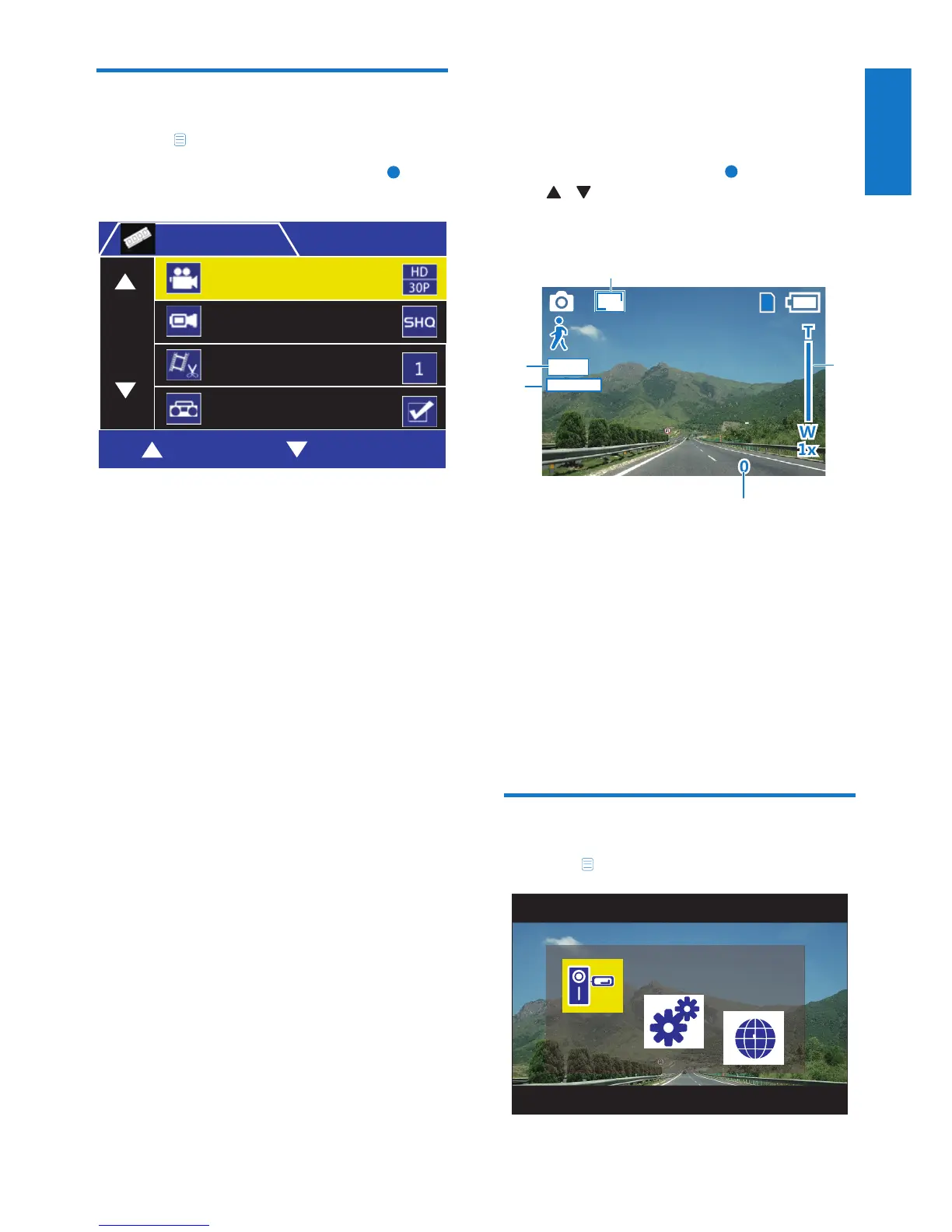
Through video settings menu, you can adjust
below settings.
• [Movie Mode]
• [Movie Quality]
• [Movie Clip Time]
• [Sound Record]
• [MIC Sensitivity]
• [Scene]
• [Exposure]
• [White Balance]
图像参数
0RYLH0RGH
6(/(&7 2.
0RYLH0RGH
0RYLH4XDOLW\
0RYLH&OLS7LPH
6RXQG5HFRUG
5 Photo capture
In photo capture mode, press
OK
to take photos,
press / to zoom in/zoom out.
Photo capture screen:
a Photo resolution
b Zoom in/zoom out
c The remaining photos
d Exposure value
e White balance
f Scene
Photo settings
1 Press to access system menus.
a
b
c
d
e
3M
'=(
+<
0RYLH0RGH


 To Next Page