EasyManua.ls Logo

Philips D 8734 - Page 12

Philips D 8734
32 pages
Print Icon
To Next Page IconTo Next Page
To Previous Page IconTo Previous Page
Loading...
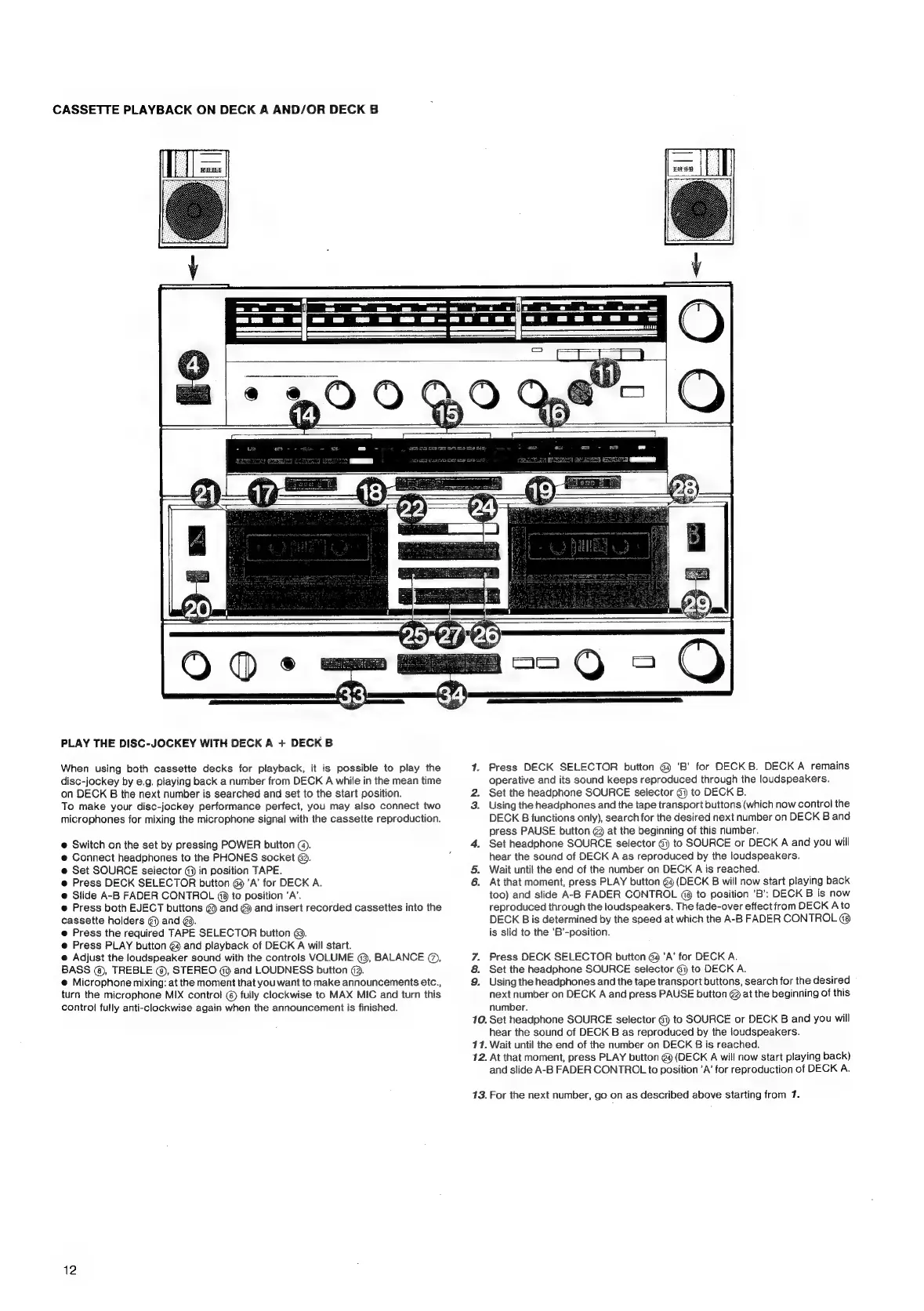
CASSETTE
PLAYBACK
ON
DECK
A
AND/OR
DECK
B
PLAY
THE
DISC-JOCKEY
WITH
DECK
A
+
DECK
B
When
using
both
cassette
decks
for
playback,
it
is
possible
to
play
the
disc-jockey
by
e.g.
playing
back
a
number
from
DECK
A
while
in
the
mean
time
on
DECK
B
the
next
number
is
searched
and
set
to
the
start
position.
To
make
your
disc-jockey
performance
perfect,
you
may
also
connect
two
microphones
for
mixing
the
microphone
signal
with
the
cassette
reproduction.
@
Switch
on
the
set
by
pressing
POWER
button
@.
e
Connect
headphones
to
the
PHONES
socket
62.
e@
Set
SOURCE
selector
@
in
position
TAPE.
e@
Press
DECK
SELECTOR
button
69
’A’
for
DECK
A.
@
Slide
A-B
FADER
CONTROL
49
to
position
‘A’.
e
Press
both
EJECT
buttons
@9
and
@
and
insert
recorded
cassettes
into
the
cassette
holders
@)
and
@@.
@
Press
the
required
TAPE
SELECTOR
button
63.
@
Press
PLAY
button
@4
and
playback
of
DECK
A
will
start.
@
Adjust
the
loudspeaker
sound
with
the
controls
VOLUME
3,
BALANCE
@,
BASS
@,
TREBLE
@,
STEREO
(@
and
LOUDNESS
button
@9.
@
Microphone
mixing:
at
the
moment
that
you
want
to
make
announcements
etc.,
turn
the
microphone
MIX
control
©
fully
clockwise
to
MAX
MIC
and
turn
this
contro!
fully
anti-clockwise
again
when
the
announcement
is
finished.
12
1.
Press
DECK
SELECTOR
button
@
'B’
for
DECKB.
DECK
A
remains
operative
and
its
sound
keeps
reproduced
through
the
loudspeakers.
2.
Set
the
headphone
SOURCE
selector
6)
to
DECK
B.
3.
Using
the
headphones
and
the
tape
transport
buttons
(which
now
control
the
DECK
B
functions
only),
search
for
the
desired
next
number
on
DECK
B
and
press
PAUSE
button
@
at
the
beginning
of
this
number.
4.
Set
headphone
SOURCE
selector
6)
to
SOURCE
or
DECK
A
and
you
will
hear
the
sound
of
DECK
A
as
reproduced
by
the
loudspeakers.
5.
Wait
until
the
end
of
the
number
on
DECK
A
is
reached.
6.
At
that
moment,
press
PLAY
button
@
(DECK
B
will
now
start
playing
back
too)
and
slide
A-B
FADER
CONTROL
(8
to
position
’B’:
DECK
B
is
now
reproduced
through
the
loudspeakers.
The
fade-over
effect
from
DECK
A
to
DECK
B
is
determined
by
the
speed
at
which
the
A-B
FADER
CONTROL
is
slid
to
the
'B’-position.
Press
DECK
SELECTOR
button
@4
’A’
for
DECK
A.
Set
the
headphone
SOURCE
selector
@
to
DECK
A.
Using
the
headphones
and
the
tape
transport
buttons,
search
for
the
desired
next
number
on
DECK
A
and
press
PAUSE
button
@
at
the
beginning
of
this
number.
10.
Set
headphone
SOURCE
selector
@)
to
SOURCE
or
DECK
B
and
you
will
hear
the
sound
of
DECK
B
as
reproduced
by
the
loudspeakers.
11.
Wait
until
the
end
of
the
number
on
DECK
B
is
reached.
12.
At
that
moment,
press
PLAY
button
@
(DECK
A
will
now
start
playing
back)
and
slide
A-B
FADER
CONTROL
to
position
’A’
for
reproduction
of
DECK
A.
©
QN
13.
For
the
next
number,
go
on
as
described
above
starting
from
1.

Related product manuals