EasyManua.ls Logo

Philips D 8734 - Page 6

Philips D 8734
32 pages
Print Icon
To Next Page IconTo Next Page
To Previous Page IconTo Previous Page
Loading...
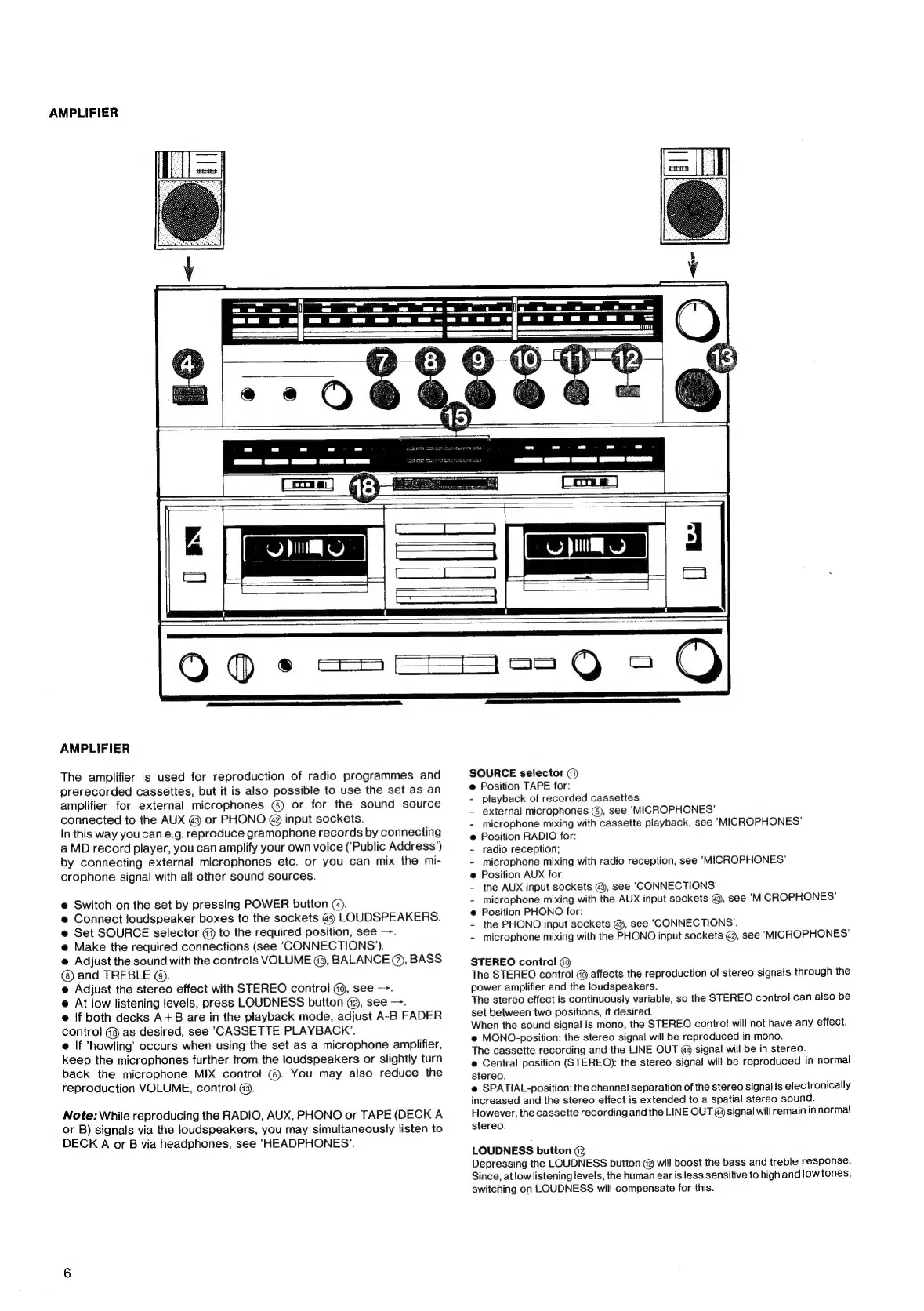
AMPLIFIER
———
a
==
=
a
a
ee
er
a
ee
ee
ee
ee
a
2
ee.
de
AMPLIFIER
The
amplifier
is
used
for
reproduction
of
radio
programmes
and
prerecorded
cassettes,
but
it
is
also
possible
to
use
the
set
as an
amplifier
for
external
microphones
@
or
for
the
sound
source
connected
to
the
AUX
@
or
PHONO
@
input
sockets.
in
this
way
you
can
e.g.
reproduce
gramophone
records
by
connecting
a
MD
record
player,
you
can
amplify
your
own
voice
(‘Public
Address’)
by
connecting
external
microphones
etc.
or
you
can
mix
the
mi-
crophone
signal
with
all
other
sound
sources.
e@
Switch
on
the
set
by
pressing
POWER
button
().
@
Connect
loudspeaker
boxes
to
the
sockets
@
LOUDSPEAKERS.
e@
Set
SOURCE
selector
({)
to
the
required
position,
see
—.
e@
Make
the
required
connections
(see
CONNECTIONS’).
@
Adjust
the
sound
with
the
controls
VOLUME
@3,
BALANCE
@,
BASS
and
TREBLE
@).
e
Adjust
the
stereo
effect
with
STEREO
control
G0,
see
—.
@
At
low
listening
levels,
press
LOUDNESS
button
@3,
see
—.
@
|f
both
decks
A+B
are
in
the
playback
mode,
adjust
A~-B
FADER
control
@@
as
desired,
see
CASSETTE
PLAYBACK’.
@
If
‘howling’
occurs
when
using
the
set
as
a
microphone
amplifier,
keep
the
microphones
further
from
the
loudspeakers
or
slightly
turn
back
the
microphone
MIX
control!
@.
You
may
also
reduce
the
reproduction
VOLUME,
contro!
@9.
Note:
While
reproducing
the
RADIO,
AUX,
PHONO
or
TAPE
(DECK
A
or
B)
signals
via
the
loudspeakers,
you
may
simultaneously
listen
to
DECK
A
or
B
via
headphones,
see
HEADPHONES’.
SOURCE
selector
()
@
Position
TAPE
for:
-
playback
of
recorded
cassettes
-
external
microphones
(),
see
‘MICROPHONES'
-
microphone
mixing
with
cassette
playback,
see
MICROPHONES’
@
Position
RADIO
for:
-
radio
reception;
-
microphone
mixing
with
radio
reception,
see
MICROPHONES’
e
Position
AUX
for:
-
the
AUX
input
sockets
@,
see
"CONNECTIONS'
-
microphone
mixing
with
the
AUX
input
sockets
@,
see
‘MICROPHONES’
@
Position
PHONO
for:
-
the
PHONO
input
sockets
@,
see
‘CONNECTIONS’.
-
microphone
mixing
with
the
PHONO
input
sockets
@3,
see
‘MICROPHONES’
STEREO
control
The
STEREO
control
@
affects
the
reproduction
of
stereo
signals
through
the
power
amplifier
and
the
loudspeakers.
The
stereo
effect
is
continuously
variable,
so
the
STEREO
control
can
also
be
set
between
two
positions,
if
desired.
When
the
sound
signa!
is
mono,
the
STEREO
contro!
will
not
have
any
effect.
e@
MONO-position:
the
stereo
signa!
will
be
reproduced
in
mono.
The
cassette
recording
and
the
LINE
OUT
@
signal
will
be
in
stereo.
e
Central
position
(STEREO):
the
stereo
signal
will
be
reproduced
in
normal
stereo.
e@
SPATIAL-position:
the
channel
separation
of
the
stereo
signal
is
electronically
increased
and
the
stereo
effect
is
extended
to
a
spatial
stereo
sound.
However,
the
cassette
recording
and
the
LINE
OUT
@
signal
will
remain
in
normal
stereo.
LOUDNESS
button
(3
Depressing
the
LOUDNESS
button
@
will
boost
the
bass
and
treble
response.
Since,
at
low
listening
levels,
the
human
ear
is
less
sensitive
to
high
and
low
tones,
switching
on
LOUDNESS
will
compensate
for
this.

Related product manuals