EasyManua.ls Logo

Philips D 8734 - Page 9

Philips D 8734
32 pages
Print Icon
To Next Page IconTo Next Page
To Previous Page IconTo Previous Page
Loading...
MICROPHONES
ed
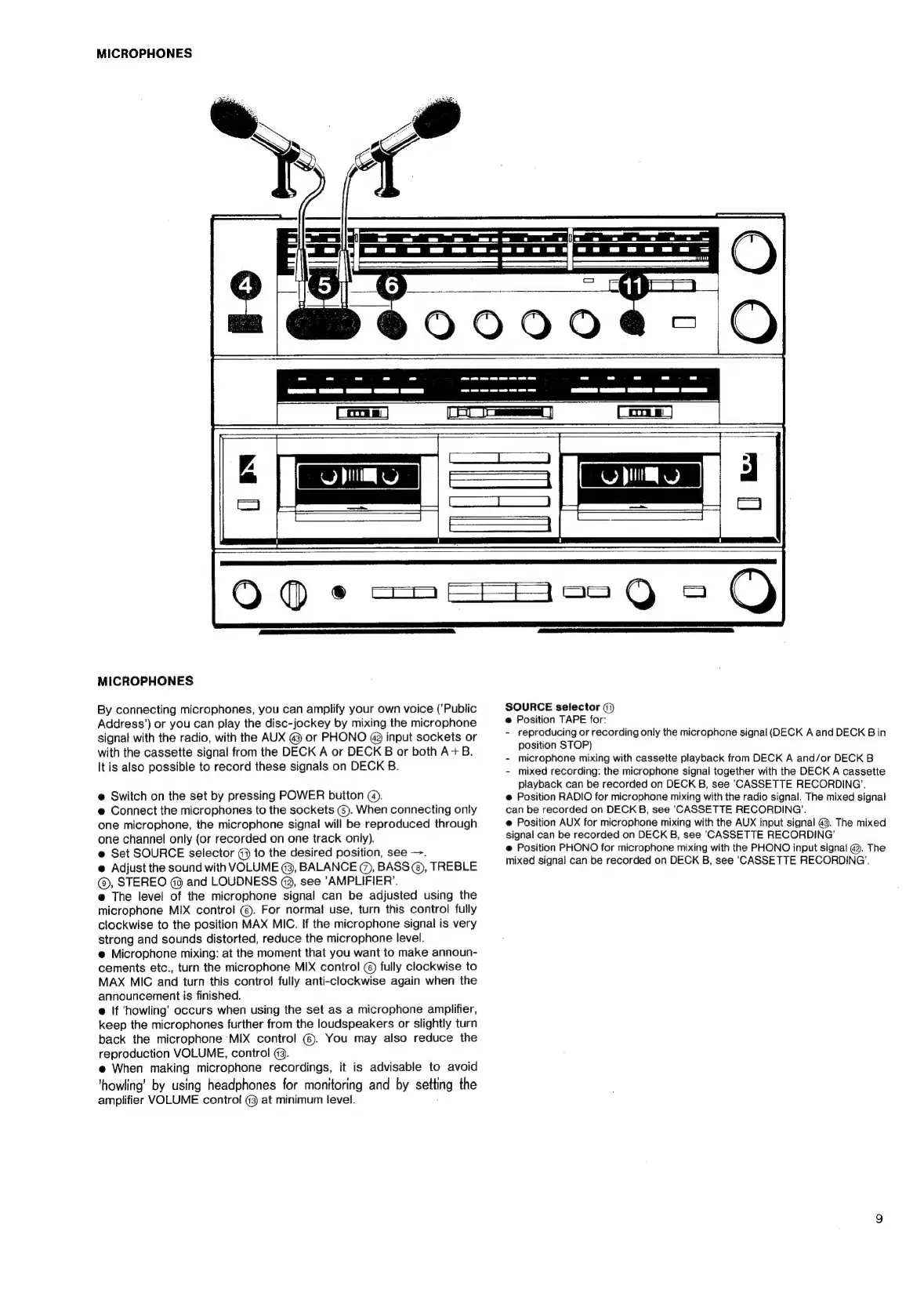
MICROPHONES
By
connecting
microphones,
you
can
amplify
your
own
voice
(’Public
Address’)
or
you
can
play
the
disc-jockey
by
mixing
the
microphone
signal
with
the
radio,
with
the
AUX
@
or
PHONO
@9
input
sockets
or
with
the
cassette
signal
from
the
DECK
A
or
DECK
B
or
both
A+B.
It
is
also
possible
to
record
these
signals
on
DECK
B.
@
Switch
on
the
set
by
pressing
POWER
button
@).
@
Connect
the
microphones
to
the
sockets
@).
When
connecting
only
one
microphone,
the
microphone
signal
will
be
reproduced
through
one
channel
only
(or
recorded
on
one
track
only).
e@
Set
SOURCE
selector
@
to
the
desired
position,
see
—.
@
Adjust
the
sound
with
VOLUME
@,
BALANCE
@,
BASS
©,
TREBLE
(@,
STEREO
@
and
LOUDNESS
@,
see
‘AMPLIFIER’.
e@
The
level
of
the
microphone
signal
can
be
adjusted
using
the
microphone
MIX
control
©.
For
normal
use,
turn
this
control
fully
clockwise
to
the
position
MAX
MIC.
If
the
microphone
signal
is
very
strong
and
sounds
distorted,
reduce
the
microphone
level.
@
Microphone
mixing:
at
the
moment
that
you
want
to
make
announ-
cements
etc.,
turn
the
microphone
MIX
control
©
fully
clockwise
to
MAX
MIC
and
turn
this
control
fully
anti-clockwise
again
when
the
announcement
is
finished.
e@
If
‘howling’
occurs
when
using
the
set
as
a
microphone
amplifier,
keep
the
microphones
further
from
the
loudspeakers
or
slightly
turn
back
the
microphone
MIX
control
©.
You
may
also
reduce
the
reproduction
VOLUME,
control
@93.
e@
When
making
microphone
recordings,
it
is
advisable
to
avoid
’howling’
by
using
headphones
for
monitoring
and
by
setting
the
amplifier
VOLUME
control
@3
at
minimum
level.
SOURCE
selector
(7)
@
Position
TAPE
for:
-
reproducing
or
recording
only
the
microphone
signal
(DECK
A
and
DECK
B
in
position
STOP)
-
microphone
mixing
with
cassette
playback
from
DECK
A
and/or
DECK
B
-
mixed
recording:
the
microphone
signal
together
with
the
DECK
A
cassette
playback
can
be
recorded
on
DECK
B,
see
‘CASSETTE
RECORDING’.
@
Position
RADIO
for
microphone
mixing
with
the
radio
signal.
The
mixed
signal
can
be
recorded
on
DECK
B,
see
‘CASSETTE
RECORDING’.
e
Position
AUX
for
microphone
mixing
with
the
AUX
input
signal
@3.
The
mixed
signal
can
be
recorded
on
DECK
B,
see
CASSETTE
RECORDING’
e
Position
PHONO
for
microphone
mixing
with
the
PHONO
input
signal
@.
The
mixed
signal
can
be
recorded
on
DECK
B,
see
'CASSETTE
RECORDING’.

Related product manuals