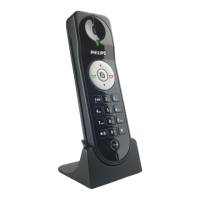
This document is the extended user documentation for the Philips D120 cordless telephone.
Function Description
The Philips D120 is a cordless telephone designed for home use, offering basic telephony functions along with some advanced features like intercom and conference calls. It operates on a DECT™ GAP standard, ensuring compatibility with other GAP-compliant devices. The phone allows users to make and receive calls, manage a phonebook of up to 50 entries, and access a redial list of up to 10 numbers. It supports multi-handset configurations, enabling intercom and 3-way conference calls between handsets and with external callers. The device also includes features for adjusting sound settings, naming the handset, setting date and time, and customizing the display language.
Important Technical Specifications
- Talk time: 10 hours
- Standby time: 180 hours
- Range: Indoor: 50 meters, Outdoor: 300 meters
- Phonebook list: 50 entries
- Redial list: 10 entries
- Call log: 20 entries
- Caller identification standard support: FSK, DTMF
- Battery: 2 x AAA Ni-MH 1.2V 300 mAh rechargeable batteries
- Power adapter: Tenpao: S003GB0600050, input: 100-240 V~, 50/60 Hz 150 mA, output: 6 Vdc 500 mA
- Power consumption (idle mode): around 0.6 W
- Handset dimensions (H x W x D): 148 x 47.5 x 25.5 mm
- Base dimensions (H x W x D): 43.2 x 77.9 x 86.4 mm
- Charger dimensions (H x W x D): 43.2 x 77.9 x 86.4 mm
- Handset weight: 105 grams
- Base weight: 56 grams
- Charger weight: 42 grams
- Operating temperature: 0°C to +35°C (32°F to 95°F)
- Storage temperature: -20°C to +45°C (-4°F to 113°F)
Usage Features
The Philips D120 offers a user-friendly interface with a clear display and intuitive menu navigation.
Basic Call Functions:
- Make a call: Normal call or redial call.
- Answer a call: Press the call button.
- End a call: Place the handset on the base station or charging cradle.
- Mute the microphone: Temporarily silence the microphone during a call.
- Adjust earpiece volume: Increase or decrease the volume during a call.
Advanced Call Functions:
- Make a second call: Initiate a new call while an existing call is on hold.
- Answer a second call: Switch to an incoming second call.
- Switch between two calls: Easily toggle between two active calls.
- Make a conference call with external callers: Establish a 3-way conversation.
- Intercom calls: Make calls between registered handsets.
- Transfer a call: Transfer an external call to another registered handset.
- During an external call: Initiate an internal call while on an external call.
Phonebook and Redial List:
- View the phonebook: Access stored contacts.
- Search a record: Find specific entries in the phonebook.
- Call from the phonebook: Dial a number directly from the phonebook.
- Add a record: Store new contacts with names and numbers (up to 24 digits long).
- Edit a record: Modify existing phonebook entries.
- Delete a record/all records: Remove individual or all entries.
- Redial list: View the history of dialed numbers (up to 10 records).
- Redial a call: Dial a number from the redial list.
- Save a call record to the phonebook: Store a redial list entry as a new phonebook contact.
- Delete a redial record/all redial records: Remove individual or all entries from the redial list.
Call Log:
- View the call records: Access the history of missed or received calls (up to 20 records).
- Save a call record to the phonebook: Store a call log entry as a new phonebook contact.
- Return a call: Dial a number directly from the call log.
- Delete a call record/all call records: Remove individual or all entries from the call log.
Phone Settings:
- Sound settings: Customize ringtone volume and melodies (5 ringtone levels, 10 ringtones).
- Name the handset: Personalize the handset name displayed in standby mode.
- Set the date and time: Configure the current date and time.
- Set the display language: Choose from available languages.
- Set the key tone: Enable or disable key press sounds.
- Set the docking tone: Enable or disable the tone when the handset is placed on the base station or charger.
Services:
- Auto conference: Automatically establish a conference call.
- Auto prefix: Configure a prefix for outgoing calls.
- Network type: Select the appropriate network type (DTMF or pulse).
- Select the recall duration: Adjust the flash time for network services.
- Dial mode: Choose between tone (DTMF) and pulse dialing.
- Auto clock: Synchronize the phone's clock with the network.
- Register additional handsets: Add up to 4 additional handsets to the base station.
- Unregister the handsets: Remove registered handsets from the base station.
- Restore default settings: Reset all phone settings to factory defaults.
Display Icons:
The handset display uses various icons to indicate status:
- Handset on base/charger, battery full/low: Indicates charging status and battery level.
- Empty battery icon: Flashes when the battery is low and needs recharging.
- Signal strength bars: Shows the connection status between the handset and base station.
- Incoming call log: Indicates new or unread incoming calls.
- Outgoing call log: Indicates outgoing calls.
- Missed call log: Flashes when there are new missed calls.
- Ringer off: Indicates that the ringer is muted.
- New voice message: Flashes when there is a new voice message.
- Scroll up/down arrows: Indicates that more digits are available on the right.
Maintenance Features
Installation and Setup:
- Connect the base station: Connect the power adapter and telephone line cord to the base station.
- Insert the supplied batteries: Ensure correct polarity when inserting the rechargeable batteries into the handset.
- Charge the handset: Place the handset on the base station or charging cradle for at least 8 hours for the first charge.
- Configure your phone: Set the country/language, date, and time.
Battery Management:
- The handset uses 2 x AAA Ni-MH rechargeable batteries.
- Charge the batteries for 8 hours before first use.
- The handset becomes warm when the batteries are charging, which is normal.
- Replace batteries when they no longer hold a charge effectively.
- Dispose of old batteries responsibly according to local regulations.
Cleaning:
- Do not use cleaning agents containing alcohol, ammonia, benzene, or abrasives as these may harm the set.
- Use a soft, damp cloth to clean the device.
Safety Precautions:
- Do not drop the phone or allow objects to fall on it.
- Do not use the product in places where there are explosive hazards.
- Do not let small metal objects come into contact with the handset.
- Avoid placing the handset near active mobile phones to prevent interference.
- Metallic objects should not be placed near or on the handset receiver.
- Use only the power adapter listed in the user instructions.
- Do not dispose of batteries in fire.
- Do not allow the charging contacts or the battery to come into contact with metal objects.
- Do not open the handset, base station, or charger as you could be exposed to high voltages.
- Do not allow the product to come into contact with liquids.
- Risk of explosion if battery is replaced by an incorrect type.
- Dispose of used batteries according to the instructions.
- Always use the cables provided with the product.
- For pluggable equipment, the socket-outlet must be installed near the equipment and shall be easily accessible.
- This equipment is not designed to make emergency calls when the power fails. An alternative has to be made available to allow emergency calls.
- Do not expose the phone to excessive heat caused by heating equipment or direct sunlight.
Environmental Compliance:
- The product is designed and manufactured with high quality materials and components, which can be recycled and reused.
- The crossed-out wheeled bin symbol indicates that the product must be disposed of separately from household waste according to European Directive 2012/19/EC.
- The product contains batteries covered by the European Directive 2006/66/EC, which cannot be disposed of with normal household waste.
- Packaging materials should be separated into cardboard (box), polystyrene foam (buffer), and polyethylene (bags, protective foam sheet) for recycling.

 Need help?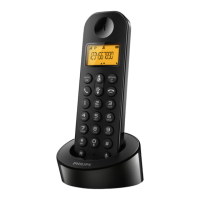

 To Next Page
 General