EasyManua.ls Logo

Philips D215 - User Manual

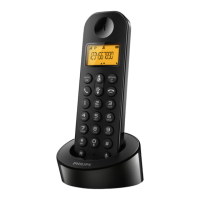
Philips D215
42 pages
Print Icon
To Next Page IconTo Next Page
Loading...
www.philips.com/welcome
Extended user
documentation
Always there to help you
Register your product and get support at
D210
D215
Question?
Contact
Philips

Table of Contents

Other manuals for Philips D215

Question and Answer IconNeed help?

Do you have a question about the Philips D215 and is the answer not in the manual?

Summary

Important Safety Instructions

Power requirements

Product requires electrical supply of 100-240 volts AC. Communication can be lost during power failure.

Warning

Electrical network is hazardous; ensure charger outlet is accessible.

Caution

Use supplied power supply and batteries. Risk of explosion if battery replaced incorrectly. Dispose properly.

Operating and Storage Temperatures

Operating temperature 0-40°C, storage -20°C to +45°C. Battery life may be shorter in low temperatures.

Your Phone

What is in the box

Lists the items included with the phone package, such as handset, base station, and accessories.

Overview of the phone

Details the components and functions of the phone handset.

Overview of the base station

Details the components and functions of the phone base station.

Get Started

Connect the base station

Instructions for connecting the phone's base station to power and telephone line.

Insert the supplied batteries

Guide on how to properly insert batteries into the handset.

Configure your phone

Initial setup for country and language settings.

Set the date and time

Instructions for setting the phone's date and time.

Change remote access PIN (D215)

How to change the PIN for remote access to the answering machine.

Calls

Make a call

Instructions for initiating different types of calls (normal, redial, speed dial).

Answer a call

How to receive an incoming call.

End a call

How to terminate an ongoing call.

Adjust call volume

How to control the audio volume during a call.

Mute microphone

How to temporarily disable the microphone during a call.

Speakerphone

How to activate or deactivate the speakerphone function.

Multi-call Management

Features for making/answering second calls, switching between calls, and conference calls.

Intercom and Conference Calls

Make an intercom call

How to initiate an intercom call to another handset.

Switch between calls

How to switch between an outside call and an intercom call.

Make a conference call

Guide to setting up a 3-way conference call.

Text and Numbers

Enter text and numbers

Instructions for inputting characters and numbers for various phone functions.

Switch case

How to change text input case.

Phonebook

View and Search Phonebook

Accessing, viewing and searching contacts in the phonebook.

Call from Phonebook

How to dial a number directly from the phonebook.

Access Phonebook During Call

How to use the phonebook while on an active call.

Add a record

Steps to add new contacts to the phonebook.

Edit a record

How to modify existing phonebook entries.

Delete records

How to remove single or all contacts from the phonebook.

Call Log

Call list type

Setting to filter incoming calls (all vs. missed).

View and Manage Call Log

Accessing, viewing, returning, and deleting call records.

Save Call to Phonebook

Adding a call log entry to the phonebook.

Delete all call records

How to erase all entries from the call log.

Redial List

View and Redial

Accessing and redialing numbers from the redial list.

Save Redial to Phonebook

Adding a redial list entry to the phonebook.

Delete redial records

How to remove single or all entries from the redial list.

Phone Settings

Sound Settings

Adjusting ringtone volume, ringtones, key tone, and docking tone.

ECO+ Mode

Activating ECO+ mode to reduce radiation and standby time.

Name the handset

Assigning a name to the handset.

Set date and time

Setting the phone's date and time.

Set display language

Changing the language displayed on the handset screen.

Telephone Answering Machine

Manage Answering Machine

Turning on/off, setting language, and answer mode.

Manage Announcements

Recording, listening, and restoring default announcements.

Incoming messages

Information about new messages and indicators.

Listen to incoming messages

How to play back recorded messages from base or handset.

Delete incoming messages

Removing individual or all messages from the answering machine.

Set ring delay

Adjusting the number of rings before the answering machine answers.

Remote Access Management

Activating/deactivating remote access and changing PIN.

Access Answering Machine Remotely

Steps to call and operate the answering machine from outside.

Services

Call list type

Setting to filter incoming calls (all vs. missed).

Auto conference

Joining an external call with another handset.

Auto prefix

Formatting outgoing call numbers with a prefix.

Recall duration & Dial mode

Adjusting recall time and setting dialling mode (tone/pulse).

Auto clock

Synchronizing date and time automatically from the network.

Register additional handsets

Adding new handsets to the base station.

Unregister handsets

Removing handsets from the base station.

Restore default settings

Resetting phone settings to factory defaults.

Technical Data

Specifications and Features

Key specifications like talk time, range, phonebook, and features.

Battery and Power Adapter

Details about the rechargeable batteries and power adapter.

Weight and Dimensions

Physical specifications for handset, base, and charger.

Notice

Compliance Statements

Declarations of conformity, GAP compliance, and EMF compliance.

Product and Battery Disposal

Guidelines for environmentally sound disposal of old products and batteries.

Environmental Information

Details on packaging and recycling.

Frequently Asked Questions

Troubleshooting No Signal;Registration

Resolving issues with no signal, registration failures, or searching status.

Troubleshooting Audio;Connection

Addressing connection loss, distorted sound, bad audio, and no dialing tone.

Troubleshooting Charging;Display

Resolving issues with charging, no docking tone, or no display.

Other Common Issues

Solutions for wrong language selection, voicemail settings, and audio issues.

Appendix

Text and number input tables

Tables showing character mapping for different languages.

Summary

Important Safety Instructions

Power requirements

Product requires electrical supply of 100-240 volts AC. Communication can be lost during power failure.

Warning

Electrical network is hazardous; ensure charger outlet is accessible.

Caution

Use supplied power supply and batteries. Risk of explosion if battery replaced incorrectly. Dispose properly.

Operating and Storage Temperatures

Operating temperature 0-40°C, storage -20°C to +45°C. Battery life may be shorter in low temperatures.

Your Phone

What is in the box

Lists the items included with the phone package, such as handset, base station, and accessories.

Overview of the phone

Details the components and functions of the phone handset.

Overview of the base station

Details the components and functions of the phone base station.

Get Started

Connect the base station

Instructions for connecting the phone's base station to power and telephone line.

Insert the supplied batteries

Guide on how to properly insert batteries into the handset.

Configure your phone

Initial setup for country and language settings.

Set the date and time

Instructions for setting the phone's date and time.

Change remote access PIN (D215)

How to change the PIN for remote access to the answering machine.

Calls

Make a call

Instructions for initiating different types of calls (normal, redial, speed dial).

Answer a call

How to receive an incoming call.

End a call

How to terminate an ongoing call.

Adjust call volume

How to control the audio volume during a call.

Mute microphone

How to temporarily disable the microphone during a call.

Speakerphone

How to activate or deactivate the speakerphone function.

Multi-call Management

Features for making/answering second calls, switching between calls, and conference calls.

Intercom and Conference Calls

Make an intercom call

How to initiate an intercom call to another handset.

Switch between calls

How to switch between an outside call and an intercom call.

Make a conference call

Guide to setting up a 3-way conference call.

Text and Numbers

Enter text and numbers

Instructions for inputting characters and numbers for various phone functions.

Switch case

How to change text input case.

Phonebook

View and Search Phonebook

Accessing, viewing and searching contacts in the phonebook.

Call from Phonebook

How to dial a number directly from the phonebook.

Access Phonebook During Call

How to use the phonebook while on an active call.

Add a record

Steps to add new contacts to the phonebook.

Edit a record

How to modify existing phonebook entries.

Delete records

How to remove single or all contacts from the phonebook.

Call Log

Call list type

Setting to filter incoming calls (all vs. missed).

View and Manage Call Log

Accessing, viewing, returning, and deleting call records.

Save Call to Phonebook

Adding a call log entry to the phonebook.

Delete all call records

How to erase all entries from the call log.

Redial List

View and Redial

Accessing and redialing numbers from the redial list.

Save Redial to Phonebook

Adding a redial list entry to the phonebook.

Delete redial records

How to remove single or all entries from the redial list.

Phone Settings

Sound Settings

Adjusting ringtone volume, ringtones, key tone, and docking tone.

ECO+ Mode

Activating ECO+ mode to reduce radiation and standby time.

Name the handset

Assigning a name to the handset.

Set date and time

Setting the phone's date and time.

Set display language

Changing the language displayed on the handset screen.

Telephone Answering Machine

Manage Answering Machine

Turning on/off, setting language, and answer mode.

Manage Announcements

Recording, listening, and restoring default announcements.

Incoming messages

Information about new messages and indicators.

Listen to incoming messages

How to play back recorded messages from base or handset.

Delete incoming messages

Removing individual or all messages from the answering machine.

Set ring delay

Adjusting the number of rings before the answering machine answers.

Remote Access Management

Activating/deactivating remote access and changing PIN.

Access Answering Machine Remotely

Steps to call and operate the answering machine from outside.

Services

Call list type

Setting to filter incoming calls (all vs. missed).

Auto conference

Joining an external call with another handset.

Auto prefix

Formatting outgoing call numbers with a prefix.

Recall duration & Dial mode

Adjusting recall time and setting dialling mode (tone/pulse).

Auto clock

Synchronizing date and time automatically from the network.

Register additional handsets

Adding new handsets to the base station.

Unregister handsets

Removing handsets from the base station.

Restore default settings

Resetting phone settings to factory defaults.

Technical Data

Specifications and Features

Key specifications like talk time, range, phonebook, and features.

Battery and Power Adapter

Details about the rechargeable batteries and power adapter.

Weight and Dimensions

Physical specifications for handset, base, and charger.

Notice

Compliance Statements

Declarations of conformity, GAP compliance, and EMF compliance.

Product and Battery Disposal

Guidelines for environmentally sound disposal of old products and batteries.

Environmental Information

Details on packaging and recycling.

Frequently Asked Questions

Troubleshooting No Signal;Registration

Resolving issues with no signal, registration failures, or searching status.

Troubleshooting Audio;Connection

Addressing connection loss, distorted sound, bad audio, and no dialing tone.

Troubleshooting Charging;Display

Resolving issues with charging, no docking tone, or no display.

Other Common Issues

Solutions for wrong language selection, voicemail settings, and audio issues.

Appendix

Text and number input tables

Tables showing character mapping for different languages.

Philips D215 Specifications

General IconGeneral
BrandPhilips
ModelD215
CategoryTelephone
LanguageEnglish

Related product manuals