EasyManua.ls Logo

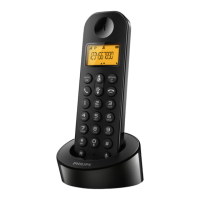
Philips D210 - User Manual

Philips D210
10 pages
Print Icon
To Next Page IconTo Next Page
Loading...
D210
D215
Register your product and get support at
www.philips.com/welcome
Short user manual
05.en
Question and Answer IconNeed help?

Do you have a question about the Philips D210 and is the answer not in the manual?

Summary

Safety Instructions

Overview of Phone Features

In-Call Operations

Key functions and controls during an active call.

Standby Mode Operations

Actions available when the phone is not in a call.

Text Input Functions

How to enter text and characters on the handset.

Understanding Display Icons

Guide to symbols and indicators shown on the screen.

Connecting the Phone

Getting Started with Your Phone

Battery Installation

Step-by-step guide for inserting batteries into the handset.

Phone Charging Guide

Instructions on how to charge the phone and battery status indicators.

Initial Phone Configuration

Setting up country, language, date, and time for first use.

Using Your Philips Phone Features

Phonebook Management

Adding, accessing, and managing contacts in the phonebook.

Call Log and Redial

Reviewing call history and redialing numbers.

Answering Machine Functions (D215)

Using the answering machine for messages and announcements.

Registering Additional Handsets

Process for pairing extra handsets with the base station.

Restoring Factory Settings

How to reset the phone to its original default configuration.

Technical Specifications

Battery Details

Specifications for rechargeable batteries used in the phone.

Power Adapter Information

Input and output specifications for the phone's power adapter.

Phone Performance Specs

Details on phonebook capacity, call log, talk, and standby times.

Important Technical Notes

Notes on DSL interference and conformity declarations.

Frequently Asked Questions (FAQ)

Troubleshooting Signal Issues

Solutions for no signal, out of range, or unregistered handset problems.

Handset Searching Status Resolution

Steps to fix the handset constantly searching for the base.

Voice Mail Settings Assistance

Guidance for managing voice mail via service provider.

Troubleshooting Charging Problems

Fixes for handset not charging, battery issues, and contact cleaning.

Resolving Audio Quality Issues

Tips to improve audio clarity and reduce interference or echo.

Troubleshooting Ringing Issues

Solutions if the handset is not ringing for incoming calls.

Caller ID Display Troubleshooting

Fixes for missing or withheld caller ID information.

Summary

Safety Instructions

Overview of Phone Features

In-Call Operations

Key functions and controls during an active call.

Standby Mode Operations

Actions available when the phone is not in a call.

Text Input Functions

How to enter text and characters on the handset.

Understanding Display Icons

Guide to symbols and indicators shown on the screen.

Connecting the Phone

Getting Started with Your Phone

Battery Installation

Step-by-step guide for inserting batteries into the handset.

Phone Charging Guide

Instructions on how to charge the phone and battery status indicators.

Initial Phone Configuration

Setting up country, language, date, and time for first use.

Using Your Philips Phone Features

Phonebook Management

Adding, accessing, and managing contacts in the phonebook.

Call Log and Redial

Reviewing call history and redialing numbers.

Answering Machine Functions (D215)

Using the answering machine for messages and announcements.

Registering Additional Handsets

Process for pairing extra handsets with the base station.

Restoring Factory Settings

How to reset the phone to its original default configuration.

Technical Specifications

Battery Details

Specifications for rechargeable batteries used in the phone.

Power Adapter Information

Input and output specifications for the phone's power adapter.

Phone Performance Specs

Details on phonebook capacity, call log, talk, and standby times.

Important Technical Notes

Notes on DSL interference and conformity declarations.

Frequently Asked Questions (FAQ)

Troubleshooting Signal Issues

Solutions for no signal, out of range, or unregistered handset problems.

Handset Searching Status Resolution

Steps to fix the handset constantly searching for the base.

Voice Mail Settings Assistance

Guidance for managing voice mail via service provider.

Troubleshooting Charging Problems

Fixes for handset not charging, battery issues, and contact cleaning.

Resolving Audio Quality Issues

Tips to improve audio clarity and reduce interference or echo.

Troubleshooting Ringing Issues

Solutions if the handset is not ringing for incoming calls.

Caller ID Display Troubleshooting

Fixes for missing or withheld caller ID information.

Philips D210 Specifications

General IconGeneral
SpeakerphoneYes
Phonebook capacity50 entries
Battery typeAAA
Standby time180 h
AC input voltage100 - 240 V
Battery capacity550 mAh
AC input frequency50 - 60 Hz
Battery technologyNickel-Metal Hydride (NiMH)
Battery recharge time8 h
Backlight colorAmber
Display diagonal1.6 \
Display number of colorsMonochrome
Call log entries20
Redial list capacity10
TypeDECT telephone
Ringer typePolyphonic
Answering machineNo
Maximum indoor range50 m
Maximum outdoor range300 m
Specific absorption rate (SAR) value (EU)0.1 W/kg
Mounting typeDesk
Product colorBlack
Volume controlDigital
PersonalizationIcons, Menu
Number of handsets included2
Weight and Dimensions IconWeight and Dimensions
Weight558 g
Cable length1.8 m
Package depth84 mm
Package width185 mm
Package height136 mm
Package weight664 g

Related product manuals