EasyManua.ls Logo

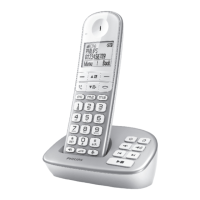
Philips SE65 - User Manual

Philips SE65
6 pages
Print Icon
To Next Page IconTo Next Page
Loading...
SE658
Quick start guide
1
Connect
2
Install
3
Enjoy
Register your product and get support at
www.philips.com/welcome
Question and Answer IconNeed help?

Do you have a question about the Philips SE65 and is the answer not in the manual?

Summary

Whats in the box

Connect

Connect the base station

Guides the user through connecting the base station to power and telephone line.

Install

Insert rechargeable batteries and charge

Instructions for inserting batteries into the handset and charging it.

Enjoy

Make a call

Details on how to dial, answer, and end calls using the phone.

Adjust earpiece or speaker volume

Instructions for adjusting audio volume levels during a call.

Setting the ring tones

Procedure for customizing ringtones for the handset or base station.

Phonebook Features

Store a contact in the phonebook

Step-by-step guide to adding new contacts with names and numbers.

Access and call from the phonebook

Instructions on browsing stored contacts and initiating calls.

Answering Machine

Listen to messages recorded on the answering machine

Guidance on playing, skipping, replaying, and deleting recorded messages.

Troubleshooting

Summary

Whats in the box

Connect

Connect the base station

Guides the user through connecting the base station to power and telephone line.

Install

Insert rechargeable batteries and charge

Instructions for inserting batteries into the handset and charging it.

Enjoy

Make a call

Details on how to dial, answer, and end calls using the phone.

Adjust earpiece or speaker volume

Instructions for adjusting audio volume levels during a call.

Setting the ring tones

Procedure for customizing ringtones for the handset or base station.

Phonebook Features

Store a contact in the phonebook

Step-by-step guide to adding new contacts with names and numbers.

Access and call from the phonebook

Instructions on browsing stored contacts and initiating calls.

Answering Machine

Listen to messages recorded on the answering machine

Guidance on playing, skipping, replaying, and deleting recorded messages.

Troubleshooting

Philips SE65 Specifications

General IconGeneral
BrandPhilips
ModelSE65
CategoryTelephone
LanguageEnglish

Related product manuals