Need help?
Do you have a question about the Philips M550 and is the answer not in the manual?
Details the electrical supply requirements and voltage classification for the product.
Lists precautions to prevent damage or malfunction of the phone.
Specifies the recommended temperature ranges for operating and storing the phone.
Lists the components included in the product packaging.
Provides a labeled diagram and description of the handset's features and buttons.
Details the components and functions of the phone's base station.
Explains the meaning of various icons displayed on the handset screen.
Step-by-step guide to connecting the base station and charger to power and the phone line.
Instructions for preparing the handset for use, including battery tape removal.
Guides users through initial phone setup, including country, language, date, time, and security PIN.
Details how to charge the handset by placing it on the base station or charger.
Explains how to check battery level, understand standby mode, and verify signal strength.
Instructions for initiating calls using normal dialling or predialling.
How to respond to an incoming call and manage the ringer.
Methods to terminate an ongoing phone call.
How to mute the microphone and adjust earpiece/speaker volume during a call.
Guides on making a second call, answering another call, and switching between calls.
Steps to set up a three-way conference call with external participants.
Instructions for initiating internal calls between handsets on the same base station.
How to transfer an external call to another registered handset.
Guide to setting up a conference call involving multiple handsets and external callers.
Details on how to manage calls during a conference, including holding and re-establishing calls.
Instructions for typing characters and numbers for names, records, and menu items.
How to change the case of text input for letters.
How to access, view, and find specific contacts in the phonebook.
Instructions for making calls directly from the stored phonebook entries.
Step-by-step guide to adding new contacts to the phonebook.
Procedures for modifying existing contact details in the phonebook.
How to remove individual contacts from the phonebook.
How to view call histories, return calls, and manage individual call log entries.
Procedures for saving call records to the phonebook and deleting entries.
How to erase all entries from the call log simultaneously.
How to access the redial list and make calls using recently dialed numbers.
Process to add a number from the redial list to the phonebook.
How to remove a single entry from the redial list.
How to erase all entries from the redial list at once.
Adjustments for ringtone volume, ringtone selection, and key tone sounds.
Option to enable or disable the sound made when placing the handset on the charger.
Information on enabling ECO+ mode to reduce radiation and its effects on standby time.
How to assign a custom name to the handset for identification.
Guide to changing the language displayed on the handset screen.
Instructions for activating or deactivating the answering machine feature.
Options to configure how the answering machine handles incoming calls (record or answer only).
Manage language settings and record custom greetings for the answering machine.
How to play back the currently set announcement for the answering machine.
How to play back recorded messages left by callers.
How to remove a specific recorded message from the answering machine.
Customizing the number of rings before the answering machine answers.
How to operate the answering machine remotely using a touch-tone phone.
Controls for enabling or disabling remote access to the answering machine.
Process to modify the PIN code used for remote access.
Configure call list display and activate auto conference features.
Set recall duration for second calls and configure dial mode (tone/pulse).
Guide to adding extra handsets to the base station, up to the maximum capacity.
How to remove previously registered handsets from the base station.
Process to reset all phone settings to their original factory configurations.
Overview of key specifications like talk time, range, phonebook capacity, and features.
Details on batteries, power adapters, consumption, weight, and dimensions.
Information on conformity declarations, GAP compliance, and EMF standards.
Guidance on environmentally responsible disposal of the product and its batteries.
Details on battery disposal, recycling, and packaging as per environmental directives.
Answers to frequently asked questions covering signal loss, registration, charging, and display problems.
Reference tables showing character mapping for different languages and input methods.
 General
| Type | DECT telephone |
|---|---|
| Ringer type | Polyphonic |
| Answering machine | No |
| Number of melodies | 10 |
| Maximum indoor range | 50 m |
| Maximum outdoor range | 300 m |
| Elderly phone | - |
| Mounting type | Desk |
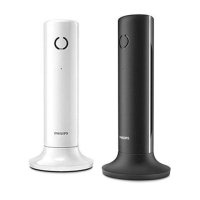
| Product color | Black, White |
| Backlight buttons | Yes |
| Number of products included | 1 pc(s) |
| Dialer location | Handset |
| Phonebook capacity | 100 entries |
| Call log entries | 50 |
| Redial list capacity | 20 |
| Volume control | Digital |
| Number of programmable buttons | 2 |
| Backlight color | White |
| Display diagonal | 1.6 \ |
| Battery type | AAA |
| Standby time | 250 h |
| Battery capacity | 550 mAh |
| Battery technology | Nickel-Metal Hydride (NiMH) |
| Power requirements | AC 100-240V, 50/60Hz |
| Battery recharge time | 8 h |
| Power consumption (typical) | 0.6 W |
 Weight and Dimensions
| Package depth | 82 mm |
|---|---|
| Package width | 223 mm |
| Package height | 144 mm |
| Package weight | 659 g |


 To Next Page