EasyManua.ls Logo

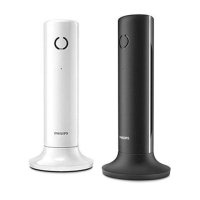
Philips M330 - User Manual

Philips M330
40 pages
Print Icon
To Next Page IconTo Next Page
Loading...
www.philips.com/support
Always there to help you
Register your product and get support at
M330
M335
Extended user
documentation
Question?
Contact
Philips

Table of Contents

Other manuals for Philips M330

Question and Answer IconNeed help?

Do you have a question about the Philips M330 and is the answer not in the manual?

Summary

Important Safety Instructions

To avoid damage or malfunction

Use specified power supply/batteries, avoid explosion risk, dispose properly, use provided cables, avoid contact with metal objects.

Get Started

Connect the base station

Steps to connect the base station to power and telephone line.

Install the handset

Instructions to prepare the handset for first use, including battery tape removal.

Calls

Make a call

Methods for making a call: normal, predial, speed dial.

Answer a call

How to answer an incoming call.

End a call

How to end an active call.

Adjust call volume and mute

Adjusts call volume and allows microphone muting during calls.

Make a conference call with the external callers

How to set up a 3-way conference call.

Intercom and Conference Calls

Make a conference call

How to set up a 3-way conference call.

Phonebook

Call from the phonebook

How to make calls using contacts from the phonebook.

Call Log

Return a call

How to redial a number from the call log.

Redial List

Redial a call

How to redial a number from the redial list.

Telephone Answering Machine

Turn the answering machine on or off

Instructions to activate or deactivate the answering machine.

Remote access to answering machine

How to operate the answering machine remotely using a PIN.

Frequently Asked Questions

The handset loses connection or sound is distorted during a call.

Troubleshooting for connection loss or distorted sound during calls.

The handset on the charger does not charge.

Troubleshooting steps for handset charging issues.

Bad audio (crackles, echo, etc.)

Troubleshooting steps for poor audio quality.

Summary

Important Safety Instructions

To avoid damage or malfunction

Use specified power supply/batteries, avoid explosion risk, dispose properly, use provided cables, avoid contact with metal objects.

Get Started

Connect the base station

Steps to connect the base station to power and telephone line.

Install the handset

Instructions to prepare the handset for first use, including battery tape removal.

Calls

Make a call

Methods for making a call: normal, predial, speed dial.

Answer a call

How to answer an incoming call.

End a call

How to end an active call.

Adjust call volume and mute

Adjusts call volume and allows microphone muting during calls.

Make a conference call with the external callers

How to set up a 3-way conference call.

Intercom and Conference Calls

Make a conference call

How to set up a 3-way conference call.

Phonebook

Call from the phonebook

How to make calls using contacts from the phonebook.

Call Log

Return a call

How to redial a number from the call log.

Redial List

Redial a call

How to redial a number from the redial list.

Telephone Answering Machine

Turn the answering machine on or off

Instructions to activate or deactivate the answering machine.

Remote access to answering machine

How to operate the answering machine remotely using a PIN.

Frequently Asked Questions

The handset loses connection or sound is distorted during a call.

Troubleshooting for connection loss or distorted sound during calls.

The handset on the charger does not charge.

Troubleshooting steps for handset charging issues.

Bad audio (crackles, echo, etc.)

Troubleshooting steps for poor audio quality.

Philips M330 Specifications

General IconGeneral
BrandPhilips
ModelM330
CategoryTelephone
LanguageEnglish

Related product manuals