Need help?
Do you have a question about the Philips XL4901S/FR and is the answer not in the manual?
This document serves as a quick start guide for the Philips XL490 and XL495 cordless phones, providing essential information for setup, basic operation, and maintenance. It also directs users to the full user manual for more detailed information and support.
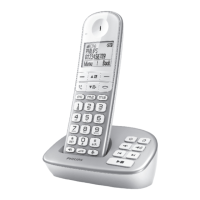
The Philips XL490 and XL495 are cordless telephone systems designed for home or office use. They offer basic telephony functions, including making and receiving calls, storing contacts, and, in the case of the XL495, an integrated answering machine. The system typically consists of a base unit that connects to the telephone line and a cordless handset that allows for mobility within a certain range.
The primary function of these devices is to facilitate voice communication over a landline connection. The cordless design provides freedom of movement, allowing users to converse while moving around their environment. The handsets are equipped with a keypad for dialing numbers and navigating menus, a display screen for showing call information, menu options, and other relevant data, and dedicated buttons for various functions like answering/ending calls, accessing the phonebook, and adjusting volume.
The XL495 model extends functionality by incorporating a telephone answering machine directly into the system. This feature allows the phone to automatically answer incoming calls when the user is unavailable, record messages from callers, and store them for later playback. Users can record a personalized announcement for the answering machine, ensuring callers receive a custom greeting.
Upon first use, the phone prompts the user to configure essential settings. This includes setting the country and language, which is crucial for proper operation and display of information. Users also need to set the date and time, which is important for call logging and, for the XL495, for timestamping recorded messages. The guide specifically mentions the option to select "am" or "pm" if the time format is 12-hour, indicating country-dependent settings.
The quick start guide illustrates the connection process for both single and multi-handset versions. For the XL495 and XL490, the base unit needs to be connected to a power outlet and a telephone line. The multi-handset version, if applicable, also shows how additional base units (chargers for extra handsets) are connected to power. This ensures the phone is powered and connected to the telecommunications network.
Before initial use, and regularly thereafter, the handset needs to be charged. The guide indicates that a full charge can take approximately 8 hours. The display on the handset provides visual indicators of the battery charge level, ranging from >70% down to flashing for low battery, and scrolling to indicate ongoing charging. This feature helps users monitor battery status and ensure the phone is ready for use.
The core function of the phone is straightforward. To make a call, users press the call button (often depicted as a green handset icon) and then dial the desired phone number. To answer an incoming call, users press the same call button when the phone rings. To end a call, a dedicated end call button (often a red handset icon) is pressed.
During a call, users can adjust the earpiece volume to their preference using dedicated up and down arrow buttons. This ensures comfortable listening regardless of the call quality or the user's hearing.
The phone features direct keys (m1, m2, m3) that allow for quick dialing of frequently used numbers. To set these keys, users enter a number and then press and hold the desired direct key. Once programmed, a quick press of the direct key followed by the call button in standby mode will initiate a call to the stored number. This is a convenient feature for contacting important contacts quickly.
The phone includes a phonebook for storing contacts. Users can access the phonebook through the menu, select "Add new," and then follow on-screen instructions to save contact details. This centralizes contact information, making it easy to find and dial numbers without having to remember them.
The XL495 model offers an integrated answering machine.
While not explicitly detailed as a "maintenance feature" in the quick start guide, the battery charge indicators and the charging process are crucial for the ongoing functionality of the cordless handset. Regular charging and awareness of battery levels are essential to prevent the phone from running out of power during use. The guide's emphasis on an 8-hour charge time for a full battery suggests that proper charging practices are a key aspect of maintaining the device's operational readiness.
The quick start guide strongly emphasizes referring to the full user manual for more detailed information. This is a critical maintenance feature in itself, as the user manual typically contains comprehensive troubleshooting steps, cleaning instructions, safety guidelines, and information on advanced features that contribute to the longevity and proper functioning of the device. For instance, the guide explicitly states that for more information on the telephone answering machine, users should consult the relevant section in the user manual.
The document directs users to www.philips.com/support for product registration and support, as well as to download the latest version of the user manual. This online resource serves as a central point for obtaining assistance, updates, and detailed information, which are all vital for maintaining the device and resolving any issues that may arise.
The presence of the WEEE (Waste Electrical and Electronic Equipment) symbol on the last page, along with the description of its meaning, indicates that the product is designed with end-of-life environmental considerations in mind. While not a direct maintenance feature for the user, it highlights the manufacturer's commitment to responsible disposal and recycling, which is an important aspect of product lifecycle management. Users are implicitly encouraged to dispose of the device responsibly when it reaches the end of its useful life, contributing to environmental maintenance.
In summary, the Philips XL490 and XL495 are user-friendly cordless phones offering essential communication features, with the XL495 adding an integrated answering machine. The quick start guide focuses on getting the user up and running quickly, while directing them to comprehensive resources for ongoing support and detailed information, which are key to the device's long-term maintenance and optimal performance.
 General
| Answering machine | Yes |
|---|---|
| Maximum indoor range | 50 m |
| Maximum outdoor range | 300 m |
| Phonebook capacity | 50 entries |
| GAP compatible | Yes |
| Speakerphone | Yes |
| Caller ID | Yes |
| Handsets | 1 |
| Type | Cordless |
| Display diagonal | 1.8 inches |
| Frequency | DECT |
| Color | Silver |
| Talk time | 16 hours |


 To Next Page