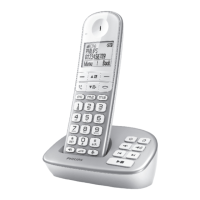
This document serves as a quick start guide for the Philips XL490 and XL495 cordless telephones, providing essential information on setup, basic operation, and key features.
Function Description:
The Philips XL490 and XL495 are cordless telephones designed for home or office use, offering basic telephony functions along with additional features for enhanced communication. The XL495 model includes an integrated telephone answering machine, distinguishing it from the XL490. Both models are designed for ease of use, featuring a clear display, tactile buttons, and intuitive menu navigation. The phones allow users to make and receive calls, store contacts, and manage call volume. The XL495 further extends functionality by enabling users to record and listen to messages, as well as customize an announcement.
Important Technical Specifications:
While detailed technical specifications like frequency band, battery type, or talk/standby times are not explicitly listed in this quick start guide, the document implies standard cordless phone operation. The charging indicator shows battery levels in increments: >70%, 70%-40%, 40%-10%, and flashing for low battery, with a full charge taking approximately 8 hours. The device complies with European Directive 2012/19/EU, indicated by the CE 0168 mark, signifying its conformity with health, safety, and environmental protection standards within the European Economic Area. The product is manufactured by Gibson Innovations Ltd. under license from Koninklijke Philips N.V. The quick start guide version is QSG_XL490-495 05_EN V2.0 WK15172.
Usage Features:
Connection:
- Base Unit Setup (XL495 & XL490):
- Connect the power adapter (1) to the base unit and a wall outlet.
- Connect the telephone line cord (2) to the base unit and a telephone wall jack.
- Multi-handset Version (XL495 & XL490):
- For multi-handset setups, an additional power adapter (3) is connected to the charging cradle and a wall outlet for each additional handset.
Getting Started:
- Initial Setup:
- Upon first use, the phone displays a welcome message.
- Users are prompted to set the country and language.
- The date and time must be set. For 12-hour format, users select [am] or [pm] using the ▲/▼ buttons.
- Charging the Phone:
- Place the handset on the base unit or charging cradle to charge.
- The battery indicator on the display shows the charging status:
- Solid bars indicate charge level (>70%, 70%-40%, 40%-10%).
- Flashing bar indicates low battery.
- Scrolling bars indicate charging in progress.
- A full charge takes approximately 8 hours.
- Making a Call:
- Press the call button (R) or the speakerphone button ( ) and dial the phone number.
- Answering a Call:
- Press the call button (R) or the speakerphone button ( ) when the phone rings.
- Ending a Call:
- Press the end call button ( ).
- Adjusting Earpiece Volume:
- During a call, press ▲ or ▼ to adjust the volume.
- Setting Direct Keys (m1, m2, m3):
- To assign a number: Enter the number, then press and hold m1, m2, or m3. Follow on-screen instructions.
- To make a quick call: In standby mode, press m1, m2, or m3, then press the call button (R) or speakerphone button ( ).
- Adding a Contact to the Phonebook:
- Press [Menu].
- Select [Phonebook] > [Add new].
- Follow on-screen instructions.
Telephone Answering Machine (XL495 Only):
- Listening to Recorded Messages:
- Turn the answering machine on or off in standby mode by pressing the dedicated button ( ).
- Delete the current message by pressing the delete button ( ).
- Adjust the volume using the volume up (›) / volume down ( ) buttons.
- Play the next message by pressing the next message button (►I).
- Play the previous message or replay the current message by pressing the previous message button (◄).
- Start or stop listening by pressing the play/pause button (►■).
- Recording an Announcement:
- Press [Menu].
- Select [Answ. Machine] > [Announcement].
- Follow on-screen instructions.
Maintenance Features:
The quick start guide does not explicitly detail maintenance features beyond basic setup and operation. However, the presence of a user manual (accessible via www.philips.com/support) suggests that more comprehensive maintenance instructions, troubleshooting, and care guidelines would be available there. The product's compliance with environmental directives (2012/19/EU) implies considerations for proper disposal and recycling, which are typically covered in full user manuals.

 Need help?

 To Next Page
 General