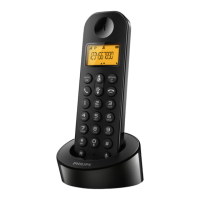
Need help?
Do you have a question about the Philips D131 and is the answer not in the manual?
General warnings and precautions for using the product safely, including electrical hazards and liquid contact.
Details key functions and button actions for different phone states like 'In call', 'In menu', 'Standby', and 'In text input'.
Explains various icons displayed on the phone screen and their meanings, including signal strength and call status indicators.
Step-by-step visual guide for connecting the phone base and handset, including multi-handset setup.
Instructions for inserting batteries and charging the phone, including charging times and battery status indicators.
Steps for setting up the phone for the first time, including language, country, date, and time settings.
Instructions for adding, calling from, and managing direct access memory entries in the phonebook.
How to view, call from, save, and delete entries in the call log and redial list.
For D136 models, guides on recording announcements and managing incoming messages.
Procedures for registering additional handsets and restoring default phone settings.
Specifications for the rechargeable batteries and the power adapter (base and charger).
Key performance metrics including phonebook capacity, call log entries, talk time, and standby time.
Solutions for common problems like no signal bars, failed handset registration, and searching/unavailable status.
Troubleshooting steps for display issues, charging problems, bad audio, no ringing, and caller ID not displaying.
Guidance on changing language settings and managing voice mail when encountering issues.
 General
| Speakerphone | Yes |
|---|---|
| Phonebook capacity | 50 entries |
| Battery type | AAA NiMH |
| Standby time | 200 h |
| AC input voltage | 100-240 V |
| Battery capacity | 300 mAh |
| AC input frequency | 50 - 60 Hz |
| Battery technology | Nickel-Metal Hydride (NiMH) |
| Battery recharge time | 8 h |
| Power consumption (typical) | 0.7 W |
| Backlight color | Blue |
| Display diagonal | 1.6 \ |
| Call log entries | 20 |
| Redial list capacity | 10 |
| Type | DECT telephone |
| Maximum indoor range | 50 m |
| Maximum outdoor range | 300 m |
| Elderly phone | - |
| Mounting type | Desk |
| Product color | Black, Grey |
| Quantity | 1 |
| Specific absorption rate (SAR) value (EU) | 0.1 W/kg |
| Volume control | Digital |
 Weight and Dimensions
| Cable length | 1.5 m |
|---|---|
| Package depth | 59 mm |
| Package width | 184 mm |
| Package height | 135 mm |
| Package weight | 336 g |


 To Next Page