8 EN
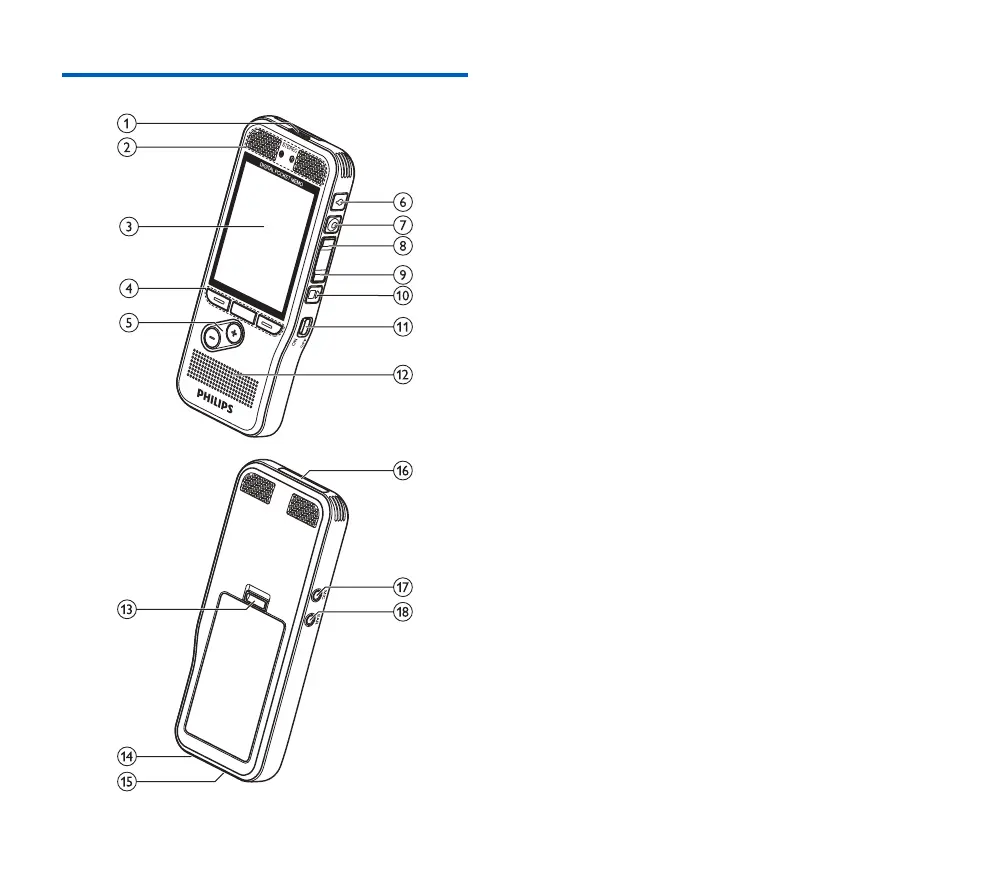
Overview of the recorder
a LED light
• Red: device is recording in overwrite or append mode
• Green: device is recording in insert mode
• Yellow: data is being transferred to/from the computer
b Microphones
c Screen
d Function keys F1, F2, F3
• Select the function displayed on the screen directly above
the key
e +/–
• File navigation in stop mode
• Volume control during playback
• Menu navigation
f EOL/File lock, Priority
• Mark a file as finished and protect it from being deleted
• Prioritize urgent recordings during transcription
g G REC/H PAUSE
h B REW
i A FWD
j F C STOP/PLAY
k ON/OFF
l Speaker
m Open the battery cover
n Docking station connector
o USB connector
• Micro USB connection for the computer
p Memory card slot
q MIC
• External microphone socket (stereo jack plug, 3.5mm)
r EAR
• Headphone socket (stereo jack plug, 3.5mm)














 To Next Page