Need help?
Do you have a question about the Philips VoiceTracer DVT1120 and is the answer not in the manual?
General safety precautions for device operation.
Guidelines for safe battery handling and disposal.
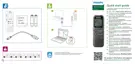
Explanation of the functions of each button on the device.
Step-by-step guide to installing batteries.
Instructions for turning the device on and off.
How to copy or move files between the device and a computer.
Procedure for deleting single audio recordings.
How to delete all recordings within a specific folder.
Adjustments for recording quality and microphone sensitivity.
Procedure to delete all recordings and format the device memory.
Restoring device settings to factory defaults.
Solutions for common problems encountered with the device.
 General
| Sample rate | 12 kHz |
|---|---|
| Audio quality | - bit |
| Frequency range | 750 - 18000 Hz |
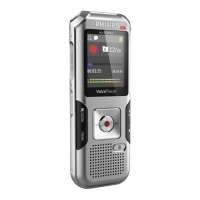
| Product color | Gray |
| Compatible operating systems | Windows 10/8/7, macOS |
| Headphone outputs | 1 |
 Weight and Dimensions
| Weight | 46 g |
|---|---|
| Dimensions (WxDxH) | 34 x 108 x 19 mm |













 To Next Page