
 Need help?
Do you have a question about the Philips VoiceTracer VTR5102 and is the answer not in the manual?
Lists key features like high-sensitivity microphone, intelligent translation, voice-to-text, and role identification.
Advises on avoiding short circuits, heat sources, direct sunlight, and cable pinching. Includes a disclaimer about data loss.
Lists the items included in the product package, such as the recorder and accessories.
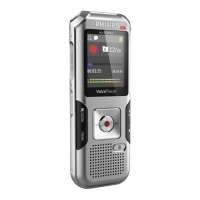
Details the device components like indicator light, display, record/play keys, volume keys, and ports.
Instructions for turning the device on and off by long-pressing the power/play button.
Guides users to scan a QR code to download and install the companion mobile application.
Steps to connect the device to an Android phone via Bluetooth and the app, including troubleshooting notes.
Explains the meaning of different indicator lights for various states like Bluetooth pairing, recording, and charging.
Details how to start, pause, resume, and save recordings using the device's buttons.
Instructions on how to play back recorded audio files directly on the device and switch between files.
Describes how to control recording functions using the companion mobile application.
Guides users on using the app for real-time speech recognition and translation.
Details various settings available in the app, such as recording scene, indicator, playback mode, and time calibration.
Explains how to manage recorded and translated files within the app, including deletion and sharing.
Instructions for synchronizing files between the recorder and the mobile app for transcription and translation.
 General
| Brand | Philips |
|---|---|
| Model | VoiceTracer VTR5102 |
| Category | Voice Recorder |
| Language | English |













 To Next Page