Need help?
Do you have a question about the Philips VoiceTracer DVT2010 and is the answer not in the manual?
General safety guidelines for device operation and protection against hazards.
Guidelines for using, handling, and disposing of batteries to prevent damage and pollution.
Specifications and formatting requirements for using microSD memory cards with the device.
Guidelines for safe headphone usage to prevent hearing damage from excessive volume.
Information on the device's guaranteed maximum sound power with supplied headphones.
Explains legal considerations and privacy rights related to recording conversations or lectures.
Explains the meaning of symbols (Tip, Note, Caution, Warning) used throughout the manual.
Key features and capabilities of the Philips VoiceTracer device.
Lists all the components included in the package with the VoiceTracer.
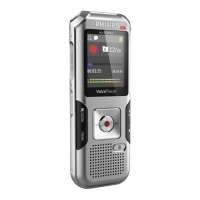
Identifies and describes the physical parts on the front and rear of the device.
Explains the function of each button and control on the VoiceTracer device.
Details the elements displayed on the device's screen during the startup sequence.
Provides a guide to navigating and understanding the device's menu structure.
Step-by-step instructions for installing AAA batteries into the device.
Instructions on how to properly turn the device on and off.
Guide for initial setup tasks like language selection and date/time configuration.
Steps to select the preferred display language for the device interface.
Instructions for setting the device's current date and time accurately.
How to lock or unlock the device's keys to prevent accidental presses.
Guide to inserting and removing a microSD card for expanded storage.
Information about obtaining additional accessories for the VoiceTracer device.
Steps for connecting headphones to the device for audio playback.
Instructions for connecting an external microphone to the device's input.
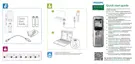
Guide on how to connect the device to a computer via USB for data transfer.
How to copy, move, or delete files between the device and a computer.
Safe procedure for disconnecting the device from a computer to prevent data loss.
Step-by-step guide to start, pause, resume, and stop a new audio recording.
How to use an external microphone as the recording source.
Options for starting recordings automatically via timer or voice activation.
How to set a specific date and time for automatic recording to begin.
How to enable and configure voice activation for automatic recording start/pause.
How to choose a specific recording file or folder for playback.
Instructions for playing back recorded files or music, including volume control.
How to change the playback speed of recordings to slow down or speed up.
Method to quickly find specific parts within a recording by fast forwarding or rewinding.
How to set recordings to repeat automatically, file by file or by sequence.
How to prevent accidental deletion of important recordings.
How to remove protection from a locked recording file.
Steps to delete individual recordings from the device's memory.
How to delete all recordings within a selected folder on the device.
How to access and use the FM radio function on the device.
Methods to save favorite radio stations for quick access and tuning.
Guide to automatically scanning and saving radio stations to presets.
Steps to manually tune to and save a specific radio station.
How to remove saved radio stations from the device's presets.
Instructions for recording audio broadcast directly from the FM radio.
Options for configuring recording parameters like quality, sensitivity, and file location.
How to choose where recordings are saved: internal memory or microSD card.
How to select recording quality (e.g., WAV, MP3) affecting file size and quality.
Adjusting microphone sensitivity for optimal recording in different environments.
How to activate noise reduction for clearer recordings in noisy environments.
How to configure the timer function for scheduled recordings.
How to set up recordings to start automatically with speech.
How to automatically split long recordings into smaller files.
How to turn the device's recording status LED on or off.
Options for customizing the device's display appearance and behaviour.
Steps to change the device's display language.
How to adjust the contrast of the device's display for better readability.
How to control the display's backlight timeout and on/off behaviour.
General device configuration options not related to recording or display.
Detailed steps to set the device's date, time, and time format.
How to configure the automatic power-off feature to save battery life.
How to turn the device's button sounds and alert tones on or off.
Access to service-related information and tools for the device.
How to view device details like firmware version and recording time.
Instructions for formatting the internal memory or microSD card, deleting all data.
How to restore all device settings to their factory default values.
Guide on how to safely replace the device's batteries.
Information on how to update the device's internal software (firmware).
Common problems encountered with the device and their potential solutions.
Detailed specifications and technical information about the VoiceTracer device.
 General
| Headphone outputs | 1 |
|---|---|
| USB 2.0 ports quantity | USB 2.0 ports have a data transmission speed of 480 Mbps, and are backwards compatible with USB 1.1 ports. You can connect all kinds of peripheral devices to them. |
| Compatible operating systems | Windows 10/8/7, macOS |
| Product color | Aluminium, Black |
| Sample rate | - kHz |
| Audio quality | - bit |
 Weight and Dimensions
| Weight | 55 g |
|---|---|
| Dimensions (WxDxH) | 111 x 38 x 19 mm |













 To Next Page