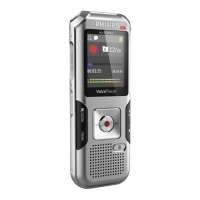
The Philips VoiceTracer VTR5166 is a versatile speech-to-text microphone designed for a wide range of audio recording and entertainment purposes. This device offers a blend of professional recording capabilities with features tailored for casual use, making it suitable for various scenarios from business meetings to live streaming.
Function Description:
The primary function of the VTR5166 is high-quality audio recording, with a strong emphasis on speech-to-text conversion. It supports one-touch recording, simplifying the process of capturing audio. A key feature is its ability to convert spoken words into text, making it ideal for transcribing meetings, lectures, and speeches. Beyond professional applications, the device also caters to entertainment needs, offering modes for singing, live recording with sound effects, and solo performances. This dual functionality allows users to switch between serious recording tasks and recreational activities like karaoke or live streaming.
For speech-to-text functionality, the device can be connected to a computer (laptop or desktop) using a Type-C to Line-in/accompaniment cable. The PC software, downloadable from the specified Philips website, facilitates the transcription process. Users can choose between transcribing pre-recorded audio files or engaging in real-time dictation, where spoken words are converted to text as they are uttered. The software also allows for editing and saving the translated text.
In entertainment modes, the VTR5166 transforms into a microphone for singing or live broadcasting. When connected to a smartphone or other device via a Line-in cable, users can access singing platforms (like Changba or全民K歌) and adjust reverb and volume for an optimal singing experience. A "solo mode" is also available for clear, unaccompanied vocal performances. For live broadcasting, the device can be integrated with various streaming platforms.
Important Technical Specifications:
- Memory: Supports MicroTF cards from 4GB to 32GB. The device itself does not have internal memory, requiring a TF card for recording.
- Dimensions & Weight:
- Width x Height: 145 × 40 (mm)
- Weight (with battery): 161g
- System Requirements:
- Operating System: Windows 10/Windows 8/Windows 7/Vista/XP/2000, Linux
- Interface: Type-C port
- Sound Pickup: 14mm capacitive independent suspension diaphragm head
- Voice Recording:
- Sampling Rate: 44.1KHz
- Bit Depth: 4bit
- Bit Rate: 176.4kbps
- Format: WAV
- Operating Conditions:
- Temperature: 5°C - 45°C
- Air Humidity: 10% – 90% (non-condensing)
Usage Features:
- Power On/Off: A physical switch (ON/OFF) controls the device's power. When turned on, an LED light indicates standby mode, ready for connection via the Type-C interface.
- Connecting to PC: The device connects to a computer via a Type-C USB cable. A TF memory card must be inserted for the computer to recognize the device as a removable disk and access recorded files.
- Recording: To record, a TF card must be inserted, formatted (recommended), and have sufficient memory. The microphone should also be fully charged. Long-pressing the "Record" button starts recording (red indicator light on), and a short press saves the recording and exits to singing mode.
- Speech-to-Text (PC Software):
- Connection: Connect the device to a laptop's headphone port or a desktop's MIC port using the provided Line-in/accompaniment cable.
- Software Download: Download the PC software from vtr5166.szgps.net. Specific software packages are available for Windows XP/7 and Windows 8/10.
- Login: Enter the product serial number and initial password (123456) to log in.
- Modes: The software offers "Voice-to-text" for transcribing recorded files and "Real-time transcription" for live dictation.
- File Management: Browse recorded files and text files, and transfer voice-to-text messages.
- Entertainment Modes:
- Singing Mode: Connect headphones and a Line-in cable to a smartphone. Open a singing app (e.g., Changba), and adjust reverb and volume for optimal performance.
- Solo Mode: In singing mode, long-press the volume "-" button to enter solo mode, allowing for clear, unaccompanied vocals.
- Live Mode: For live broadcasting, the connection method is similar to singing mode, supporting platforms like Mars Live, Huya Live, Kugou Live, and Inke Live.
- Playback: Recorded audio files can be played back by connecting the device to a computer via the Type-C USB cable and opening the files. Native playback on the device itself is not supported.
- Indicator Lights:
- Charging: Orange (on), then off when fully charged.
- Low Battery: Orange (flashing).
- Recording: Red (on).
- Standby: Green (on).
- Connected to PC: Orange (on). (Note: Device indicator does not respond when recording with PC software).
Maintenance Features:
- Troubleshooting: The manual provides solutions for common issues such as failure to start (check battery), inability to record (check TF card space, insertion, and integrity), inability to play recorded audio (check file integrity and player compatibility), and no microphone sound (check phone connection, microphone volume, power, phone volume, and connection contact).
- Safety Precautions:
- Avoid moisture exposure to prevent short circuits.
- Keep away from heat sources and direct sunlight.
- Handle cables carefully to prevent pinching.
- Hearing Protection:
- Adjust headphone volume appropriately and avoid prolonged use at high volumes.
- Do not set volume beyond a comfortable range.
- Ensure ambient sounds are not completely masked.
- Exercise caution or suspend headphone use in hazardous environments.
- Data Backup: Users are strongly recommended to make additional copies of files on the device to prevent data loss due to incorrect operation or force majeure.
- Software Installation: If the computer prompts to install Framework 4.0, it must be installed before using the PC software. A stable network connection is crucial for accurate and fast speech-to-text translation.

 Need help?
 General












 To Next Page