9EN
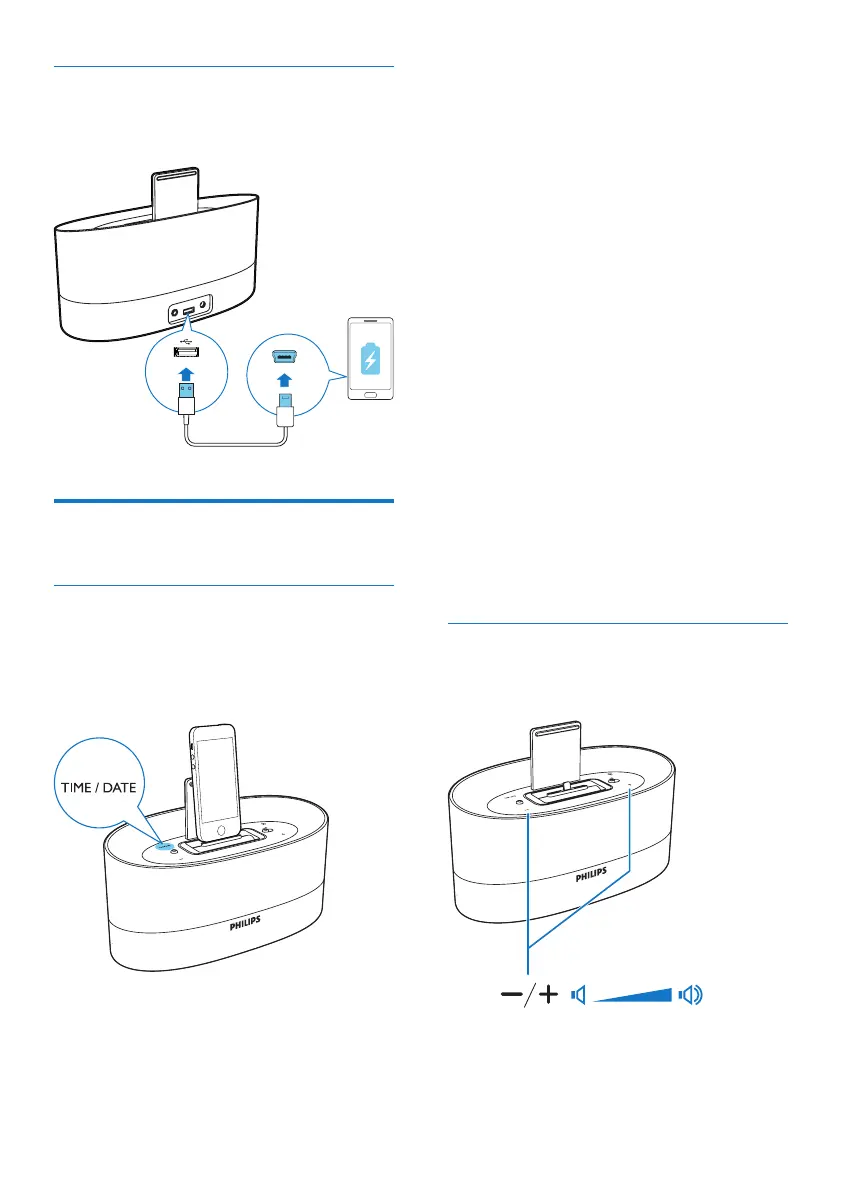
Charge your mobile phone
Charge your mobile phone through the USB
socket in DS1600 with a USB cable (not supplied).
Other features
Set time and date
A: If an iPod/iPhone/iPad is docked, the speaker
synchronizes time and date with the iPod/
iPhone/iPad automatically. In this case, you can
set time and date format.
To set time format:
1 In standby mode, press TIME/DATE to
display time.
2 Press and hold TIME/DATE for 2 seconds
to select 12 or 24 hour format.
3 Press TIME/DATE to conrm.
To set date format:
1 In standby mode, press TIME/DATE to
display date.
2 Press and hold TIME/DATE for 2 seconds
to select [MONTH--DAY] or [DAY--
MONTH] display mode.
3 Press TIME/DATE to conrm.
B: If no iPod/iPhone/iPad is docked, you can set
time manually.
1 In standby mode, press TIME/DATE to
display [--:--].
2 Press and hold TIME/DATE for 2 seconds
to activate time setting.
» The hour digits blink.
3 Press +/- repeatedly to set the hour.
4 Press TIME/DATE to conrm.
» The minute digits blink.
5 Repeat steps 3 and 4 to set the minute.
Adjust volume
During play, press +/- repeatedly to increase or
decrease the volume.



 To Next Page