7EN
4 Play
Play audio from iPod/ iPhone/
iPad
You can enjoy audio from iPod/ iPhone/ iPad by
connecting DS1600.
Compatible iPod/ iPhone/ iPad
The docking system supports the following
iPod/ iPhone/ iPad models.
• iPod/ iPhone/ iPad models with a lightning
connector:
• iPod nano 7th generation
• iPod touch 5th generation
• iPhone 6 Plus
• iPhone 6
• iPhone 5s
• iPhone 5c
• iPhone 5
• iPad mini 3
• iPad mini with Retina display
• iPad mini
• iPad Air 2
• iPad Air
• iPad (4th generation)
• iPod/ iPhone/ iPad models with a 30-pin
connector:
• iPod classic
• iPod touch (2nd, 3rd, 4th generation)
• iPod with video
• iPod nano (1st, 2nd, 3rd, 4th, 5th, and
6th generation)
• iPod with color display
• iPod mini
• iPhone 4s
• iPhone 4
• iPhone 3GS
• iPhone 3G
• iPad (3rd generation)
• iPad 2
• iPad
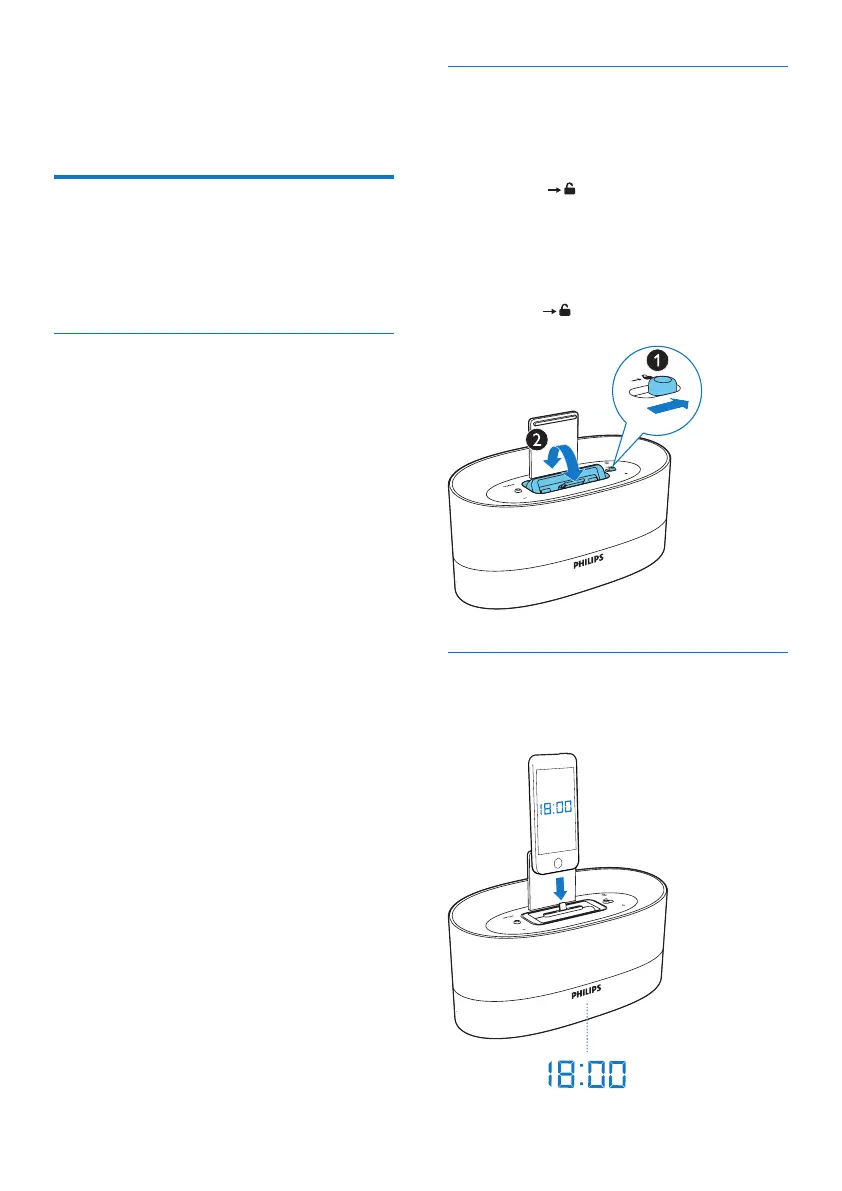
Switch the dock
Switch the dock between the lightning
connector and 30-pin connector for different
generation of Apple device.
1 Slide the switch to the right.
» The dock swivels and the alternate
connector is accessible.
2 Select your desired connector and press
down until a click sound.
• The switch slides to the left.
Load the iPod/ iPhone/ iPad
1 Connect your iPod/ iPhone/ iPad to the
dock connector.



 To Next Page