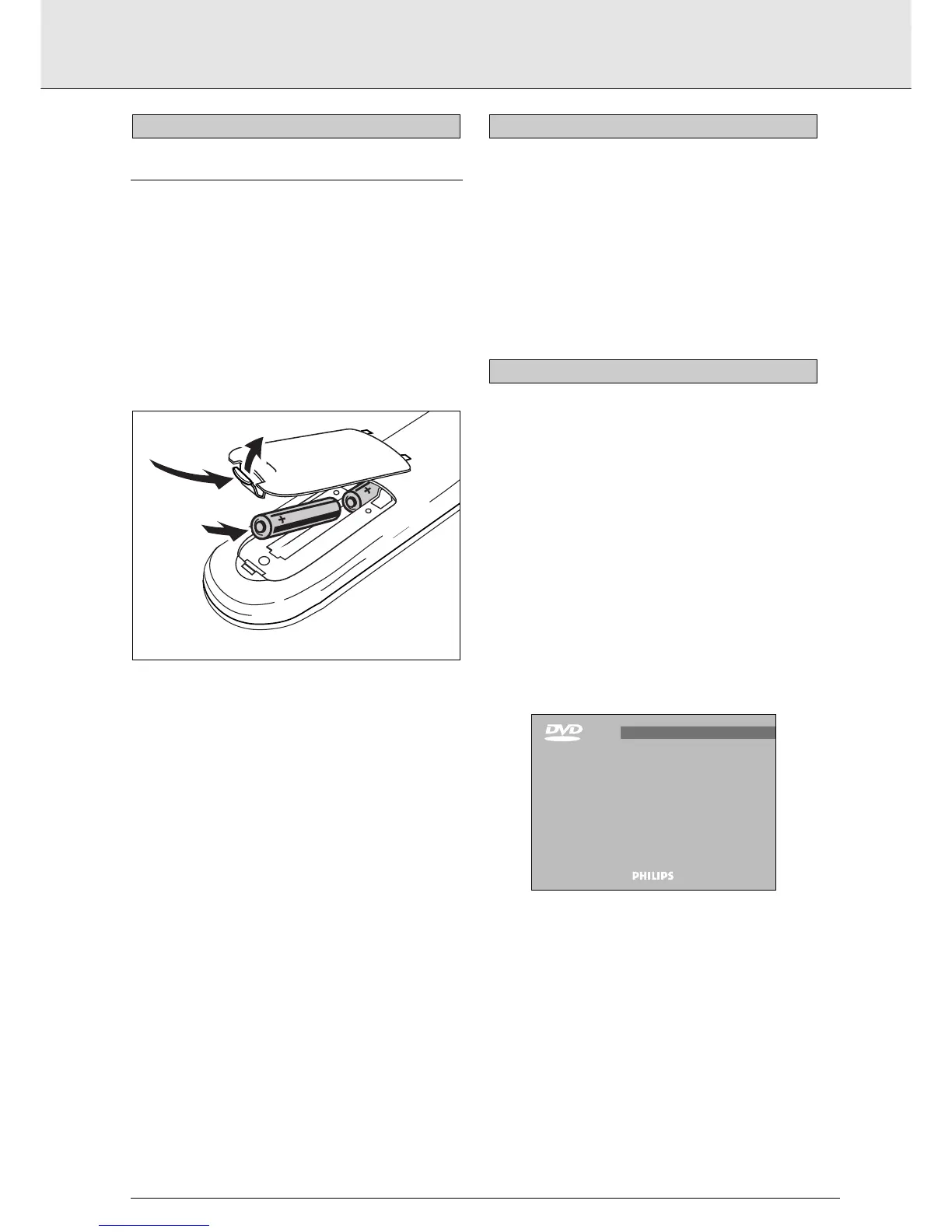
LOADING THE BATTERIES
1 Open the battery compartment cover.
2 Insert two 'AAA' (R03) batteries as indicated inside the
battery compartment.
3 Close the cover.
CAUTION
Do not mix old and new batteries. and NEVER mix dif-
ferent types of batteries (standard, alkaline and so on).
NOTE
- Unless otherwise mentioned, all operations can be carried
out with the remote control. Always point the remote con-
trol directly at the player, making sure there are no obstruc-
tions in the path of the infrared beam.
- When there are corresponding keys on the front panel, they
can also be used.
1 Switch on the TV and select the video input for your DVD-
Video player.
2 To enjoy sound through your stereo system, turn on the sys-
tem and select the source input for the DVD-Video player.
or
To enjoy DVD-Video with multichannel (surround) sound,
switch on the Home Theatre system and select the source
input for your DVD-Video player.
3 On the front of the DVD-Video player, press ON/OFF. The
player display lights, and the OSD invites you to insert a
disc.
4 With Autoplay on (the factory setting) any disc already
inserted in the player starts to play.



 To Next Page