On-Screen Displays 73
Audio CD Displays
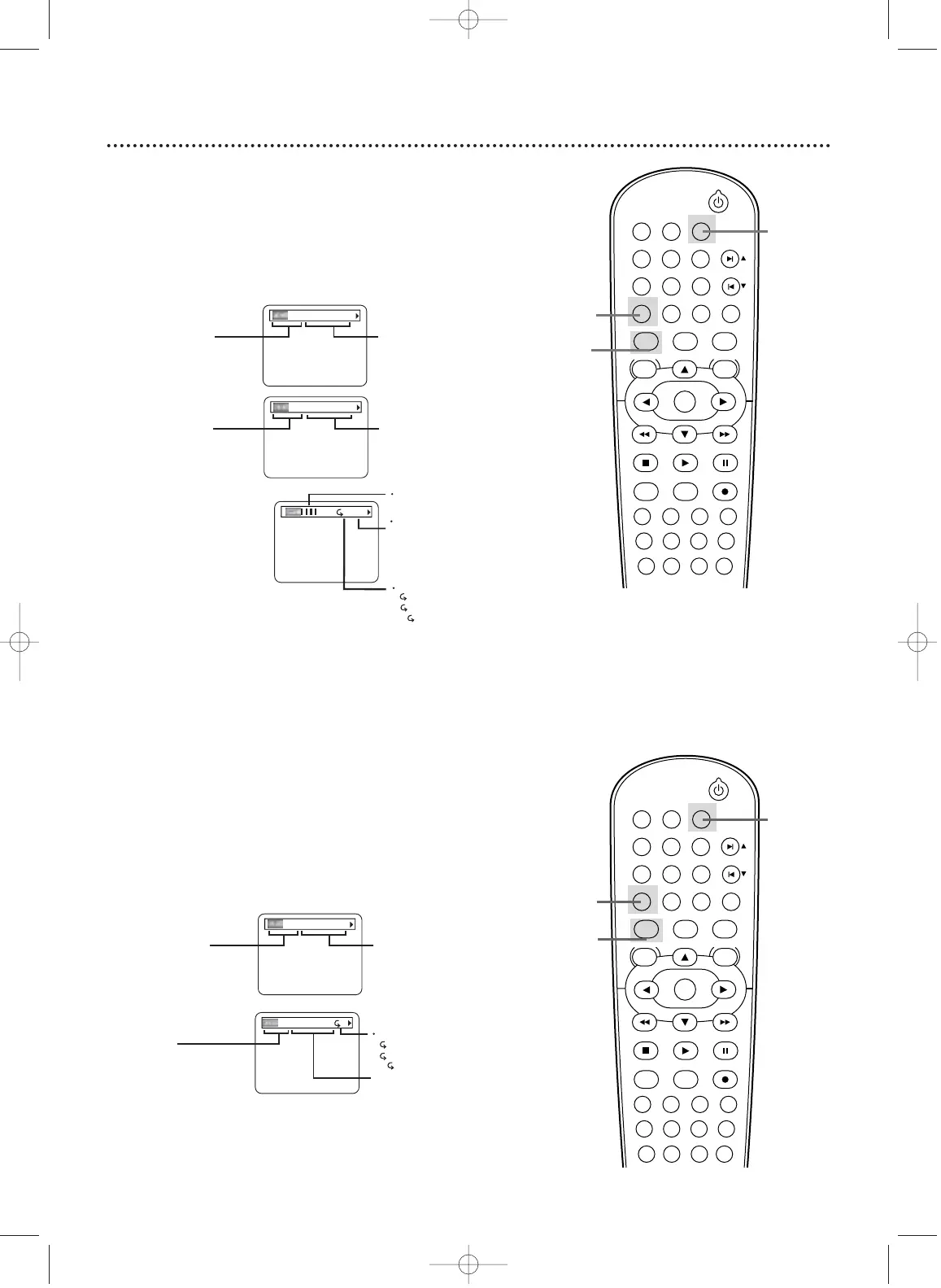
1
Press DVD to put the DVD/VCR in DVD mode.
2
Press DISPLAY repeatedly to see the following dis-
plays during Audio CD playback.
3
Press DISPLAY repeatedly
or press RETURN to
remove the display.
3
Press DISPLAY repeatedly or press RETURN to
remove the display.
BIT RATE: The amount of audio
and video data currently being read.
C
L0
Layer number, appears
only when playing a
two-layered Disc.
L0: Layer 0 is playing
L1: Layer 1 is playing
Current Repeat setting, if active
C: Chapter repeat
T: Title repeat
A B: A-B repeat
TR 4/12 0:03:21 - 0:02:15
TR (Track):
Current Track number
/ total Tracks
Elapsed playing time
of the current Track;
remaining playing time
of the current Track
ALL 4/12 0:13:45 - 0:45:40
ALL:
Current track number
/ total Tracks
Elapsed playing time
of the current Audio CD;
remaining playing time of
the current Audio CD
T
Current Repeat setting, if active
T: Track repeat
A: All Tracks repeat
A B: A-B repeat
CH 7/49 0:01:46 - 0:03:27
CH (Chapter):
Current Chapter number
/ total Chapters
Elapsed playing time
of the current Chapter;
remaining playing time
of the current Chapter
STANDBY-ON
PLAY
VCR/TV
VCRDVD
OK
MENU MENU
SYSTEM
RETURN TITLE
A-B
CLEAR/RESET SLOW
SUBTITLE ZOOM
ANGLE
REPEAT REPEAT
AUDIO
SEARCH MODE
DISPLAY
SKIP / CH
DISC/VCR
PAUSESTOP
VCR Plus+ RECORDTIMER SET
SPEED
1 2 3
7
6
5
4
8
9
0
+10
2-3
3
TT 1/2 0:00:00 - 1:23:45
TT (Title):
Current Title number
/ Total Titles
Elapsed playing time of the
current Title; remaining playing
time of the current Title
1
STANDBY-ON
PLAY
VCR/TV
VCRDVD
OK
MENU MENU
SYSTEM
RETURN TITLE
A-B
CLEAR/RESET SLOW
SUBTITLE ZOOM
ANGLE
REPEAT REPEAT
AUDIO
SEARCH MODE
DISPLAY
SKIP / CH
DISC/VCR
PAUSESTOP
VCR Plus+ RECORDTIMER SET
SPEED
1 2 3
7
6
5
4
8
9
0
+10
2-3
3
1
DVD Displays
1
Press DVD to put the DVD/VCR in DVD mode.
2
Press DISPLAY repeatedly to see the following dis-
plays during DVD playback.
H9421CD/DVD750(EN)pgs52-84.QX3 03.4.11 11:36 AM Page 73












 To Next Page