8
Hookups (cont’d)
75Ω
ANT /
CABLE
COAXIAL
S-VIDEO
OUT
DIGITAL
AUDIO OUT
AUDIO
OUT
COMPONENT
VIDEO OUT
L
Y
R
CB
CR
DVD
OFF
PROGRESSIVE
ON
AUDIO OUT
VIDEO OUT
AUDIO IN
VIDEO IN
L
R
L
R
DVD/VCR VCR
ANT-IN
ANT-OUT
75
ANT /
CABLE
AUDIO OUT
VIDEO OUT
AUDIO IN
VIDEO IN
L
R
L
R
DVD/VCR VCR
ANT-IN
ANT-OUT
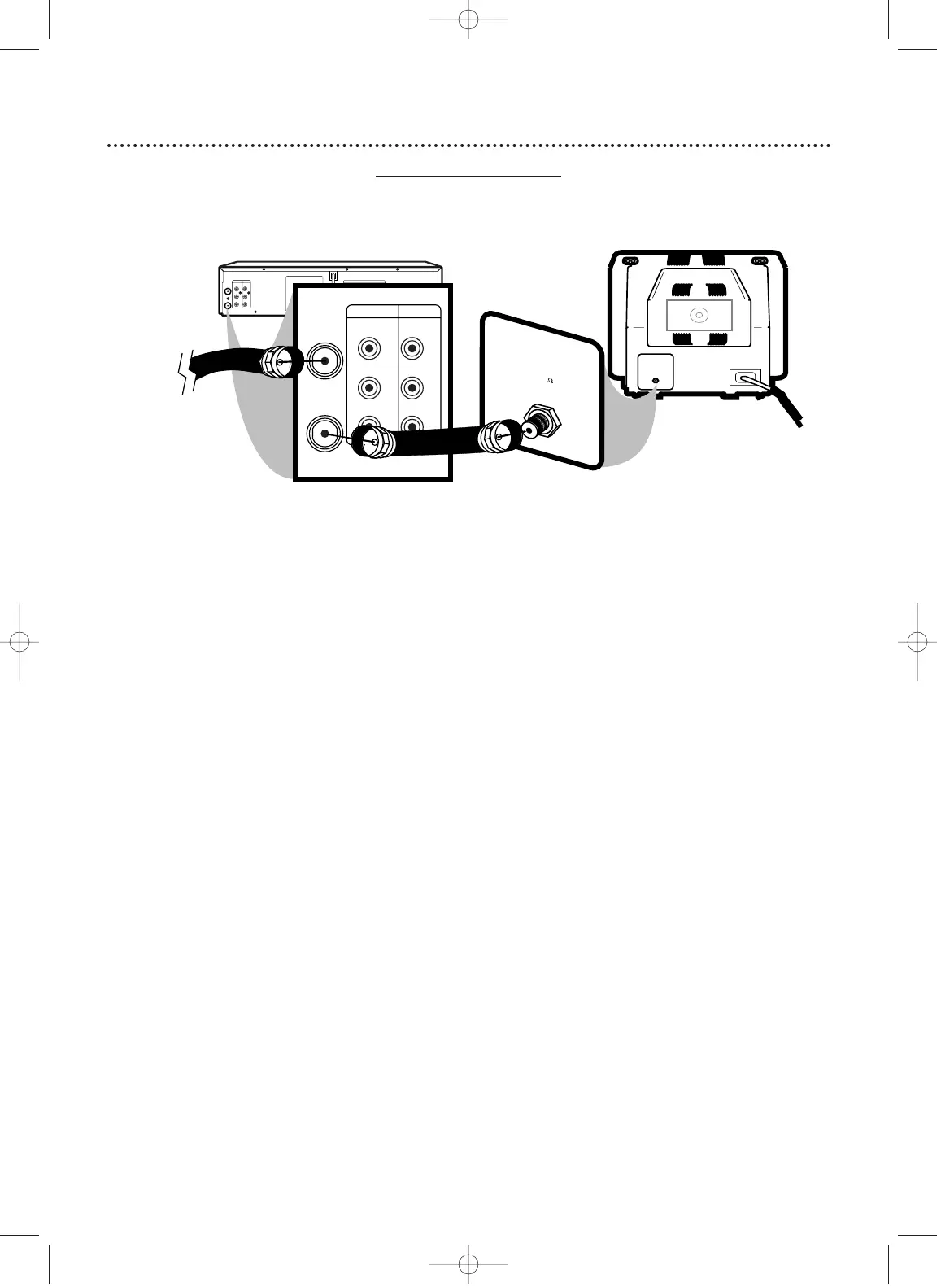
Black RF
coaxial cable
(supplied)
Antenna or
Cable TV
signal
1
Disconnect the antenna or Cable TV signal from your TV and con-
nect it to the ANT-IN (Antenna In) jack of your DVD/VCR.
2
Connect the supplied black RF coaxial cable to the ANT-OUT
(Antenna Out) jack on the back of the DVD/VCR and to the
ANTENNA IN JACK on the TV. The ANTENNA IN jack on the TV may be
labelled TV IN, RF IN, 75Ω (ohm), or ANT-IN. See your TV owner’s manual for
assistance.
3
Plug in the power cords of the TV and the DVD/VCR.
4
Set your TV to channel 3 or 4. The DVD/VCR’s output channel is 3 when
you purchase it. So, set your TV to channel 3 when the DVD/VCR is new.
If you cannot use channel 3 at your TV, you can change the DVD/VCR’s output
channel to channel 4.To do so, press the VCR button to put the DVD/VCR in
VCR mode.The green VCR light will be on the front of the DVD/VCR. Insert a
videotape and press PLAY B to start playback. During playback, press
and hold the (VCR) PLAY B button on the front of the DVD/VCR
for three to five seconds.
Each time you do this, the DVD/VCR’s output
channel switches between 3 and 4. Change your TV to channel 3 or 4 accord-
ingly. (You cannot change the DVD/VCR’s output channel while adjusting track-
ing manually. Press STOP C to stop play and cancel manual tracking, then press
PLAY
B to resume play and change the output channel.)
There is not a channel 3/4 switch on the DVD/VCR (as customary with most
VCRs).
5
You are ready to turn on the DVD/VCR. Go to page 17 before turn-
ing on the DVD/VCR.
Antenna In Jack
(on back of TV)
example only
DVD/VCR to TV only
Simplest connection using only the supplied black RF coaxial cable
This connection will let you use the features of both the VCR and the DVD Player.
1
2
H9421CD/DVD750(EN).pgs1-51.QX3 03.4.11 11:29 AM Page 8












 To Next Page