EasyManua.ls Logo

Philips DVP620VR - Tape Searching & Navigation; VCR Manual Recording; Recording Setup & Speed Selection

Philips DVP620VR
104 pages
Print Icon
To Next Page IconTo Next Page
To Previous Page IconTo Previous Page
Loading...
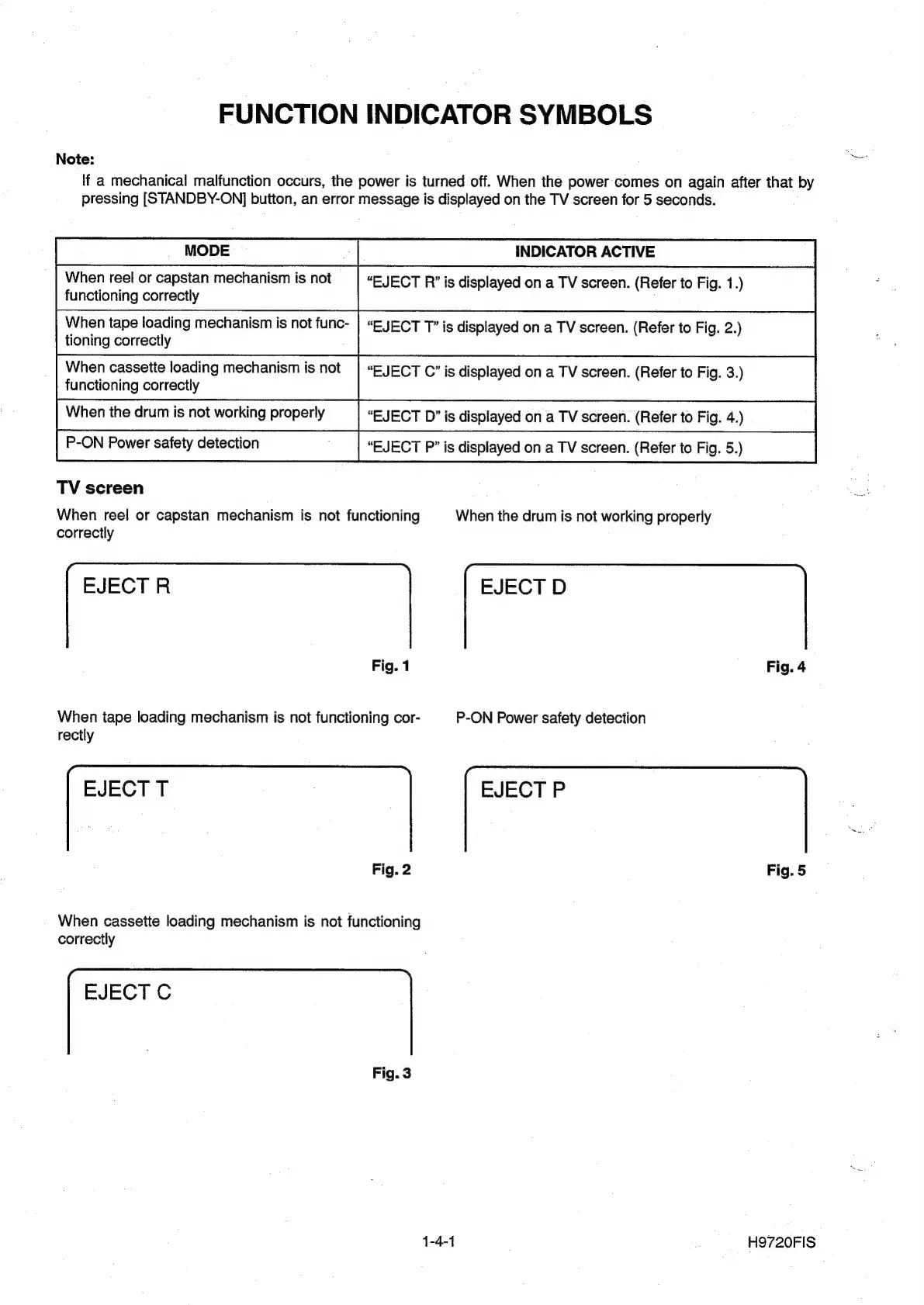
FUNCTION
INDICATOR
SYMBOLS
Note:
lf
a
mechanical
malfunction
occurs,
the
power
is
turned
off.
When
the
power
comes
on
again
after
that
by
pressing
[STANDBY-ON]
button,
an
error
message
is
displayed
on
the
TV
screen
for
5
seconds.
INDICATOR
ACTIVE
“EJECT
R’”
is
displayed
on
a
TV
screen.
(Refer
to
Fig.
1.)
When
reel
or
capstan
mechanism
is
not
functioning
correctly
When
tape
loading
mechanism
is
not
func-
|
“EJECT
T”
is
displayed
on
a
TV
screen.
(Refer
to
Fig.
2.)
tioning
correctly
When
cassette
loading
mechanism
is
not
|
“EJECT
C”
is
displayed
on
a
TV
screen.
(Refer
to
Fig.
3.)
functioning
correctly
When
the
drum
is
not
working
properly
“EJECT
D”
is
displayed
on
a
TV
screen.
(Refer
to
Fig.
4.)
P-ON
Power
safety
detection
“EJECT
P”
is
displayed
on
a
TV
screen.
(Refer
to
Fig.
5.)
TV
screen
When
reel
or
capstan
mechanism
is
not
functioning
When
the
drum
is
not
working
properly
correctly
EJECT
R
EJECT
D
Fig.
1
Fig.
4
ihe
tape
loading
mechanism
is
not
functioning
cor-
_P-ON
Power
safety
detection
EJECT
T
|
EJECT
P
Fig.
2
Fig.
5
When
cassette
loading
mechanism
is
not
functioning
correctly
EJECT
C
Fig.
3
1-4-1
H9720FIS

Other manuals for Philips DVP620VR

Related product manuals