EasyManua.ls Logo

Philips DVP620VR - Page 13

Philips DVP620VR
104 pages
Print Icon
To Next Page IconTo Next Page
To Previous Page IconTo Previous Page
Loading...
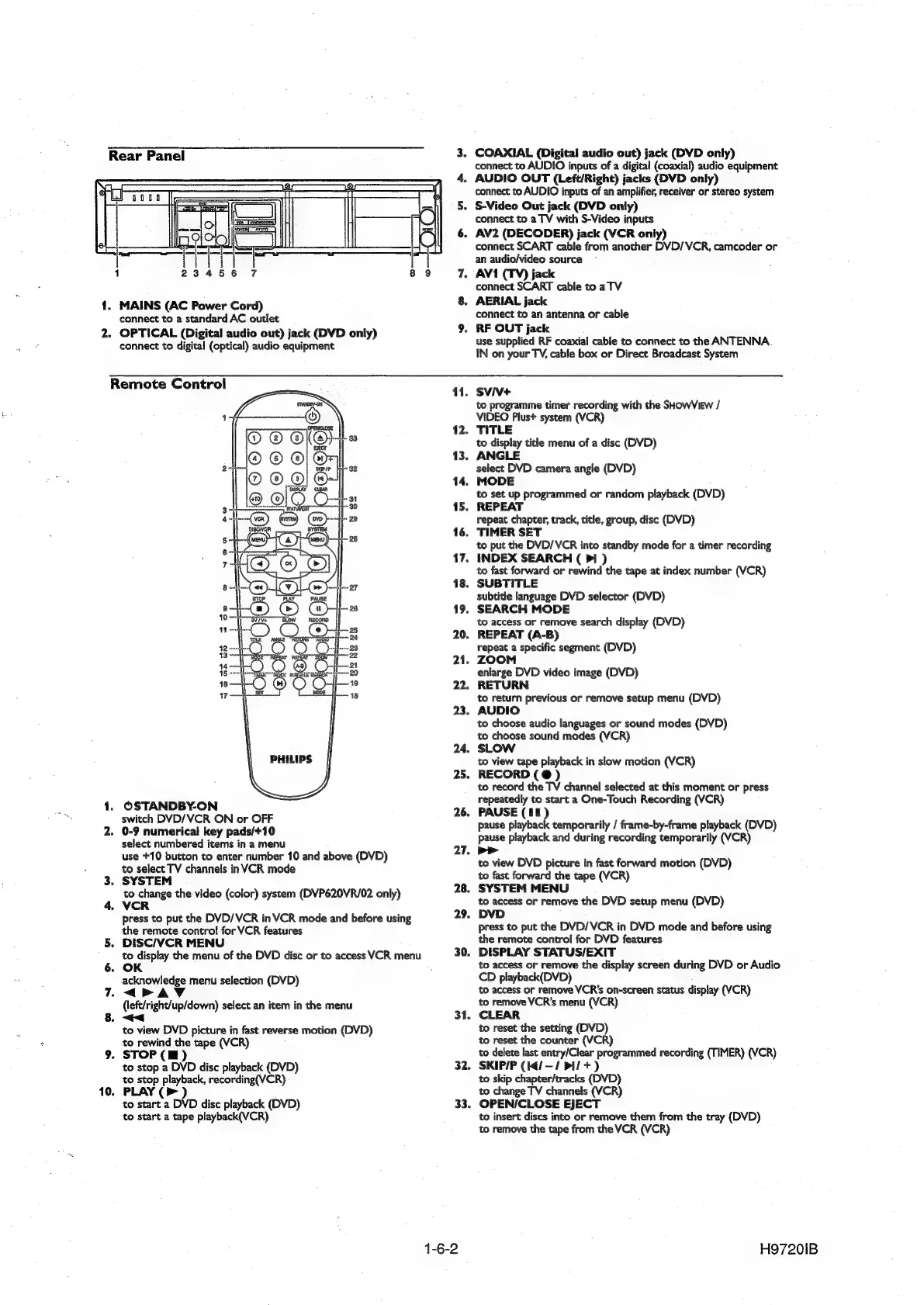
Rear
Panel
1
23456
7
8
1.
MAINS
(AC
Power
Cord)
connect
to
a
standard
AC
outlet
2.
OPTICAL
(Digital
audio
out)
jack
(DVD
only)
connect
to
digital
(optical)
audio
equipment
3.
4.
6.
9
7.
8.
COAXIAL
(Digital
audio
out)
jack
(DVD
only)
connect
to
AUDIO
inputs
of
a
digital
(coaxial)
audio
equipment
AUDIO
OUT
(Left/Right)
jacks
(DVD
only)
connect
to
AUDIO
inputs
of
an
amplifier,
receiver
or
stereo
system
S-Video
Out
jack
(DVD
only)
connect
to
a
TV
with
S-Video
inputs
AV2
(DECODER)
jack
(VCR
only)
connect
SCART
cable
from
another
DVD/VCR,
camcoder
or
an
audio/video
source
AV1
(TV)
jack
connect
SCART
cable
to
a
TV
AERIAL
jack
connect
to
an
antenna
or
cable
RF
OUT
jack
use
supplied
RF
coaxial
cable
to
connect
to
the
ANTENNA.
IN
on
your
TV,
cable
box
or
Direct
Broadcast
System
Remote
Control
PHILIPS
.
OSTANDBY-ON
switch
DVD/VCR
ON
or
OFF
2.
0-9
numerical
key
pads/+10
select
numbered
items
in
a
menu
use
+10
button
to
enter
number
10
and
above
(DVD)
to
select
TV
channels
inVCR
mode
3.
SYSTEM
to
change
the
video
(color)
system
(DVP620VR/02
only)
VCR
press
to
put
the
DVD/VCR
in
VCR
mode
and
before
using
the
remote
contro!
for
VCR
features
DISC/VCR
MENU
to
display
the
menu
of
the
DVD
disc
or
to
access
VCR
menu
OK
5.
-acknowledge
menu
selection
(DVD)
<PAVYV
(left/right/up/down)
select
an
item
in
the
menu
<<
7.
to
view
DVD
picture
in
fast
reverse
motion
(DVD)
to
rewind
the
tape
(VCR)
STOP
(HI)
to
stop
a
DVD
disc
playback
(DVD)
to
stop
playback,
recording(VCR)
PLAY
(>
)
to
start
a
DVD
disc
playback
(DVD)
to
start
a
tape
playback(VCR)
9.
10.
11.
12.
13.
14.
15.
16,
17.
18.
19.
20.
21.
22.
23.
24,
25.
26.
27.
31,
32.
33.
1-6-2
SVIV+
to
programme
timer
recording
with
the
SHOWVIEW
/
VIDEO
Plus+
system
(VCR)
TITLE
to
display
title
menu
of
a
disc
(DVD)
ANGLE
select
DVD
camera
angle
(DVD)
MODE
to
set
up
programmed
or
random
playback
(DVD)
REPEAT
repeat
chapter,
track,
title,
group,
disc
(DVD)
TIMER
SET
to
put
the
DVD/VCR
into
standby
mode
for
a
timer
recording
INDEX
SEARCH
(
>I
)
to
fast
forward
or
rewind
the
tape
at
index
number
(VCR)
SUBTITLE
subtitle
language
DVD
selector
(DVD)
SEARCH
MODE
to
access
or
remove
search
display
(DVD)
REPEAT
(A-B)
repeat
a
specific
segment
(DVD)
ZOOM
enlarge
DVD
video
image
(DVD)
RETURN
to
return
previous
or
remove
setup
menu
(DVD)
AUDIO
to
choose
audio
languages
or
sound
modes (DVD)
to
choose
sound
modes
(VCR)
SLOW
to
view
tape
playback
in
slow
motion
(VCR)
RECORD
(@
)
to
record
the
TV
channel
selected
at
this
moment
or
press
repeatedly
to
start
a
One-Touch
Recording
(VCR)
PAUSE
(11)
pause
playback
temporarily
/
frame-by-frame
playback
(DVD)
pause
playback
and
during
recording
temporarily
(VCR)
p>
to
view
DVD
picture
in
fast
forward
motion
(DVD)
to
fast
forward
the
tape
(VCR)
.
SYSTEM
MENU
to
access
or
remove
the
DVD
setup
menu
(DVD)
DVD
press
to
put
the
DVD/VCR
in
DVD
mode
and
before
using
the
remote
control
for
DVD
features
.
DISPLAY
STATUS/EXIT
to
access
or
remove
the
display
screen
during
DVD
or
Audio
CD
playback(DVD)
to
access
or
remove
VCR's
on-screen
status
display
(VCR)
to
remove
VCR’s
menu
(VCR)
CLEAR
to
reset
the
setting
(DVD)
to
reset
the
counter
(VCR)
to
delete
last
entry/Clear
programmed
recording
(TIMER)
(VCR)
SKIP/P
(14/—/
Pi/
+)
to
skip
chapter/tracks
(DVD)
to
change
TV
channels
(VCR)
OPEN/CLOSE
EJECT
to
insert
discs
into
or
remove
them
from
the
tray
(DVD)
to
remove
the
tape
from
the
VCR
(VCR)
H97201B

Other manuals for Philips DVP620VR

Related product manuals