EasyManua.ls Logo

Philips DVP620VR - Programming a Recording (TIMER); Timer Recording Basics & SHOWVIEW; Manual Timer & OTR Programming

Philips DVP620VR
104 pages
Print Icon
To Next Page IconTo Next Page
To Previous Page IconTo Previous Page
Loading...
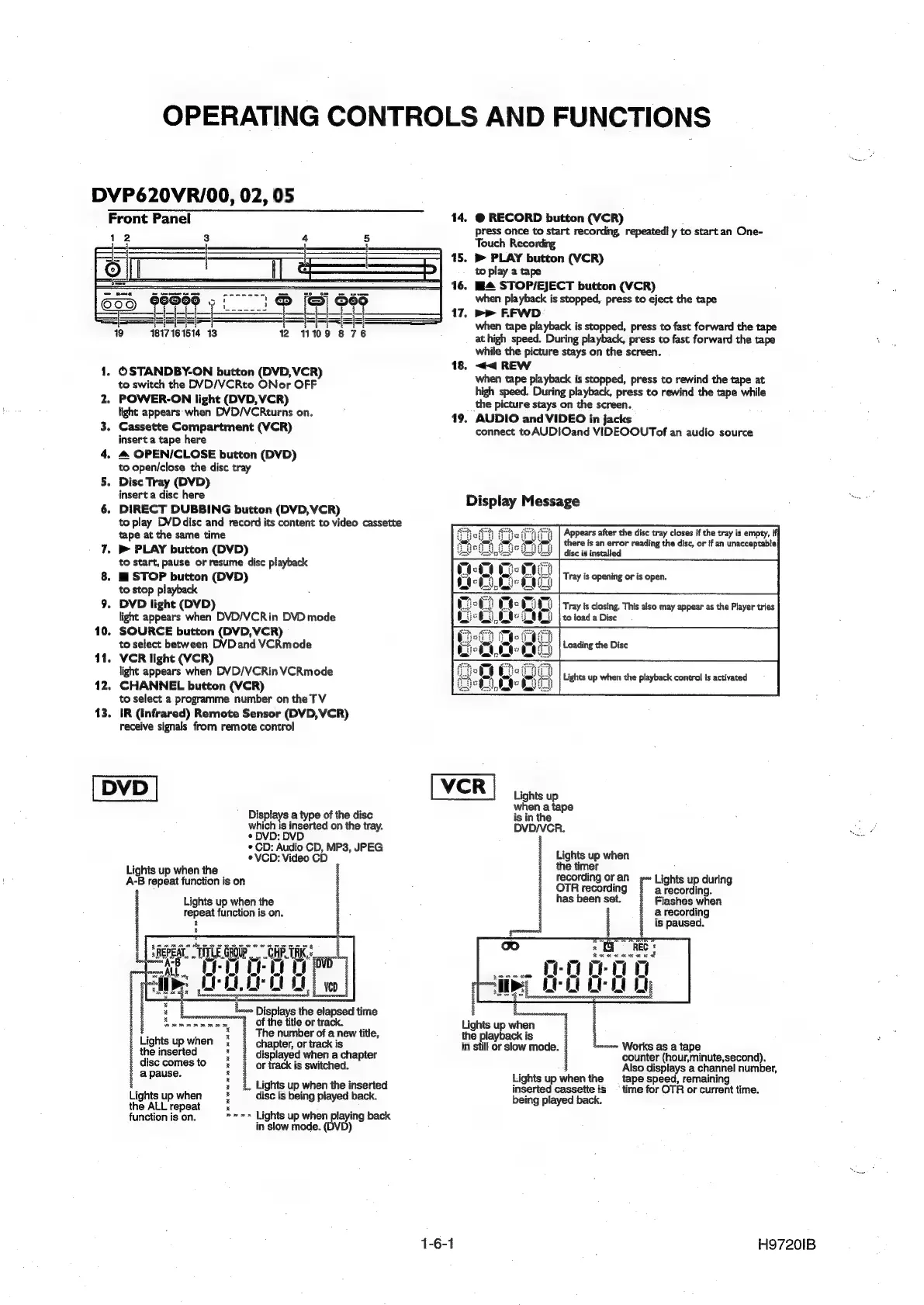
OPERATING
CONTROLS
AND
FUNCTIONS
DVP620VR/00,
02,
05
Front
Panel
==
iii
i
19
1817161514
13
1.
OSTANDBY-ON
button
(DVD,VCR)
to
switch
the
DVD/VCRto
ONor
OFF
2.
POWER-ON
light
(DVD,VCR)
light
appears
when
DVD/VCRturns
on.
3.
Cassette
Compartment
(VCR)
insert
a
tape
here
4.
4
OPEN/CLOSE
button
(DVD)
to
open/close
the
disc
tray
Disc
Tray
(DVD)
insert
a
disc
here
6.
DIRECT
DUBBING
button
(DVD,
VCR)
to
play
DVDdisc
and
record
its
content
to
video
cassette
tape
at
the
same
time
7.
»
PLAY
button
(DVD)
to
start,
pause
or
resume
disc
playback
8.
E_STOP
button
(DVD)
to
stop
playback
DVD
light
(DVD)
light
appears
when
DVD/VCRin
DVD
mode
10.
SOURCE
button
(DVD,
VCR)
to
select
between
DVDand
VCRmode
11.
VCR
light
(VCR)
light
appears
when
DVD/VCRin
VCRmode
12.
CHANNEL
button
(VCR)
to
select
a
programme
number
on
the
TV
13.
IR
(Infrared)
Remote
Sensor
(DVD,
VCR)
receive
signals
from
remote
control
9
DVD
Displays
a
type
of
the
disc
which
is
inserted
on
the
tray.
¢
DVD:
DVD
°
CD:
Audio
CD,
MP3,
JPEG
eVCD:
Video
CD
©
Lights
up
when
the
A-B
repeat
function
is
on
Lights
up
when
the
repeat
function
is
on.
&
a
ee
“ALL
nae
HLF
Oe
Le
Oe
De
000
%
ahs
sa
3
:
=
Displays
the
elapsed
time
=
of
the
title
or
track.
?
The
number
of
a
new
title,
chapter,
or
track
is
«
displayed
when
a
chapter
|
or
track
is
switched.
i
Lights
up
when
i
the
inserted
t
disc
comes
to
:
a
pause.
Lights
up
when
the
inserted
Lights
up
when
i
disc
is
being
played
back.
eee
es
ee
2
es
the
ALL
repeat
.
.
function
is
on.
»=»
Lights
up
when
playing
back
in
slow
mode.
(DVD)
14.
@
RECORD
button
(VCR)
press
once
to
start
recording,
repeated!
y
to
start
an
One-
Touch
Recording
15.
Bb
PLAY
button
(VCR)
to
play
a
tape
4
STOPI/EJECT
button
(VCR)
when
playback
is
stopped,
press
to
eject
the
tape
17.
>>
FFWD
when
tape
playback
is
stopped,
press
to
fast
forward
the
tape
at
high
speed.
During
playback,
press
to
fast
forward
the
tape
while
the
picture
stays
on
the
screen.
18.
<<
REW
when
tape
playback
is
stopped,
press
to
rewind
the
tape
at
high
speed.
During
playback,
press
to
rewind
the
tape
while
the
picture
stays
on
the
screen.
19.
AUDIO
and
VIDEO
in
jacks
connect
toAUDIOand
VIDEOOUTof
an
audio
source
16
Display
Message
Appears
after
the
disc
tray
closes
if
the
tray
is
empty,
i
there
is
an
error
reading
the
disc,
or
if
an
unacceptable}
disc
is
installed
ve
R
Lights
up
when
a
tape
is
in
the
DVD/VCR.
Lights
up
when
the
timer
recording
or
an
OTR
recording
has
been
set.
Lights
up
during
a
recording.
Flashes
when
@
recording
is
paused.
Raeanaxcca
d
epee
Leu
uy
rc
Lt
Wl:
a
Works
as
a
tape
counter
(hour,minute,second).
Also
displays
a
channel
number,
Lights
up
when
the
playback
is
j
in
still
or
slow
mode.
;
Lights
up
when
the
tape
speed,
remaining
inserted
cassette
is
_
time
for
OTR
or
current
time.
being
played
back.
1-6-1
H97201B

Other manuals for Philips DVP620VR

Related product manuals