EasyManua.ls Logo

Philips DVP620VR - Page 22

Philips DVP620VR
104 pages
Print Icon
To Next Page IconTo Next Page
To Previous Page IconTo Previous Page
Loading...
ELECTRICAL
ADJUSTMENT
INSTRUCTIONS
General
Note:
"CBA"
is
an
abbreviation
for
"Circuit
Board
Assembly."
NOTE:
1.Electrical
adjustments
are
required
after
replacing
circuit
components
and
certain
mechanical
parts.
It
is
important
to
do
these
adjustments
only
after
all
repairs
and
replacements
have
been
com-
pleted.
Also,
do
not
attempt
these
adjustments
unless
the
proper
equipment
is
available.
2.To
perform
these
alignment
/
confirmation
proce-
dures,
make
sure
that
the
tracking
control
is
set
in
the
center
position:
Press
either
"CHANNEL
w"
or
"CHANNEL
a”
button
on
the
front
panel
first,
then
the
"PLAY"
button
on
the
front
panel.
Test
Equipment
Required
1.Oscilloscope:
Dual-trace
with
10:1
probe,
V-Range:
0.001~50V/Div.,
F-Range:
DC~AC-20MHz
2.Alignment
Tape
(9965
000
14514)
Head
Switching
Position
Adjustment
Purpose:
To
determine
the
Head
Switching
position
during
playback.
Symptom
of
Misadjustment:
May
cause
Head
Switching
noise
or
vertical
jitter
in
the
picture.
TP751(V-OUT)
VR501
a
TP504(RF-SW)
|
(Switching
Point)|
58)
GND
(MAIN
CBA)
Measurement
|
tere
|
Mestigeeer”
|
Spee
9965
000
14514]
Oscilloscope
|
(4,
2
rnsi63
Sus)
Connections
of
Measurement
Equipment
TP751
ry
Main
CBA
TP504
,
Oscilloscope
CH1
CH2
Trig.
(+)
1-9-1
te
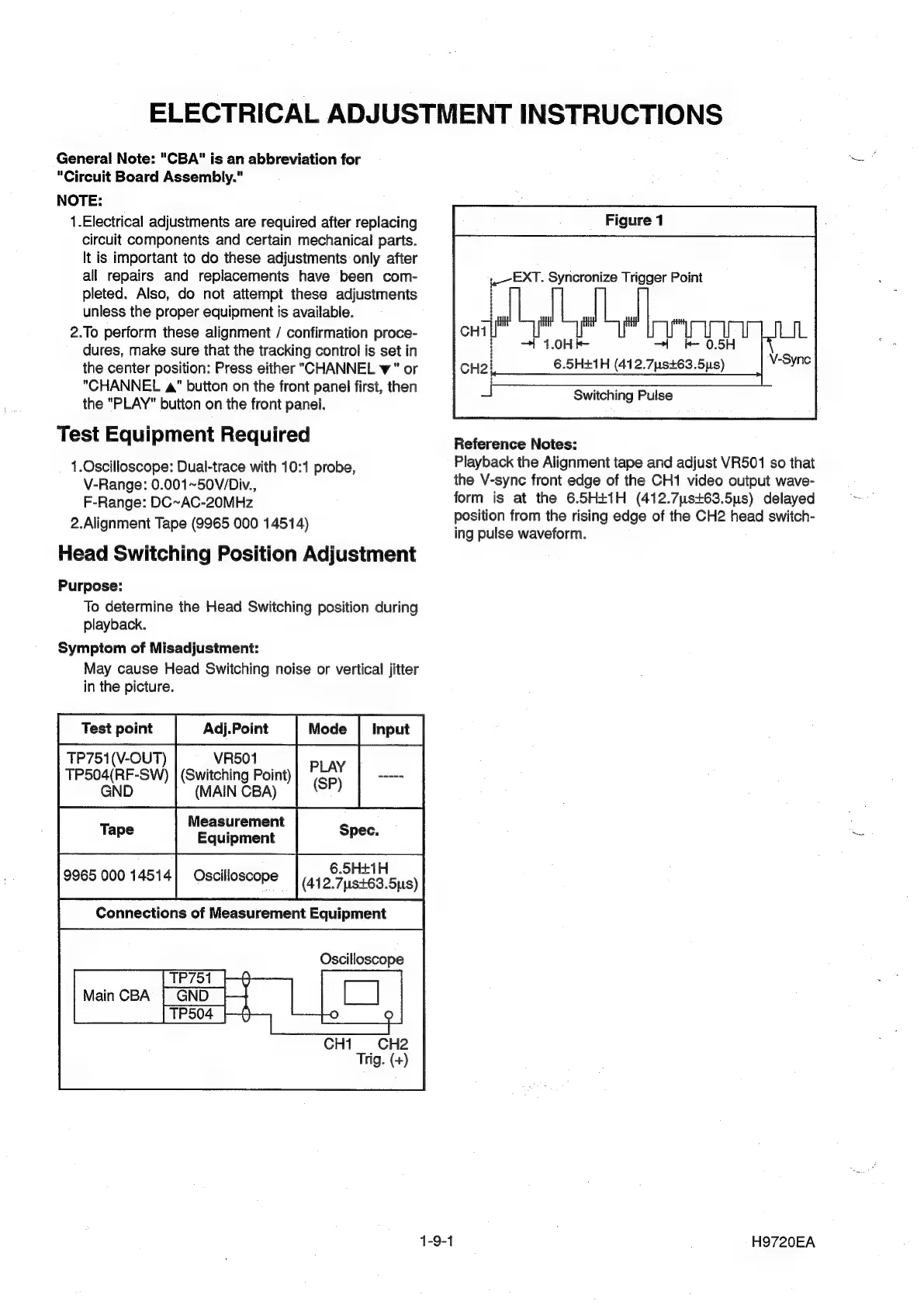
EXT.
Syncronize
Trigger
Point
—t
1.0Hk-
|
&
0.5H
6.5H+1H
(412.7s+63.5ys)
Switching
Pulse
Reference
Notes:
Playback
the
Alignment
tape
and
adjust
VR501
so
that
the
V-sync
front
edge
of
the
CH1
video
output
wave-
form
is
at
the
6.5H+1H
(412.7ys+63.5us)
delayed
position
from
the
rising
edge
of
the
CH2
head
switch-
ing
pulse
waveform.
H9720EA

Other manuals for Philips DVP620VR

Related product manuals