EasyManua.ls Logo

Philips DVP620VR - Page 23

Philips DVP620VR
104 pages
Print Icon
To Next Page IconTo Next Page
To Previous Page IconTo Previous Page
Loading...
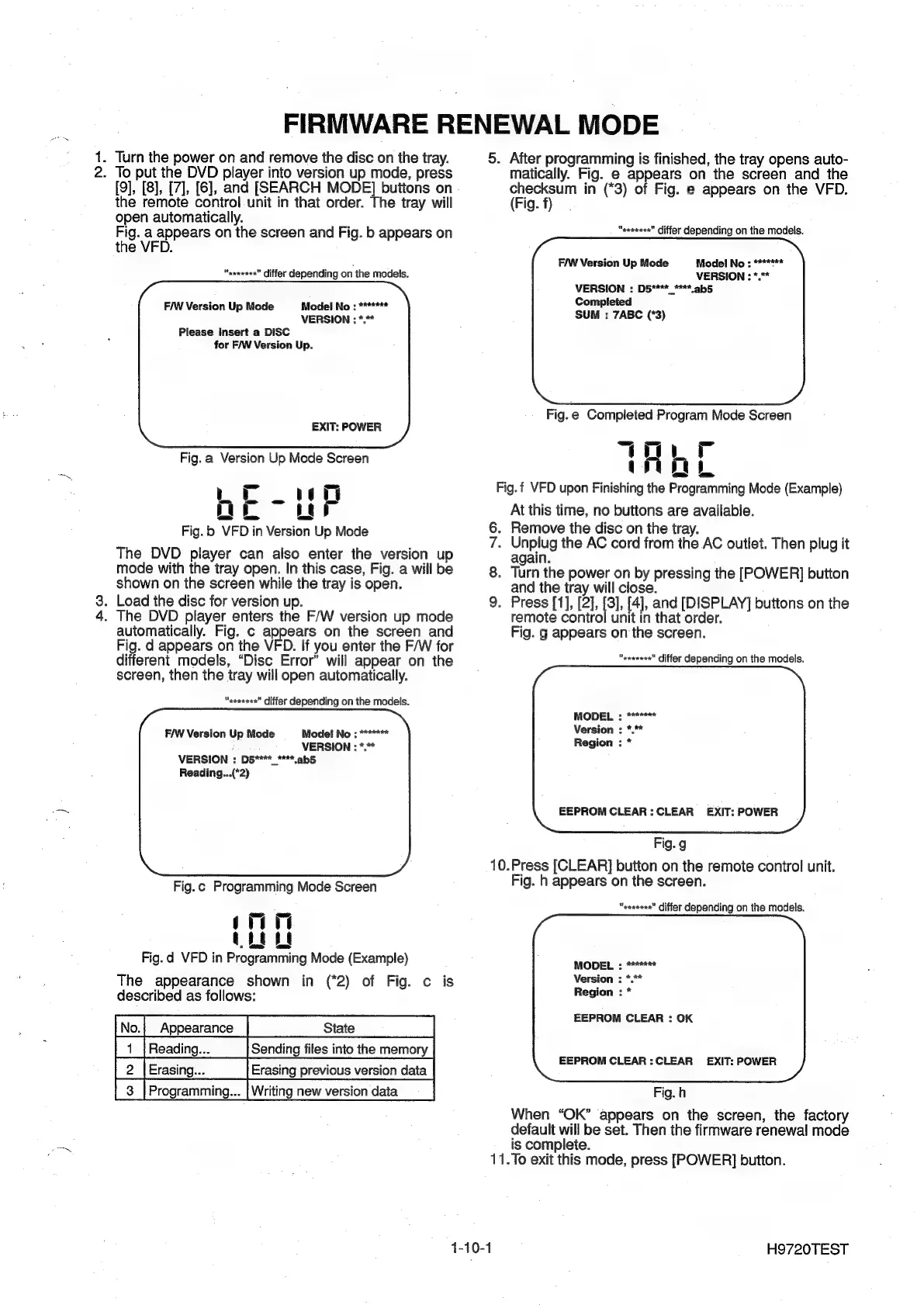
FIRMWARE
RENEWAL
MODE
1.
Turn
the
power
on
and
remove
the
disc
on
the
tray.
2.
To
put
the
DVD
player
into
version
up
mode,
press
[9], [8],
[7],
[6],
and
[SEARCH
MODE]
buttons
on
the
remote
control
unit
in
that
order.
The
tray
will
open
automatically.
Fig.
a
appears
on
the
screen
and
Fig.
b
appears
on
the
VFD.
"axeeeee"
differ
depending
on
the
models.
FAW
Version
Up
Mode
Model
No
:
*******
VERSION
:
*.**
Please
insert
a
DISC
for
F/W
Version
Up.
EXIT:
POWER
Fig.
a
Version
Up
Mode
Screen
LE
wit
Oe
ur
Fig.
b
VFD
in
Version
Up
Mode
The
DVD
player
can
also
enter
the
version
up
mode
with
the
tray
open.
In
this
case,
Fig.
a
will
be
shown
on
the
screen
while
the
tray
is
open.
3.
Load
the
disc
for
version
up.
4.
The
DVD
player
enters
the
F/W
version
up
mode
automatically.
Fig.
c
appears
on
the
screen
and
Fig.
d
appears
on
the
VFD.
If
you
enter
the
F/W
for
different
models,
“Disc
Error”
will
appear
on
the
screen,
then
the
tray
will
open
automatically.
“aeaeee"
differ
depending
on
the
models.
F/W
Version
Up
Mode
Mode!
No
:
*******
:
VERSION
:
*.*
VERSION
:
D5****_****,ab5
Reading...(*2)
Fig.
c
Programming
Mode
Screen
mn
(eet
Fig.
d
VFD
in
Programming
Mode
(Example)
The
appearance
shown
in
(*2)
of
Fig.
c
is
described
as
follows:
[No.|
Appearance
|
State
|
2
|Erasing..__|
Erasing
previous
version
data
|
1-10-1
5.
After
programming
is
finished,
the
tray
opens
auto-
matically.
Fig.
e
appears
on
the
screen
and
the
oP
in
(*3)
of
Fig.
e
appears
on
the
VFD.
ig.
“exaeaee"
differ
depending
on
the
models.
F/W
Version
Up
Mode
Model
No
:
*******
VERSION
:
*.**
VERSION
:
D5****_**"*
ab5
Completed
SUM
:
7ABC
(*3)
Fig.
e
Completed
Program
Mode
Screen
TAL
Fig.f
VFD
upon
Finishing
the
Programming
Mode
(Example)
At
this
time,
no
buttons
are
available.
.
Remove
the
disc
on
the
tray.
.
Unplug
the
AC
cord
from
the
AC
outlet.
Then
plug
it
again.
.
Turn
the
power
on
by
pressing
the
[POWER]
button
and
the
tray
will
close.
.
Press
[1],
[2], [3], [4],
and
[DISPLAY]
buttons
on
the
remote
control
unit
in
that
order.
Fig.
g
appears
on
the
screen.
o
O®©
NO
"eeeeeee"
differ
depending
on
the
models.
MODEL
:
*******
Version
:
*.*
Region
:
*
EEPROM
CLEAR:
CLEAR
EXIT:
POWER
Fig.
g
10.Press
[CLEAR]
button
on
the
remote
control
unit.
Fig.
h
appears
on
the
screen.
“aaxeeee”
differ
depending
on
the
models.
MODEL
:
*******
Version
:
*.**
Region
:
*
EEPROM
CLEAR
:
OK
EEPROM
CLEAR:
CLEAR
EXIT:
POWER
Fig.
h
When
“OK”
appears
on
the
screen,
the
factory
default
will
be
set.
Then
the
firmware
renewal
mode
is
complete.
11.To
exit
this
mode,
press
[POWER]
button.
H9720TEST

Other manuals for Philips DVP620VR

Related product manuals