EasyManua.ls Logo

Philips DVP620VR - Channel Tuning and System Settings

Philips DVP620VR
104 pages
Print Icon
To Next Page IconTo Next Page
To Previous Page IconTo Previous Page
Loading...
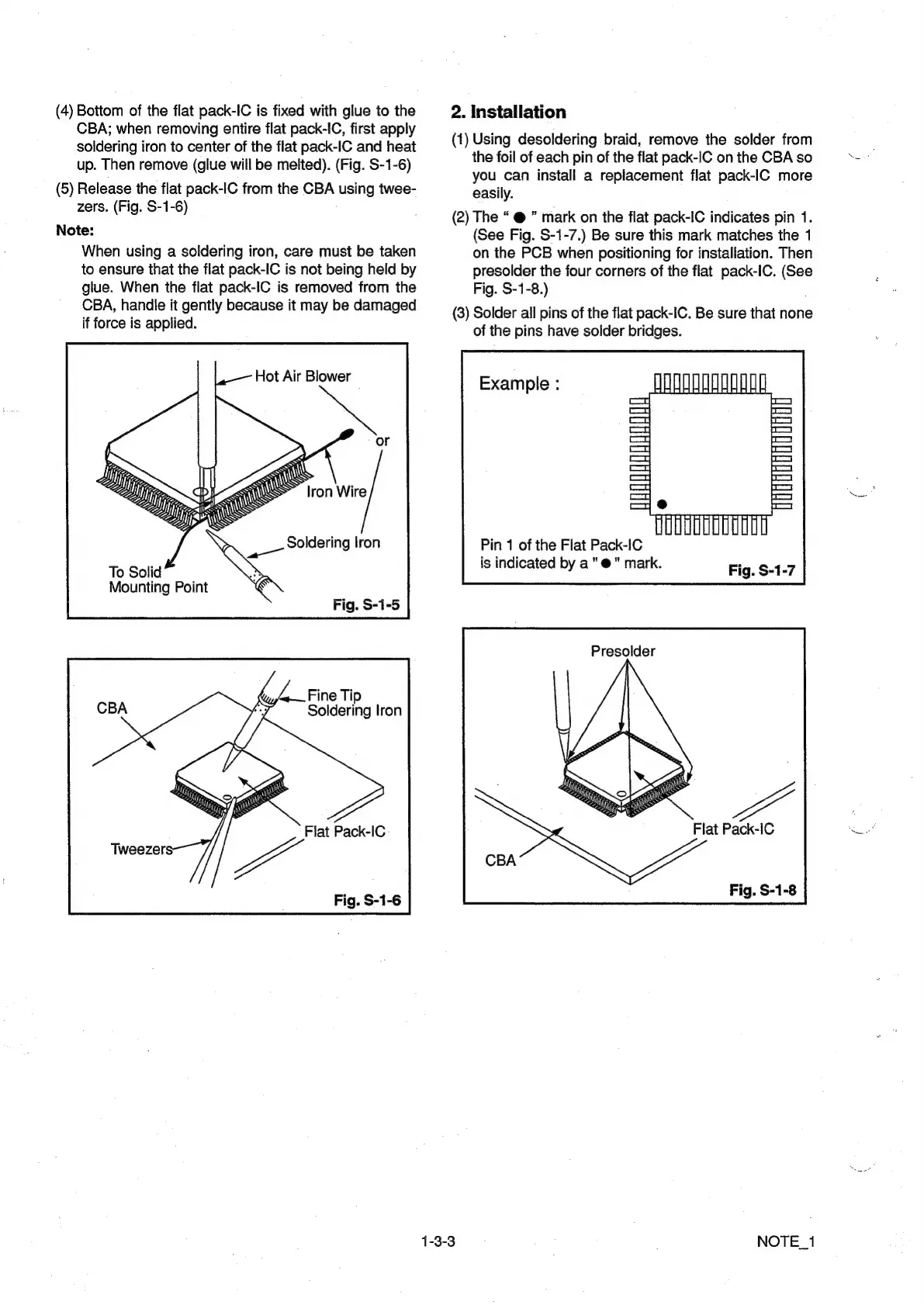
(4)
Bottom
of
the
flat
pack-IC
is
fixed
with
glue
to
the
CBA;
when
removing
entire
flat
pack-IC,
first
apply
soldering
iron
to
center
of
the
flat
pack-IC
and
heat
up.
Then
remove
(glue
will
be
melted).
(Fig.
S-1-6)
(5)
Release
the
flat
pack-IC
from
the
CBA
using
twee-
zers.
(Fig.
S-1-6)
;
Note:
When
using
a
soldering
iron,
care
must
be
taken
to
ensure
that
the
flat
pack-IC
is
not
being
held
by
glue.
When
the
flat
pack-IC
is
removed
from
the
CBA,
handle
it
gently
because
it
may
be
damaged
if
force
is
applied.
Hot
Air
Blower
Mounting
Point
/4—.Fine
Tip
Soldering
lron
Flat
Pack-IC
Fig.
S-1-6
1-3-3
2.
Installation
(1)
Using
desoldering
braid,
remove
the
solder
from
the
foil
of
each
pin
of
the
flat
pack-IC
on
the
CBA
so
you
can
install
a
replacement
flat
pack-IC
more
easily.
(2)
The
ā€œ
@
ā€
mark
on
the
flat
pack-IC
indicates
pin
1.
(See
Fig.
S-1-7.)
Be
sure
this
mark
matches
the
1
on
the
PCB
when
positioning
for
installation.
Then
presolder
the
four
corners
of
the
flat
pack-IC.
(See
Fig.
S-1-8.)
(3)
Solder
ail
pins
of
the
flat
pack-IC.
Be
sure
that
none
of
the
pins
have
solder
bridges.
Example
:
Pin
1
of
the
Flat
Pack-IC
is
indicated
by
a"
@"
mark.
Presolder
Flat
Pack-IC
NOTE_1

Other manuals for Philips DVP620VR

Related product manuals