EasyManua.ls Logo

Philips DVP620VR - Page 7

Philips DVP620VR
104 pages
Print Icon
To Next Page IconTo Next Page
To Previous Page IconTo Previous Page
Loading...
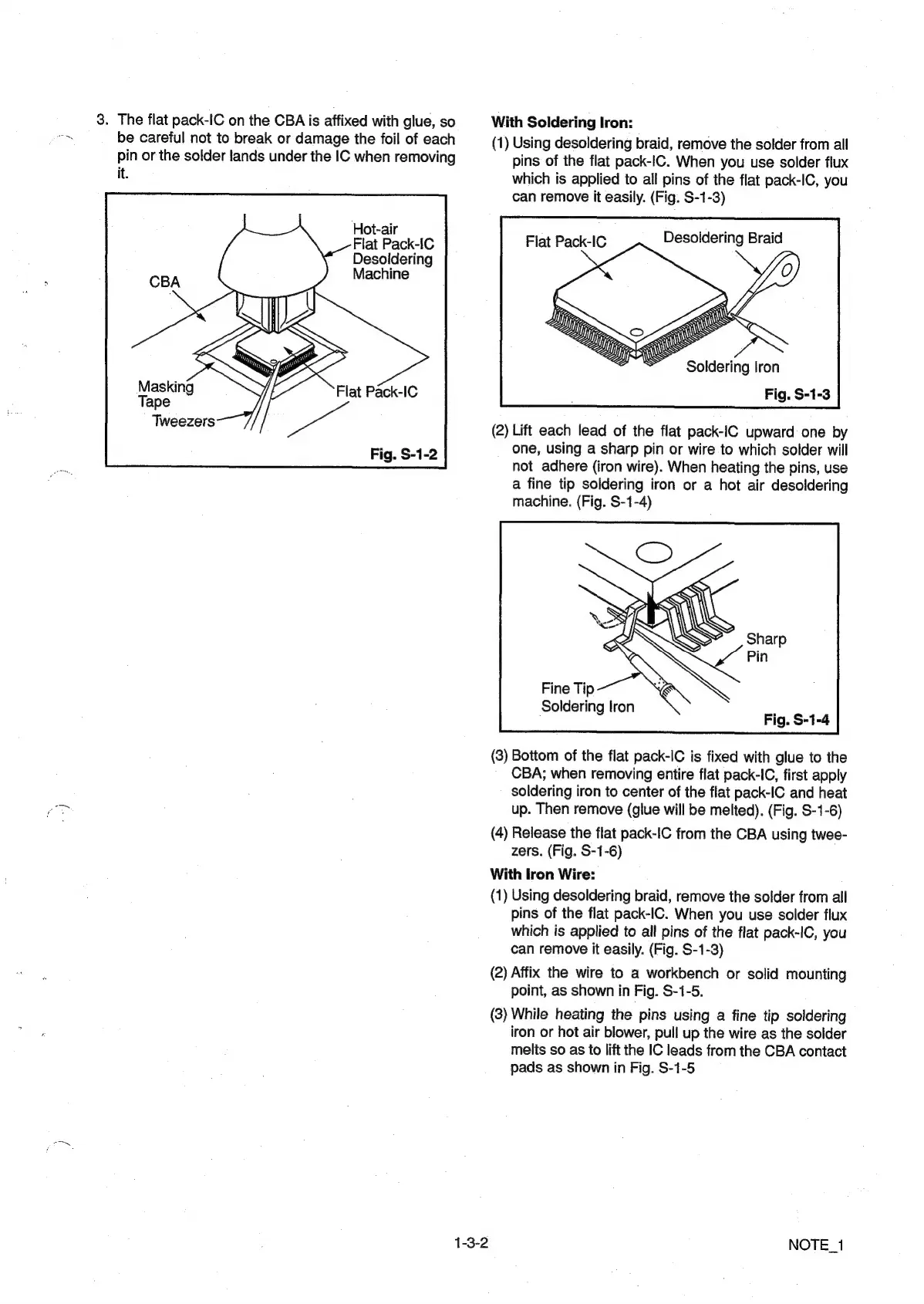
3.
The
flat
pack-IC
on
the
CBA
is
affixed
with
glue,
so
be
careful
not
to
break
or
damage
the
foil
of
each
pin
or
the
solder
lands
under
the
IC
when
removing
it.
Hot-air
Flat
Pack-iC
Desoldering
Machine
Masking
Tape
Tweezers
1-3-2
With
Soldering
Iron:
(1)
Using
desoldering
braid,
remove
the
solder
from
all
pins
of
the
flat
pack-IC.
When
you
use
solder
flux
which
is
applied
to
all
pins
of
the
flat
pack-IC,
you
can
remove
it
easily.
(Fig.
S-1-3)
Desoldering
Braid
Flat
Pack-IC
Soldering
Iron
Fig.
S-1-3
(2)
Lift
each
lead
of
the
flat
pack-IC
upward
one
by
one,
using
a
sharp
pin
or
wire
to
which
solder
will
not
adhere
(iron
wire).
When
heating
the
pins,
use
a
fine
tip
soldering
iron
or
a
hot
air
desoldering
machine.
(Fig.
S-1-4)
Soldering
Iron
(3)
Bottom
of
the
flat
pack-IC
is
fixed
with
glue
to
the
CBA;
when
removing
entire
flat
pack-IC,
first
apply
soldering
iron
to
center
of
the
flat
pack-IC
and
heat
up.
Then
remove
(glue
will
be
melted).
(Fig.
S-1-6)
(4)
Release
the
flat
pack-IC
from
the
CBA
using
twee-
zers.
(Fig.
S-1-6)
With
Iron
Wire:
(1)
Using
desoldering
braid,
remove
the
solder
from
all
pins
of
the
flat
pack-IC.
When
you
use
solder
flux
which
is
applied
to
all
pins
of
the
flat
pack-IC,
you
can
remove
it
easily.
(Fig.
S-1-3)
(2)
Affix
the
wire
to
a
workbench
or
solid
mounting
point,
as
shown
in
Fig.
S-1-5.
(3)
While
heating
the
pins
using
a
fine
tip
soldering
iron
or
hot
air
blower,
pull
up
the
wire
as
the
solder
melts
so as
to
lift
the
IC
leads
from
the
CBA
contact
pads
as
shown
in
Fig.
S-1-5
NOTE_1

Other manuals for Philips DVP620VR

Related product manuals