EasyManua.ls Logo

Philips DVP620VR - Setting Up your DVD;VCR; Connections and Basic Setup

Philips DVP620VR
104 pages
Print Icon
To Next Page IconTo Next Page
To Previous Page IconTo Previous Page
Loading...
STANDARD
NOTES
FOR
SERVICING
Circuit
Board
Indications
a.
The
output
pin
of
the
3
pin
Regulator
ICs
is
indi-
cated
as
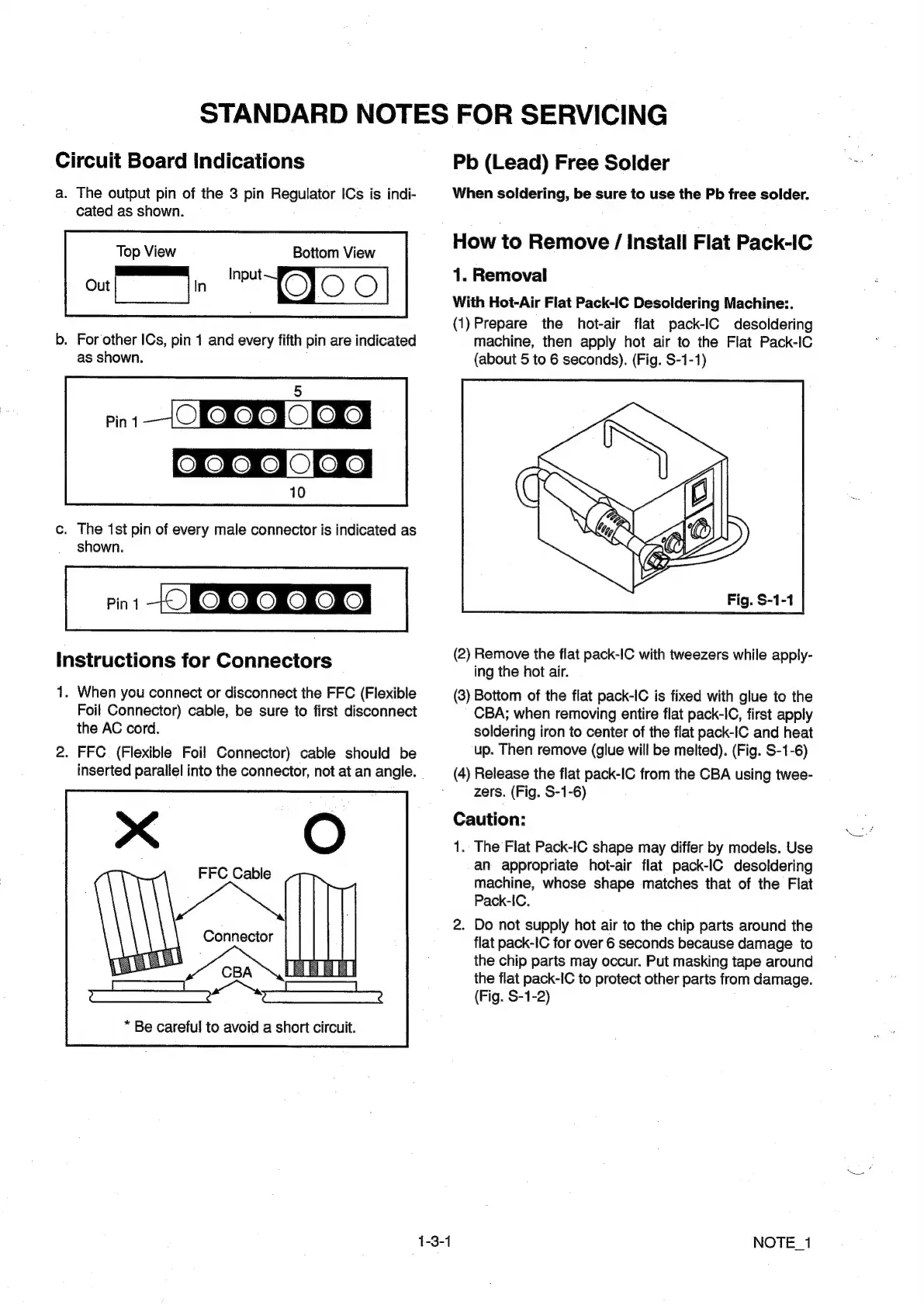
shown.
Top
View
Botiom
View
Input
b.
For
other
ICs,
pin
1
and
every
fifth
pin
are
indicated
as
shown.
5
Pin
1
ORONO
LKES
OROKOMCE
OLSKS
10
c.
The
1st
pin
of
every
male
connector
is
indicated
as
shown.
Pint
ROMO
MORRO
Instructions
for
Connectors
1.
When
you
connect
or
disconnect
the
FFC
(Flexible
Foil
Connector)
cable,
be
sure
to
first
disconnect
the
AC
cord.
2.
FFC
(Flexible
Foil
Connector)
cable
should
be
inserted
parallel
into
the
connector,
not
at
an
angle.
*
Be
careful
to
avoid
a
short
circuit.
Pb
(Lead)
Free
Solder
When
soldering,
be
sure
to
use
the
Pb
free
solder.
How
to
Remove
/
Install
Flat
Pack-IC
1.
Removal
With
Hot-Air
Flat
Pack-IC
Desoldering
Machine:.
(1)Prepare
the
hot-air
flat
pack-IC
desoldering
machine,
then
apply
hot
air
to
the
Flat
Pack-IC
(about
5
to
6
seconds).
(Fig.
S-1-1)
(2)
Remove
the
flat
pack-IC
with
tweezers
while
apply-
ing
the
hot
air.
(3)
Bottom
of
the
flat
pack-IC
is
fixed
with
glue
to
the
CBA;
when
removing
entire
flat
pack-IC,
first
apply
soldering
iron
to
center
of
the
flat
pack-IC
and
heat
up.
Then
remove
(glue
will
be
melted).
(Fig.
S-1-6)
(4)
Release
the
flat
pack-IC
from
the
CBA
using
twee-
zers.
(Fig.
S-1-6)
Caution:
1.
The
Flat
Pack-IC
shape
may
differ
by
models.
Use
an
appropriate
hot-air
flat
pack-IC
desoldering
machine,
whose
shape
matches
that
of
the
Flat
Pack-IC.
2.
Do
not
supply
hot
air
to
the
chip
parts
around
the
flat
pack-IC
for
over
6
seconds
because
damage
to
the
chip
parts
may
occur.
Put
masking
tape
around
the
flat
pack-IC
to
protect
other
parts
from
damage.
(Fig.
S-1-2)
NOTE_1

Other manuals for Philips DVP620VR

Related product manuals