EN
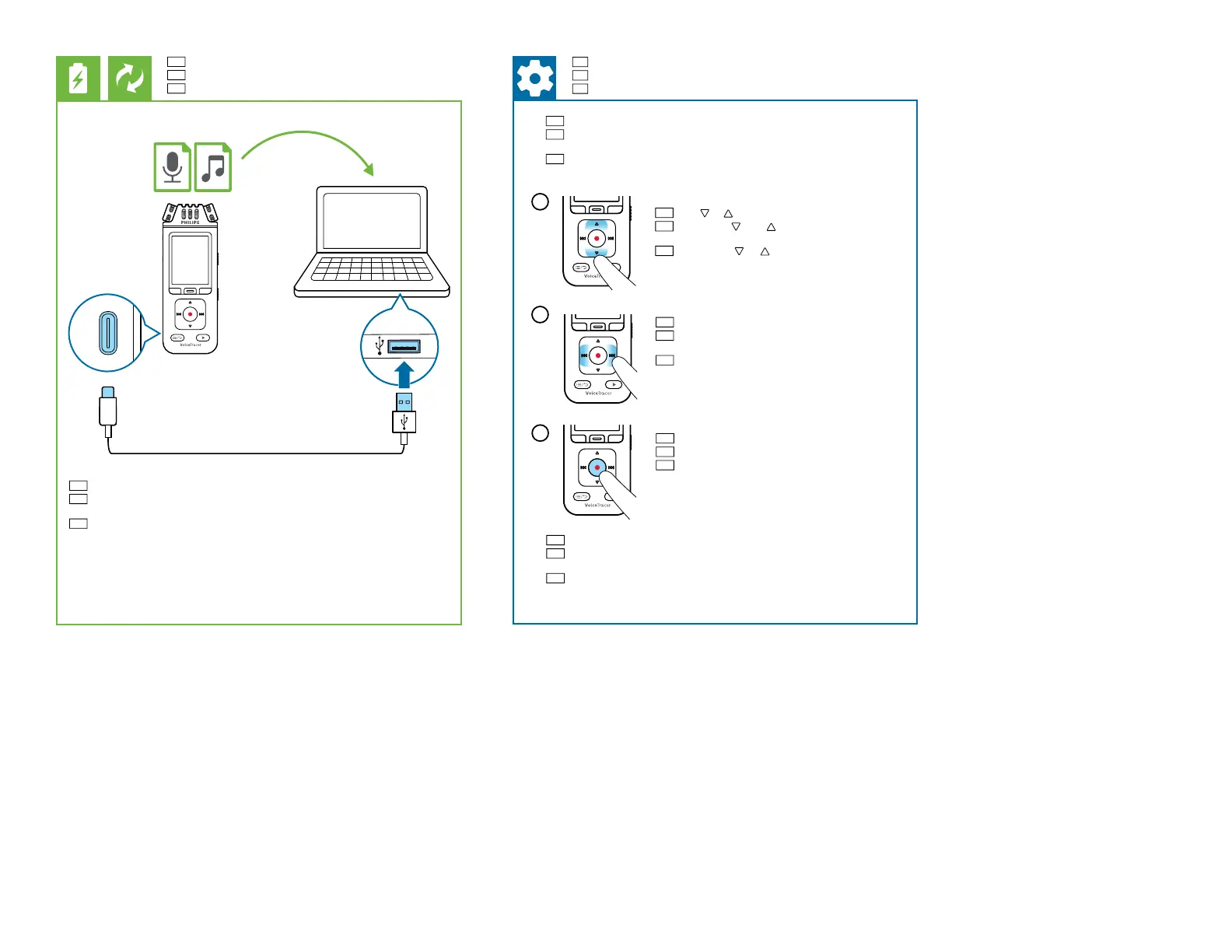
Charging the battery, Connect to a computer
DE
Akku auaden, Gerät an einen Computer anschließen
FR
Chargement de la batterie, Connexion à un ordinateur
EN
Connect the device to a computer to charge it or copy les to the computer
DE
Schließen Sie das Gerät an einen Computer an, um es aufzuladen oder
Dateien auf den Computer zu kopieren
FR
Connectez l’appareil à un ordinateur pour le charger ou copier des chiers
sur l’ordinateur
EN
Set the date and time
DE
Datum und Uhrzeit einstellen
FR
Régler la date et l’heure
EN
The rst time you turn on the device you can set the date and time
DE
Wenn Sie das Gerät zum ersten Mal einschalten, können Sie das
Datum und die Uhrzeit einstellen
FR
La première fois que vous allumez l’appareil, vous pouvez régler la
date et l’heure
EN
Press g to conrm
DE
Drücken Sie g zum Bestätigen
FR
Appuyez sur g pour conrmer
2
EN
Press or to select the desired option
DE
Drücken Sie oder und wählen Sie die
gewünschte Option aus
FR
Appuyez sur ou pour sélectionner l’option
désirée
3
EN
Press h or b to set the desired value
DE
Drücken Sie h oder b um den gewünschten
Wert einzustellen
FR
Appuyez sur h ou b pour régler la valeur
souhaitée
EN
You can also change the date/time later in the settings of the device
DE
Sie können das Datum/die Uhrzeit auch später in den Einstellungen
des Geräts ändern
FR
Vous pouvez également modier la date et l’heure ultérieurement
dans les paramètres de l’appareil
1












 To Next Page