EasyManua.ls Logo

Philips DVT4110 - Set the Device Language

Philips DVT4110
7 pages
Print Icon
To Next Page IconTo Next Page
To Previous Page IconTo Previous Page
Loading...
9
1
EN
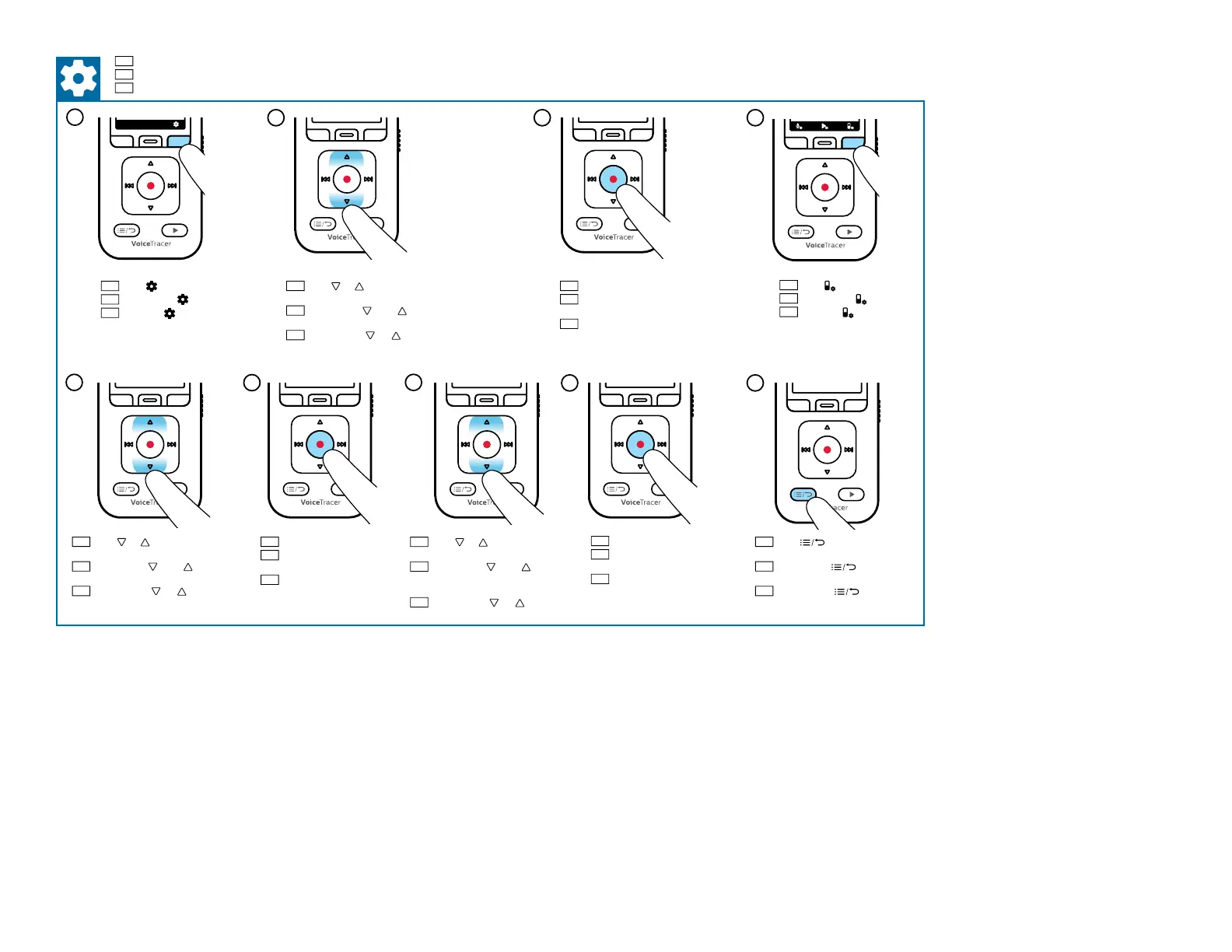
Set the device language
DE
Gerätesprache festlegen
FR
Dénir la langue de l’appareil
New
01
/01
:
:
00
00
00
:
:
00
00
00
14:31
MP3 128 kbps
Lecture
EN
Press
DE
Drücken Sie
FR
Appuyez
EN
Press or to select All
settings
DE
Drücken Sie oder und
wählen Sie All settings
FR
Appuyez sur ou et
sélectionnez All settings
EN
Press g to conrm
DE
Drücken Sie g zum
Bestätigen
FR
Appuyez sur g
pour conrmer
EN
Press
DE
Drücken Sie
FR
Appuyez
EN
Press or to select
Language
DE
Drücken Sie oder und
wählen Sie Language
FR
Appuyez sur ou et
sélectionnez Language
EN
Press g to conrm
DE
Drücken Sie g zum
Bestätigen
FR
Appuyez sur g
pour conrmer
EN
Press or to select the
desired option
DE
Drücken Sie oder und
wählen Sie die gewünschte
Option aus
FR
Appuyez sur ou pour
sélectionner l’option désirée
EN
Press g to conrm
DE
Drücken Sie g zum
Bestätigen
FR
Appuyez sur g
pour conrmer
EN
Press to exit the
settings
DE
Drücken Sie , um die
Einstellungen zu verlassen
FR
Appuyez sur pour
quitter les réglages
New
01
/01
:
:
00
00
00
:
:
00
00
00
14:31
MP3 128 kbps
Lecture
2
3
4
5
6
7
8

Related product manuals