EasyManua.ls Logo

Philips FR980 - OPERATION;GETTING STARTED; Receiver Display; OSD On-Screen Display; Changing the TV broadcast standard setting

Philips FR980
63 pages
Print Icon
To Next Page IconTo Next Page
To Previous Page IconTo Previous Page
Loading...
e8€
86
SOd
OPERATION
/
GETTING
STARTED
NOTE
Unless
the
front
and
surround
speakers
are
full
frequency
response
types,
you
must
use
a
sub-woofer
for
satisfactory
digital
surround
sound.
Working
without
a
Centre
speaker
is
also
possible:
in
this
case
the
Centre
speaker's
sound
is
distributed
between
the
Front
Left
and
Right
speakers.
This
configuration
is
not
recommended
because
most
of
the
dialogue
that
locks
the
sound
into
the
picture
is
carried
by
the
centre
channel.
If
you
wish
to
use
external
amplifiers
to
produce
extra
sound
power,
you
can
connect
them
to
the
Front
L/R,
Surround
L/R
and
Center
preamplifier
outputs.
In
this
case,
the
power
handling
capacity
of
the
speakers
should
match
the
output
power
of
the
external
amplifiers
to
which
they
are
connected.
In
this
configuration,
no
connections
should
be
made
to
the
Front
L/R,
Center,
and
Surround
L/R
speaker
terminals.
These
configurations
are
also
suitable
for
Dolby
Pro
Logic™
and
the
other
analogue
surround
sound
modes,
as
well
as
stereo.
In
some
cases
some
speakers
will
be
inactive.
AM
tuning
step
Set
this
switch
to
9
kHz
to
receive
AM
radio
broadcasts
in
Europe,
10
kHz
to
receive
them
in
the
USA
and
Asia.
Antenna
©
FM
antenna
terminal
(75Q).
For
connecting
an
external
FM
antenna
with
a
coaxial
cable,
or
for
connecting
a
cable
network
FM
source.
©
AM
antenna
and
ground
terminals.
For
connecting
the
supplied
AM
loop
antenna.
Use
the
terminals
marked
AM
and
GND.
The
supplied
AM
loop
antenna
will
provide
good
AM
reception
in
most
areas.
Position
the
loop
antenna
to
the
best
reception.
Multisystem
remote
control
The
remote
control
is
programmed
to
operate
Philips
and
related
brand
equipment
using
RC5
or
RC6
remote
control
codes.
But
it
also
has
a
learning
facility
which
allows
it
to
be
re-programmed
for
other
equipment
brands
using
other
control
codes,
The
learning
procedure
is
explained
on
page
12
of
this
manual.
Unless
codes
have
been
changed
using
the
the
learning
procedure,
the
slider
switch
should
be
set
to
RC-5
(or
User).
When
codes
have
been
changed
using
the the
leaming
procedure,
the
SLIDER
SWITCH
[€]
should
be
set
to
User.
8
Unless
otherwise
stated,
all
operations
can
be
carried
out
with
the
remote
control.
Always
point
the
remote
control
directly
at
the
player,
making
sure
there
are
no
obstructions
in
the
path
of
the
infrared
beam.
Equivalent
keys
on
the
front
panel
may
also
be
used.
Switch
on
the
‘I'V
and
select
the
video
input
chosen
for
your
receiver.
Switch
on
your
receiver
by
pressing
the
MAIN
POWER
ON
key
[2]
(or
the
Power
switch
on
the
front
panel
[4]).
Check
that
the
display
lights
up.
Switch
on
the
source
or
sources
you
intend
to
use.
Receiver
Display
VISUAL
TV
DVD
VCR
12
AUX
tai
CES
MGG
We)
Gia
went
WA
Wd
Wii
WA
WA
RA
i
WA Wa
*
TNT
WARY
WAST
ANE
HSE
TANT
HAST
FAST
HAST
TANT
a
IPRO-LOGIC
[3-STEREO§
MOVIE
mmm
OPT
ICOAX{
[NIGHT
[LFE
BATTS
ISTERED]
[HALLE
MATALX]
ISLEEPIEP-SCAN
EDISP
|
DIGITAL
SOURCE
ANALOG
SOURCE
AC-3
CHANNEL
STATUS
COAX
OIGITAL
SOURCE
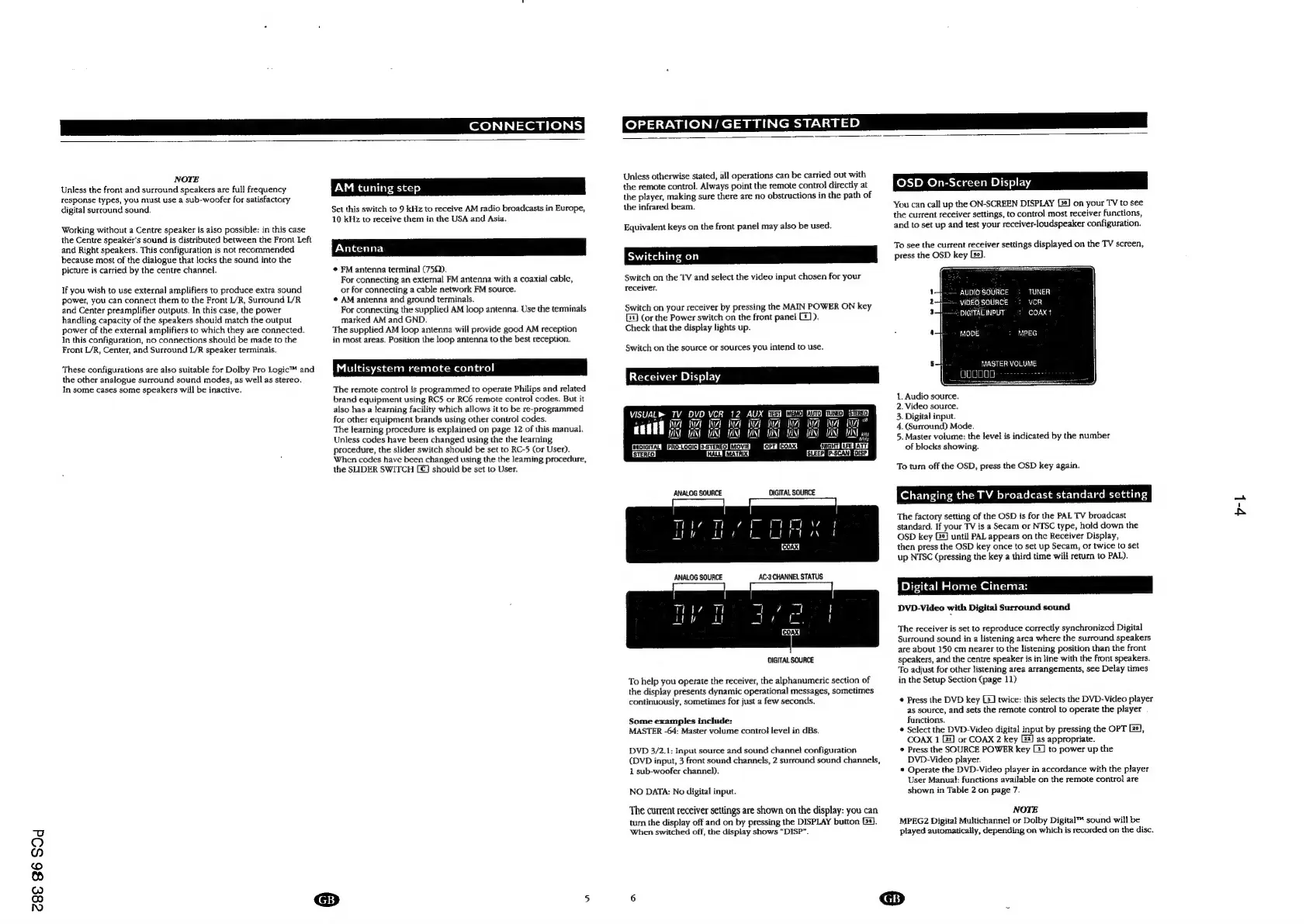
To
help
you
operate
the
receiver,
the
alphanumeric
section
of
the
display
presents
dynamic
operational
messages,
sometimes
continuously,
sometimes
for
just
4
few
seconds.
Some
examples
include:
MASTER
-64:
Master
volume
contro!
level
in
dBs.
DVD
3/2.1:
Input
source
and
sound
channel
configuration
(DVD
input,
3
front
sound
channels,
2
surround
sound
channels,
1
sub-woofer
channel).
NO
DATA:
No
digital
input.
The
current
receiver
settings
are
shown
on
the
display:
you
can
turn
the
display
off
and
on
by
pressing
the
DISPLAY
button
[3].
When
switched
off,
the
display
shows
“DISP”.
OSD
On-Screen
Display
You
can
call
up
the
ON-SCREEN
DISPLAY
Gs]
on
your
TV
to
see
the
current
receiver
settings,
to
control
most
receiver
functions,
and
to
set
up
and
test
your
receiver-loudspeaker
configuration.
To
see
the
current
receiver
settings
displayed
on
the
TV
screen,
press
the
OSD
key
Le].
--
AUDIOSOURCE
+
TUNER
WOEO
SOURCE
~:
VCR
——S/DIGITALINPUT)
=
COAX
1
MODE
+
MPEG
MASTER
VOLUME
1.
Audio
source.
2.
Video
source.
3.
Digital
input.
4.
(Surround)
Mode.
5.
Master
volume:
the
level
is
indicated
by
the
number
of
blocks
showing.
To
turn
off
the
OSD,
press
the
OSD
key
again.
Changing
the
TV
broadcast
standard
setting
The
factory
setting
of
the
OSD
is
for
the
PAL
TV
broadcast
standard.
If
your
TV
is
a
Secam
or
NTSC
type,
hold
down
the
OSD
key
until
PAL
appears
on
the
Receiver
Display,
then
press
the
OSD
key
once
to
set
up
Secam,
or
twice
to
set
up
NTSC
(pressing
the
key
a
third
time
will
return
to
PAL).
Digital
Home
Cinema:
DVD-Video
with
Digital
Surround
sound
The
receiver
is
set
to
reproduce
correctly
synchronized
Digital
Surround
sound
in
a
listening
area
where
the
surround
speakers
are
about
150
cm
nearer
to
the
listening
position
than
the
front
speakers,
and
the
centre
speaker
is
in
line
with
the
front
speakers.
To
adjust
for
other
listening
area
arrangements,
see
Delay
times
in
the
Setup
Section
(page
11)
©
Press
the
DVD
key
[2]
twice:
this
selects
the
DVD-Video
player
as
source,
and
sets
the
remote
control
to
operate
the
player
functions.
*
Select
the
DVD-Video
digital
input
by
pressing
the
OPT
Le),
COAX
1
2)
or
COAX
2
key
22)
as
appropriate.
©
Press
the
SOURCE
POWER
key
-]
to
power
up
the
DVD-Video
player.
*
Operate
the
DVD-Video
player
in
accordance
with
the
player
User
Manuat:
functions
available
on
the
remote
control
are
shown
in
Table
2
on
page
7.
NOTE
MPEG2
Digital
Multichannel
or
Dolby
Digital™
sound
will
be
played
automatically,
depending
on
which
is
recorded
on
the
disc.
P
@
v-L

Other manuals for Philips FR980

Related product manuals