16 EN
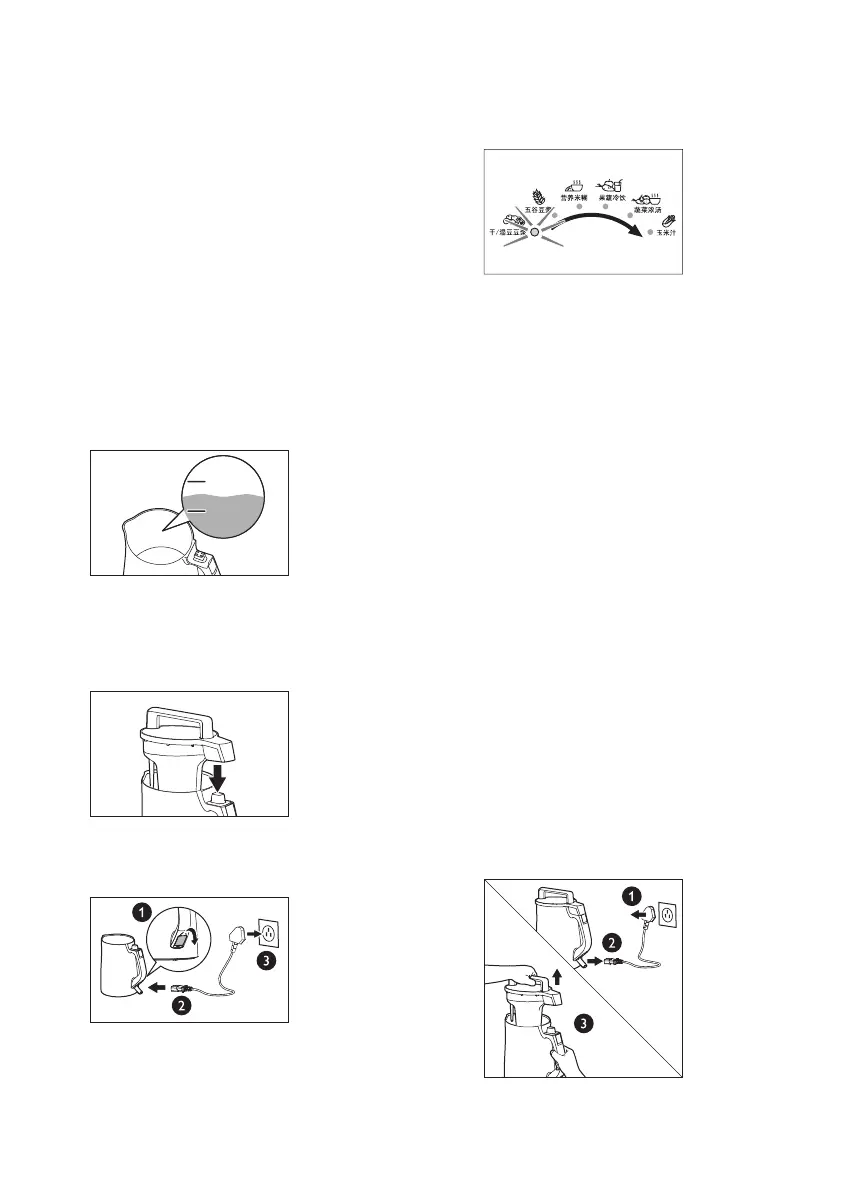
» The indicators fl ash in a circle,
indicating that the power is
connected.
7 Press 选择 (Select) to select 蔬菜浓
汤 (Puree).
» The 蔬菜浓汤 (Puree) indicator
lights up.
8 Press the 启动 (Start) button.
» The 工作中 (Working) indicator
fl ashes and 1 beep occurs,
indicating that processing starts.
After about 25 minutes, 6 beeps
occur and the 保温 (Keep warm)
indicator lights up, indicating that
vegetable puree is ready. If no
other operations are performed,
the appliance starts the keep
warm function. The keep warm
function lasts for 1 hour, and then
automatically stops (see the “Keep
warm” section on Page 18).
9 After processing, disconnect the
power. Hold the handle of the
chamber tightly with one hand and
lift the head unit with the other hand.
3 Take 1/2 cup of mung beans with
the supplied measuring cup and
wash them clean. Put the cleaned
ingredients evenly at the bottom of
the chamber to prevent them from
touching the perforated fl ow cup.
4 Pour water into the chamber.
Make sure that the water level is
between 上水位 (the maximum
level indication) and 下水位 (the
minimum level indication).
• To shorten the processing time,
add warm water no hotter than
70°C.
ഌට໎
༳ට໎
ഌට໎
༳ට໎
5 Put the head unit into the chamber.
Make sure that the upper plug is
correctly inserted into the connector.
6 Open the protective cover, insert the
power cord, and connect the power.


 To Next Page