19EN
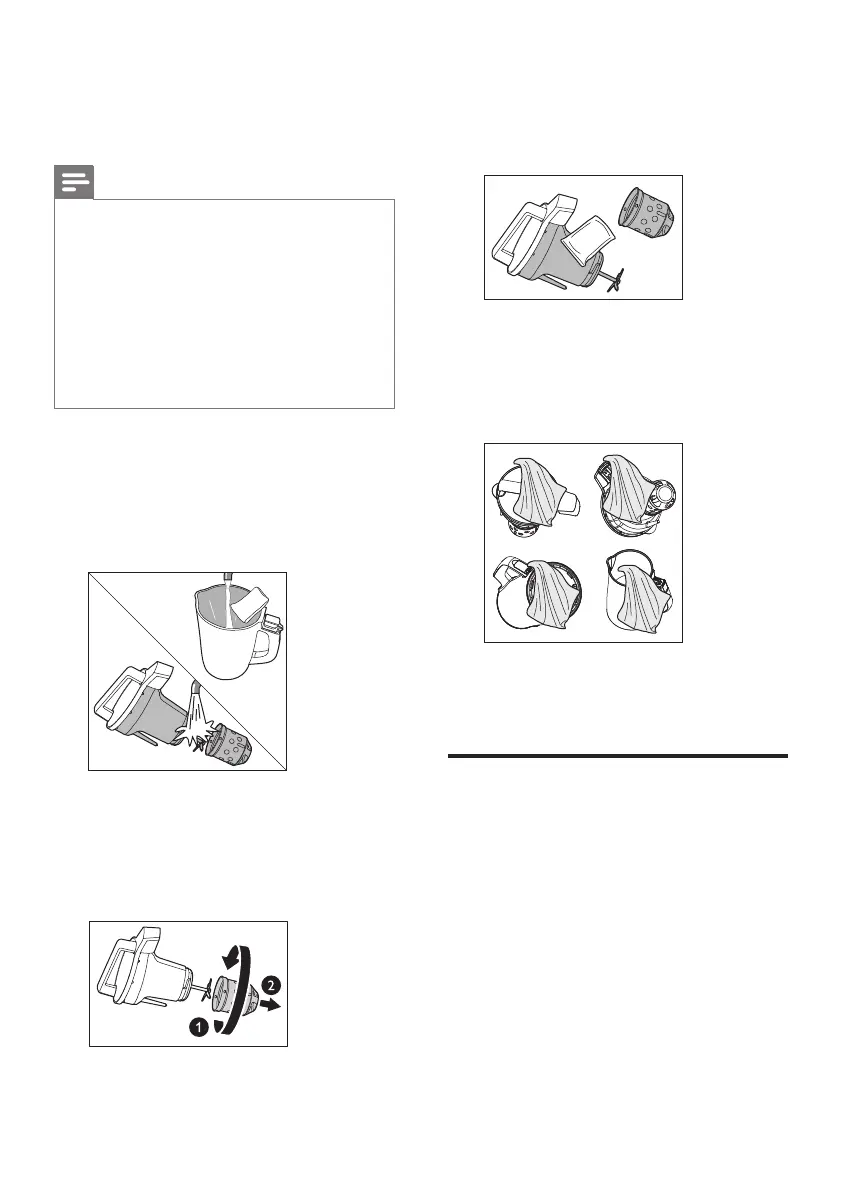
3 Use a cleaning pad to remove the
residue from the lower part of the
head unit, overfl ow sensor, and the
blade.
4 Use a dry cloth to clean the head
unit handle, control panel, upper
plug, upper plug connector, base, and
power cord connector.
5 The outside of the chamber can be
cleaned with a damp cloth.
Easy clean
• After processing is complete, if you
cannot promptly clean the residue on
the appliance, the residue will dry up
and stick on the appliance, diffi cult to
remove. As this happens, you can use
the easy clean function to heat and
soak the inner side of the chamber
and clean the appliance easier.
• To prevent the residue from smelling,
clean the appliance within 10 hours
after use.
7 Cleaning
Note
• Disconnect the power and remove
the power cord before cleaning or
disassembling this appliance.
• Do not put the head unit in water.
• To prevent scalding, do not touch the
head unit, perforated fl ow cup, or the
inner side of the chamber before they
cool down.
1 After disconnecting the power, lift
the head unit, rinse the lower part of
the head unit, overfl ow sensor, blade,
perforated fl ow cup, and inner side of
the chamber.
2 After the head unit cools down,
remove the perforated fl ow cup.
Rotate the perforated fl ow cup and
remove it, as shown in the illustration.
Take care of the sharp blade.


 To Next Page