16 ENGLISH
Selecting the pasta making program
1
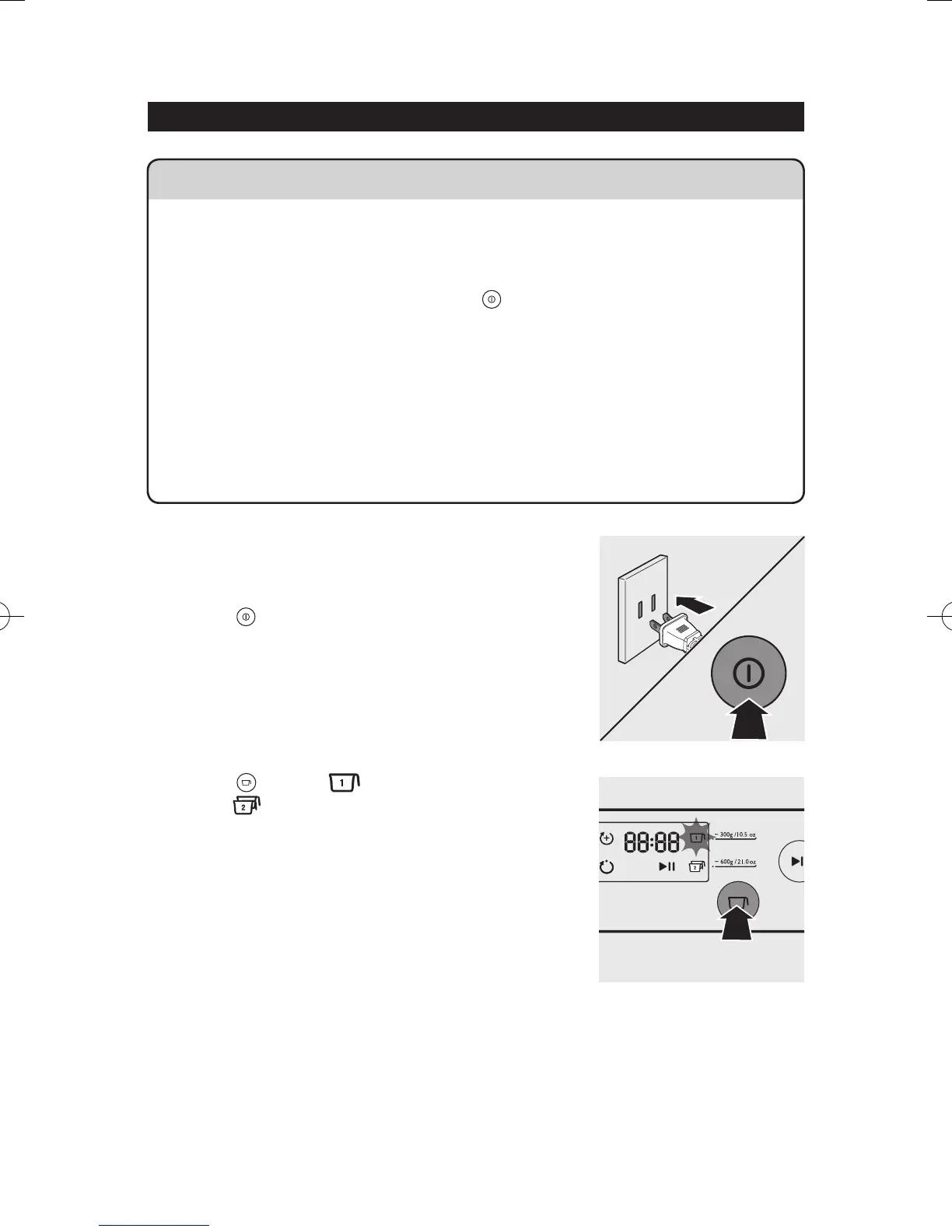
Connect the power plug to any 120V AC outlet.
The pasta maker will sound once, and all
indicators will flash once. Press the power on/off
button
to switch on the pasta maker.
2
Based on the amount of our, press the servings
button
to select to make ~ 300g (10.5
oz) or
to make ~ 600g (21 oz) of fresh
pasta.
Important
• Do not select the extrusion-only program before the dough mixing is complete.
Otherwise, this will damage the noodle maker and its lifetime.
• Do not disconnect the power cord before processing is complete. If you have to
stop processing, press the on/off button
to turn off the pasta maker and then
disconnect the power cord from outlet before performing other operations.
• To better protect the lifetime of the appliance, it is recommended the continuous
working time be less than 45 minutes. You can restart using the appliance after a
15 minute rest.
• If you intend to use the appliance continuously, clean the shaping disc with the
supplied cleaning tool each time after each pasta making session. For cleaning
ease, do not soak the shaping disc directly in water.


 To Next Page