ENGLISH 17
3
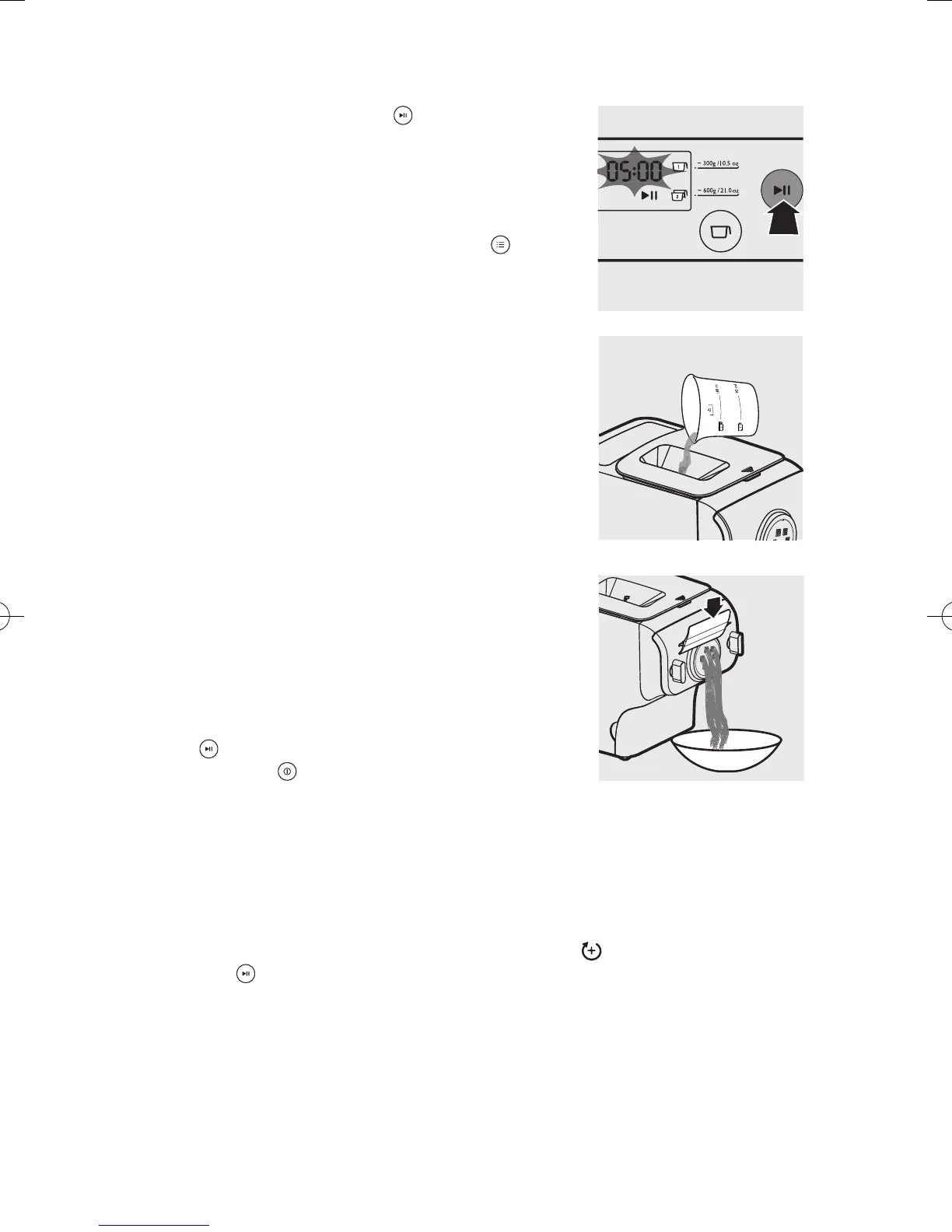
Press the start/pause button to start
processing, and the processing time starts to
count down.
Note:
• By default, the program is set as automatic. If this is
not the case, press the program button
to re-
select.
4
After the kneading starts, slowly pour in the
water or water + egg mixture along the entire
length of the slot in the lid.
Note:
• During dough mixing, do not add other ingredients
after you have poured in the water. Otherwise, it will
affect the results of the noodle texture.
5
The pasta will start extruding out after a few
minutes. Place a container right under the outlet.
Cut the pasta into the desired length with the
supplied cleaning tool.
Note:
• If you notice the program is not set as automatic
while pasta is extruding, press the start/pause button
to stop the program. Then, press the power on/
off button and disconnect the plug from the
power socket. After cleaning the shaping discs, you
can restart the process.
• If the ratio of liquid and our is not correct, the extrusion will not succeed. In this
case, prepare the ingredients again.
• Move the cleaning tool downwards to cut the pasta.
6
After the pasta making is complete, if you notice there is some leftover dough inside
the chamber, you can press the extrusion-only button
and press the start/pause
button for extra extrusion.
Note:
• The countdown timer of the extrusion-only program is 3 minutes.
• You may nd some ne pasta threads on the pasta surface. This is normal.
• The cooking time of the pasta varies depending on personal preferences, pasta
shapes, and number of servings.


 To Next Page