11
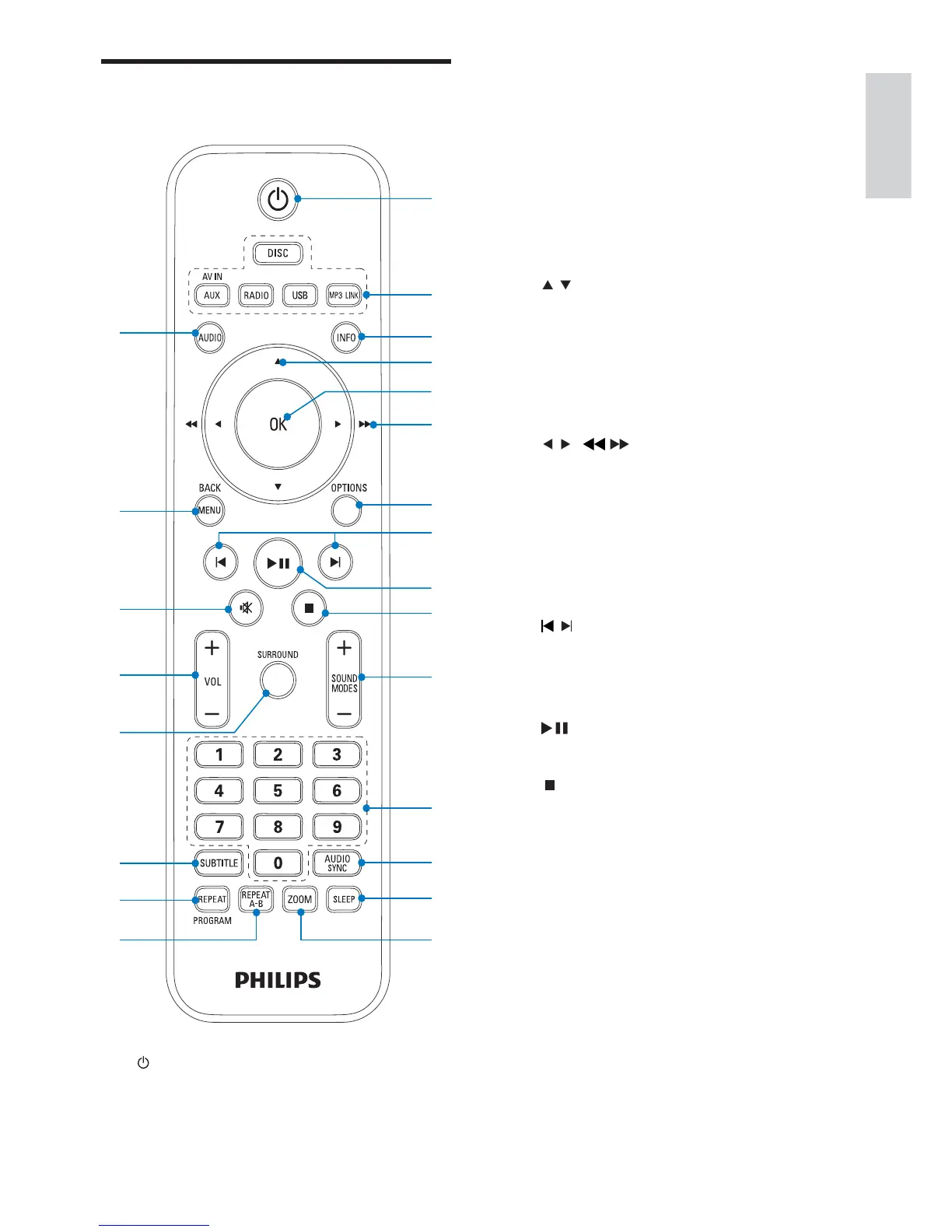
b Source selection keys
Select a source.•
c INFO
For video/audio play, display •
information about the current status
or the disc.
For pictures, display a thumbnail view •
of picture fi les.
d
/
For menus: navigate up/down.•
Move an enlarged picture up/down.•
Rotate or invert pictures.•
e OK
Confi rms an entry or selection.•
f
/ ( / )
For menus, navigate left/right.•
Search within a track or disc.•
Move an enlarged picture left/right.•
Tune to a radio station.•
g OPTIONS
Access or exit the system setup menu.•
h
/
Skip to the previous/next title/•
chapter/track.
Select a preset radio station.•
i
Start or pause play.•
j
Stop play.•
Erase a preset radio station.•
k SOUND MODES +/-
Selects a predefi ned sound effect.•
l Numeric keypad
Select a title/chapter/track directly.•
Select a preset radio station directly.•
m AUDIO SYNC
Access audio delay setting.•
n SLEEP
Set the sleep timer.•
Overview of the remote
control
a
Turn on the unit or switch to standby •
mode.
w
v
t
q
r
p
u
s
c
g
k
m
n
o
l
j
i
f
d
e
h
a
b
English
EN


 To Next Page