11
English
EN
• The digital optical connector might be
labeled SPDIF or SPDIF OUT.
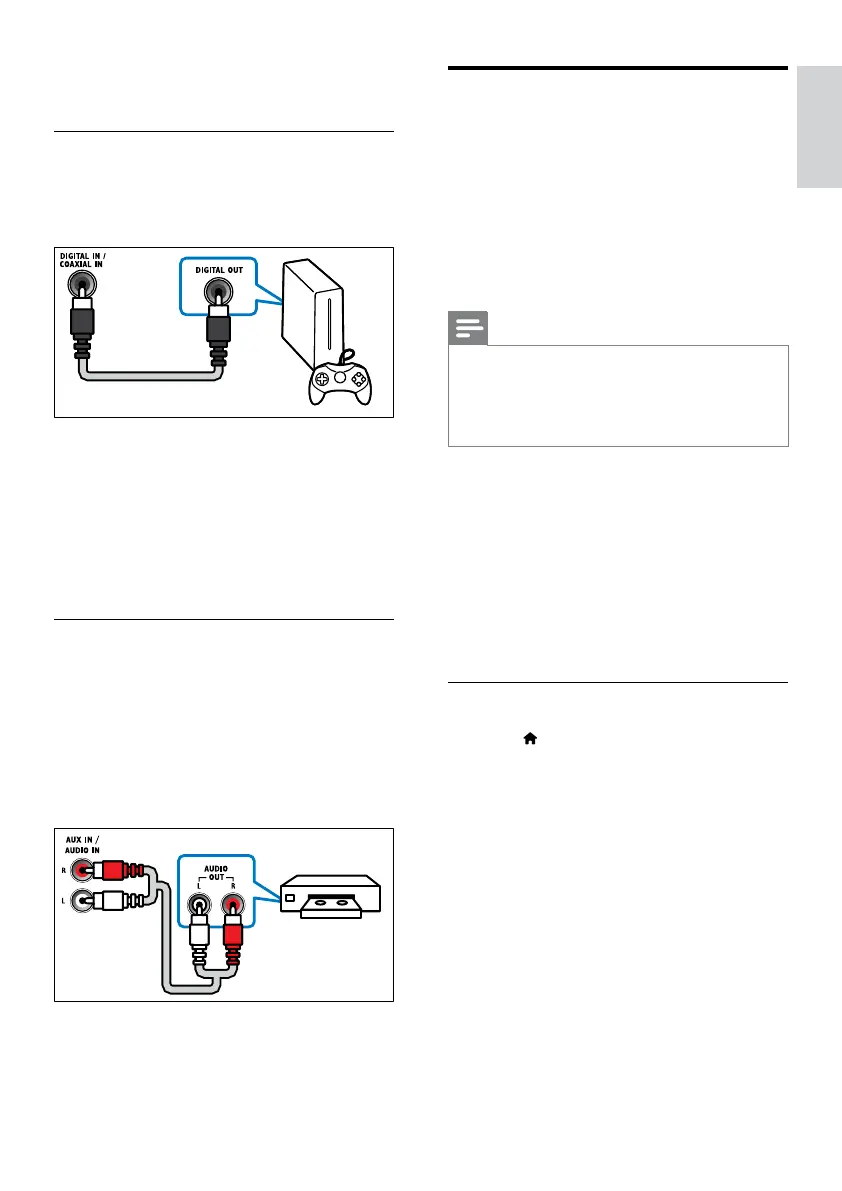
Option 2: Connect audio through a
digital coaxial cable
Good quality audio
1 Using a coaxial cable, connect the
COAXIAL IN connector on your Blu-
ray Surround Base to the COAXIAL/
DIGITAL OUT connector on the TV or
other device.
• The digital coaxial connector might be
labeled DIGITAL AUDIO OUT.
Option 3: Connect audio through
analog audio cables
Basic quality audio
1 Using an analog cable, connect the AUX
IN connector on your Blu-ray Surround
Base to the AUDIO OUT connectors on
the TV or other device.
VCR
Set up EasyLink (HDMI-CEC
control)
This Blu-ray Surround Base supports
Philips EasyLink, which uses the HDMI-CEC
(Consumer Electronics Control) protocol.
EasyLink-compliant devices that are connected
through HDMI can be controlled by a single
remote control.
Note
•
Depending on the manufacturer, HDMI-CEC is known
by many names. For information on your device, see
the user manual of the device.
• Philips does not guarantee 100% interoperability with
all HDMI-CEC devices.
Before you start
• Connect your Blu-ray Surround Base to
the HDMI-CEC compliant device through
HDMI connection.
• Make the necessary connections described
in the quick start guide, and then switch
the TV to the correct source for your Blu-
ray Surround Base .
Enable EasyLink
1 Press .
2 Select [Setup], and then press OK.
3 Select [EasyLink] > [EasyLink] > [On] .
4 On your TV and other connected devices,
turn on HDMI-CEC control. For details, see
the user manual of the TV or other devices.
• On your TV, set the audio output to
'Amplier' (instead of TV speakers).
For details, see the TV user manual.



 To Next Page