10
English
Remote Control
2
3
4
5
6
7
8
9
10
11
12
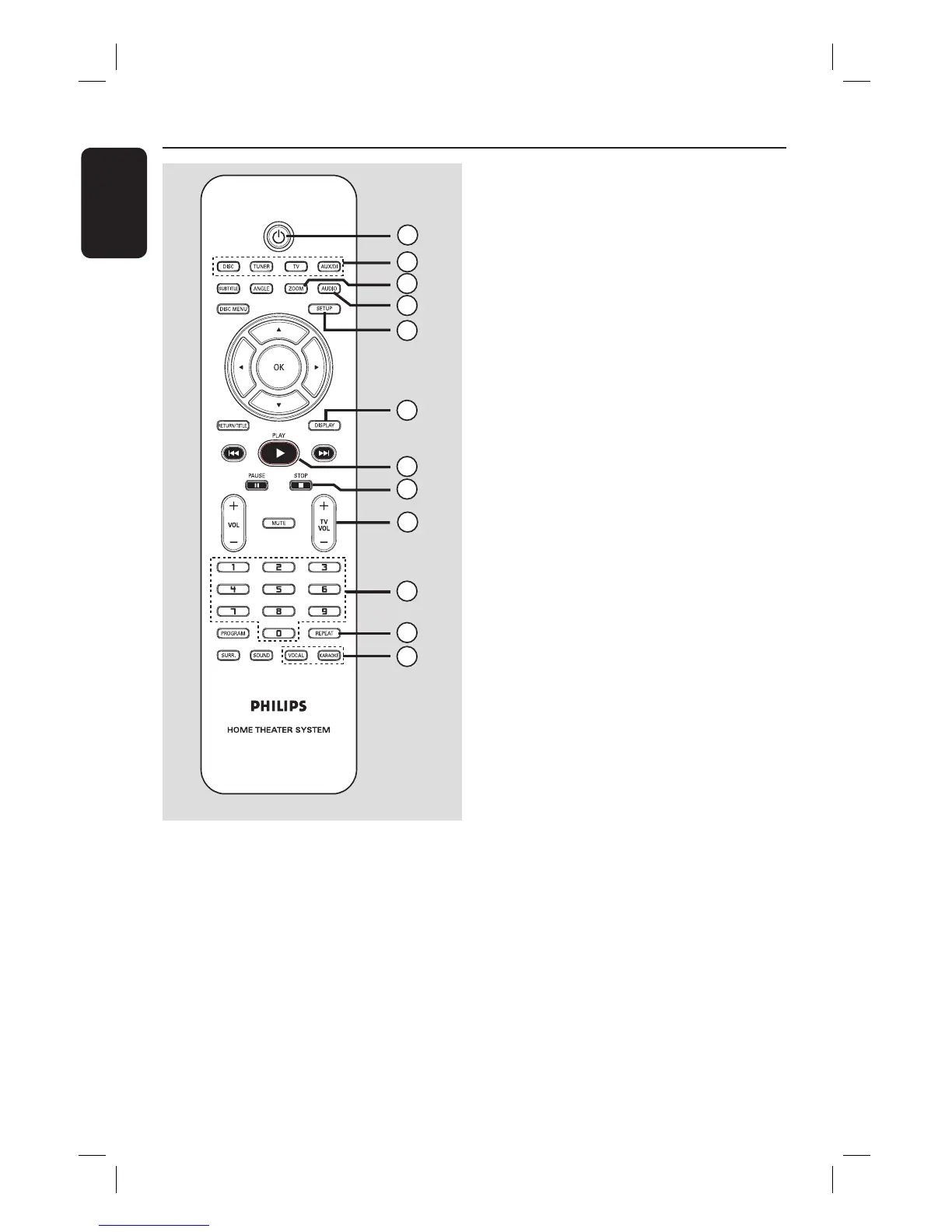
1
a 2
– Turns off to Eco Power standby mode.
b Source buttons
– DISC: switches to DISC mode.
TUNER: toggles between FM and MW
band.
TV: switches to TV mode.
The sound from the TV will output
through the connected speakers system.
AUX/DI: toggles between AUX and
DIGITAL IN external source mode.
c ZOOM
– Enlarges a picture on the TV screen.
d AUDIO
– Selects an audio language (DVD) or an
audio channel (CD).
e SETUP
– Enters or exits the system setup menu.
f DISPLAY
– Displays the current status or disc
information.
g PLAY É
– DISC: starts playback.
h STOP Ç
– Exits an operation.
– DISC: stops playback.
– DISC: hold down this button to open and
close the disc tray.
– TUNER: hold down this button to erase
the current preset radio station.
i TV VOL +-
– Adjusts TV volume (Philips TV only).
j Numeric Keypad (0-9)
– Enters a track/title number of the disc.
– Enters a number of a preset radio station.
k REPEAT
– Selects various repeat modes; turns off
repeat mode.
l VOCAL
– Toggles between various audio mode
options.
KARAOKE
– Enters microphone setup menu.


 To Next Page