16
English
~
MAINS
HDMI OUT
R
L
Basic Connections (continued)
Step 5: Connecting to TV
This connection enables you to view the
playback from this DVD system. You only
need to choose one of the options
below to make your video connection.
– For a standard TV, follow option 1 or
2.
– For a progressive scan TV, follow
option 3.
– For a HDMI TV, follow option 4.
IMPORTANT!
Connect the DVD system directly
to the TV.
OR
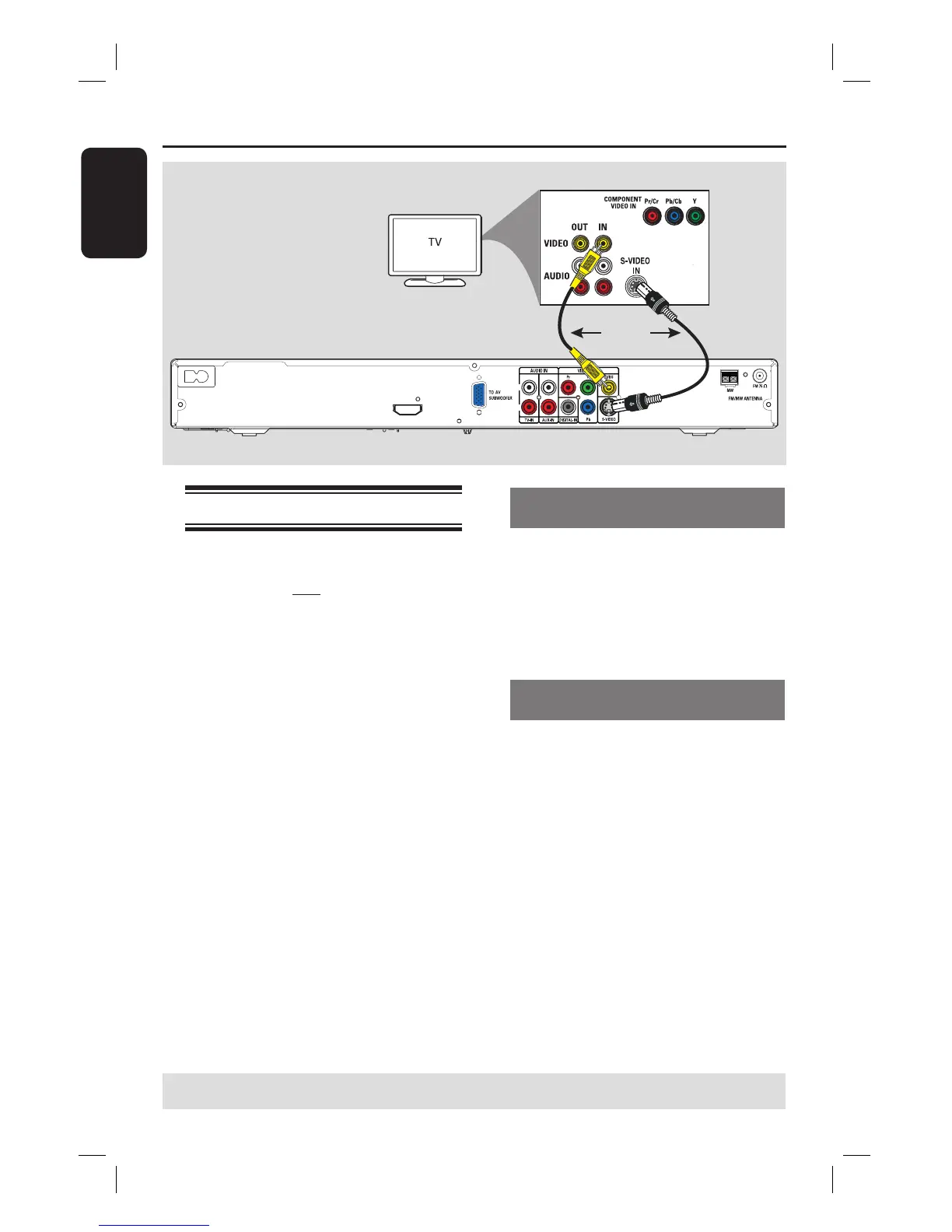
Option 1: Using the Video (CVBS)
socket (good picture quality)
Use the supplied composite video cable
(yellow) to connect the CVBS socket on
the DVD system to the video input
socket (or labeled as A/V In, Video In,
Composite or Baseband) on the TV.
Option 2: Using the S-Video socket
(excellent picture quality)
Use an S-video cable (not supplied) to
connect the S-VIDEO (Y/C) socket on
the DVD system to the S-Video input
socket (or labeled as Y/C or S-VHS) on
the TV.
TIPS: Before making or changing any connections, make sure that all the devices are disconnected
from the power outlet.
Option 2
Option 1


 To Next Page