14
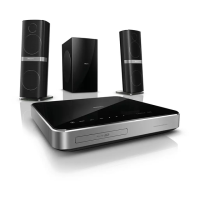
e LAN
Connect to the LAN input on a broadband
modem or router.
Connect to TV
Connect your home theater to a TV to watch
videos. You can listen to audio from TV programs
through your home theater speakers. Use the best
qualityconnectionavailableonyourhometheater
and TV.
Option 1: Connect to TV through HDMI
(ARC)
Best quality video
Your home theater supports HDMI version
1.4-AudioReturnChannel(ARC).IfyourTV
is HDMI ARC compliant, connect your home
theater to the TV through the HDMI ARC
connectionforeasyandquicksetup.
With HDMI ARC, you do not need an additional
audio cable to play audio from TV through your
home theater.
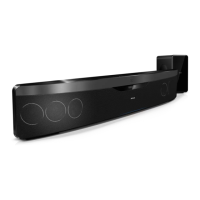
1 Using a High Speed HDMI cable, connect
the HDMI OUT (ARC) connector on your
home theater to the HDMI ARC connector
on the TV.
The HDMI ARC connector on the TV might
be labeled HDMI IN or HDMI. For details on
TV connectors, see the TV user manual.
2 OnyourTV,turnonHDMI-CEC.For
details, see the TV user manual.
» When you play a disc on your home
theater, the video is automatically
displayed on TV and the audio is
automatically played on the home theater.
3 If audio from the TV does not play
automatically on your home theater, set up
theaudiomanually(see‘Setupaudiofor
connecteddevices’onpage16).
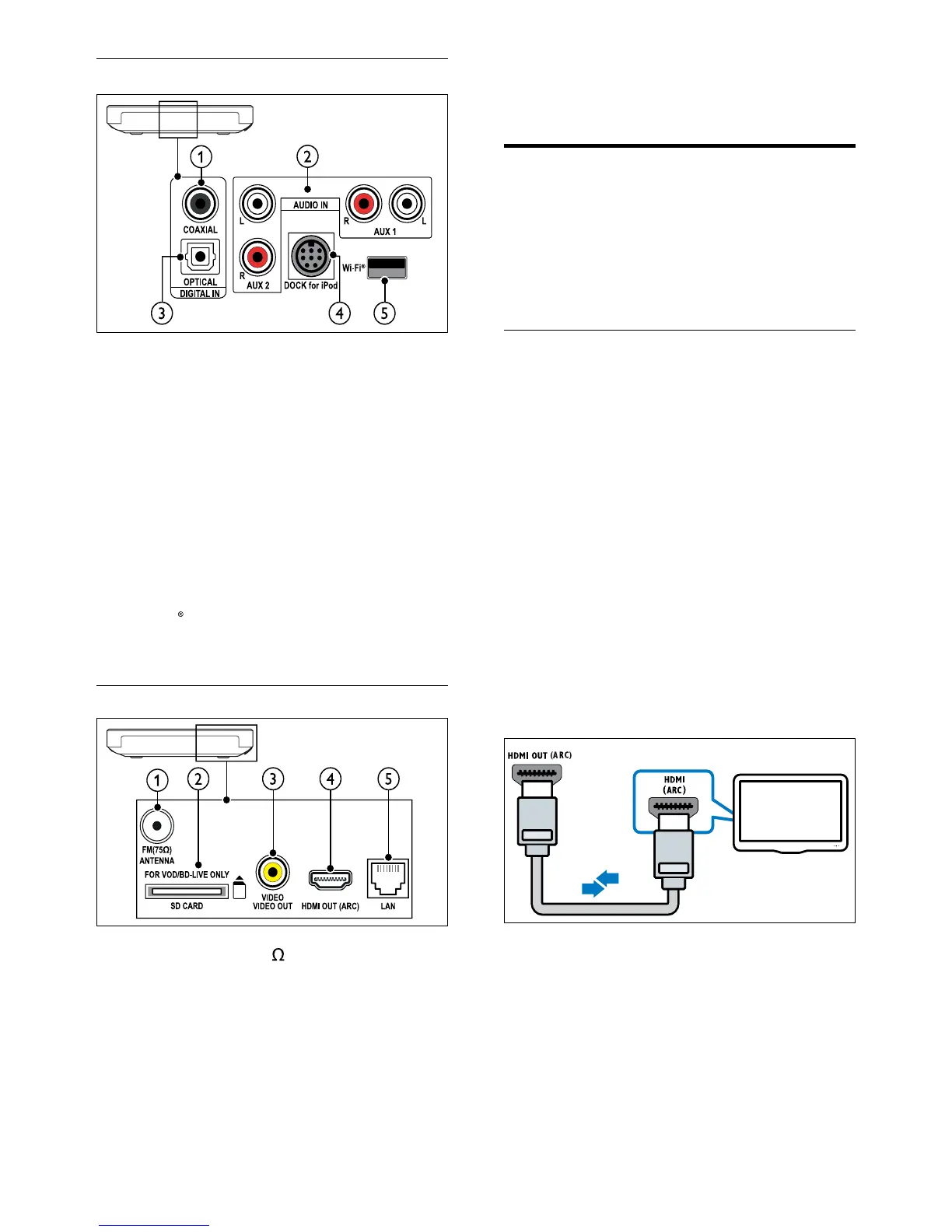
a DIGITAL IN-COAXIAL
Connect to a coaxial audio output on the
TV or a digital device.
b AUDIO IN-AUX 1/AUX 2
Connect to an analog audio output on the
TV or an analog device.
c DIGITAL IN-OPTICAL
Connect to an optical audio output on the
TV or a digital device.
d DOCK for iPod
Connect to a Philips dock for iPod or
iPhone.(Model: Philips DCK3060).
e Wi-Fi
ConnecttoaWi-Fidongle(Model:Philips
WUB1110).
Rear right
a ANTENNA FM 75
Signal input from an antenna, cable or satellite.
b SD CARD-FOR VOD/BD-LIVE ONLY
Slot for SD card. The SD card is used to
rentonlinevideosandaccessBD-Live.
c VIDEO OUT-VIDEO
Connect to the composite video input on
the TV.
d HDMI OUT (ARC)
Connect to the HDMI input on the TV.
EN


 To Next Page