EasyManua.ls Logo

Philips HU4902 - Setting the Timer Function

Philips HU4902
25 pages
Print Icon
To Next Page IconTo Next Page
To Previous Page IconTo Previous Page
Loading...
10 EN
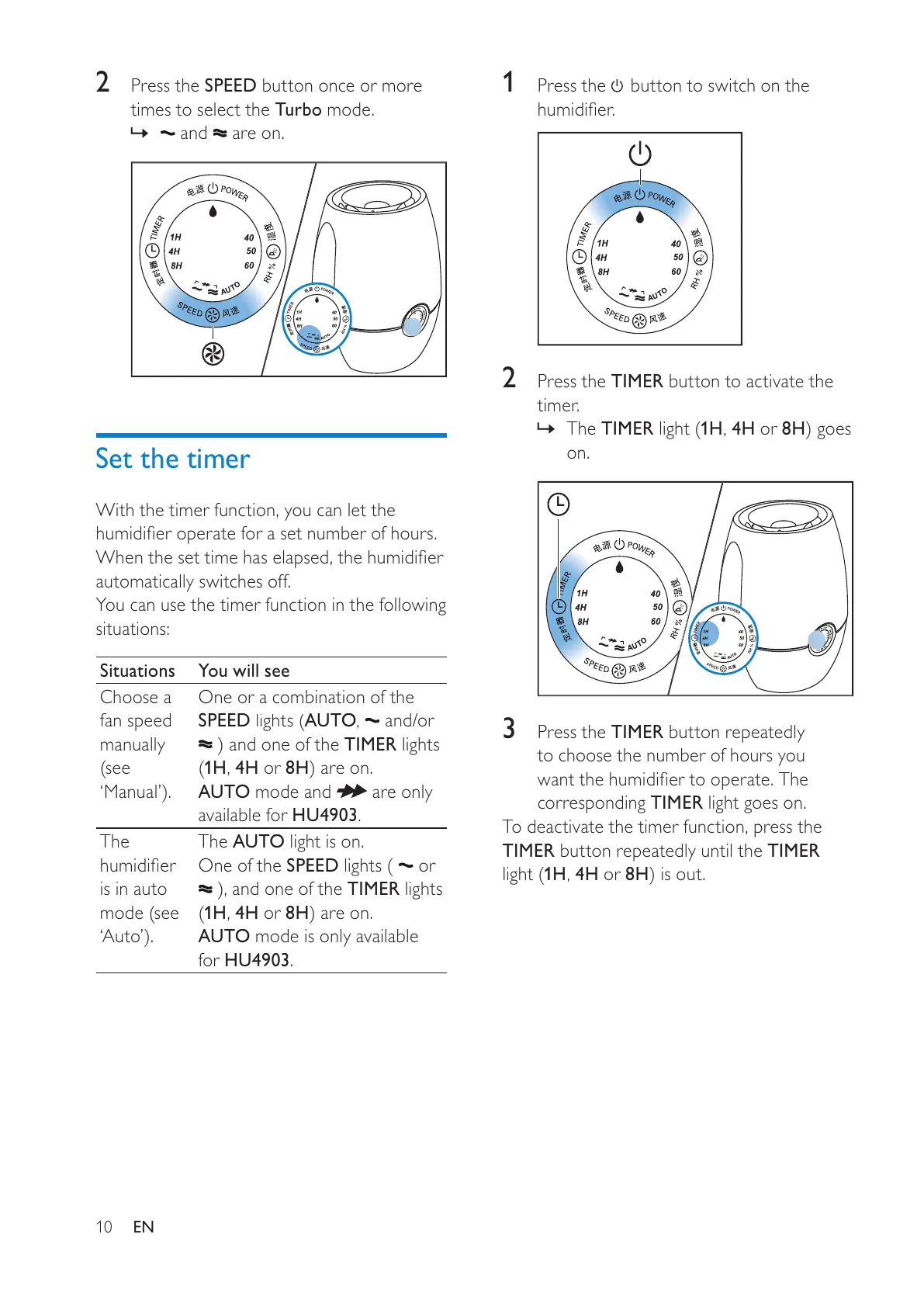
1
P
r
ess
the
butto
n
to
s
w
itch
o
n
the




2
Press the
T
IME
R
button to activate the
timer.
»
T
he
T
IME
R

1
H
,
4
H
or
8
H

on
.
3
P
ress t
h
e
TIMER
b
utton repeate
dly
to choose the number o
f
hours
y
ou


corres
p
on
di
n
g
TIMER
light goes on.
T
o deactivate the timer
f
unction, press the
TIMER
b
utton re
p
eate
dly
unt
il
t
h
e
TIMER

1
H
,
4H
or
8H

2
P
r
ess
the
S
PEE
D
butto
n
o
n
ce
o
r m
o
r
e
ti
m
es
to
select
the
Tu
r
bo
m
ode.
»
a
n
d
a
r
e
o
n
.
Set the timer
With the timer
f
unction,
y
ou can let the




automatically switches o
ff
.
Y
ou can use the timer
f
unction in the
f
ollowing
situations
:
S
ituation
s
You will se
e
C
hoose a
f
an speed
manuall
y


One or a combination of the
SPEE
D

A
UT
O
,
and/or
TIME
R
lights
1
H
,
4
H
or
8
H

A
U
T
O
mode and
are on
l
y
a
vailable
f
or HU
4903
.
Th
e

i
s
i
n auto




The A
U
T
O
light is on.
One of the SPEED 
or

TIMER
li
g
h
ts
1
H
,
4H
or
8H

A
U
T
O
mo
d
e
i
s on
l
y ava
il
a
bl
e
fo
r
HU
4903
.
All manuals and user guides at all-guides.com

Other manuals for Philips HU4902

Related product manuals