EasyManua.ls Logo

Philips HU4902 - Manual and Turbo Mode Operation

Philips HU4902
25 pages
Print Icon
To Next Page IconTo Next Page
To Previous Page IconTo Previous Page
Loading...
9EN
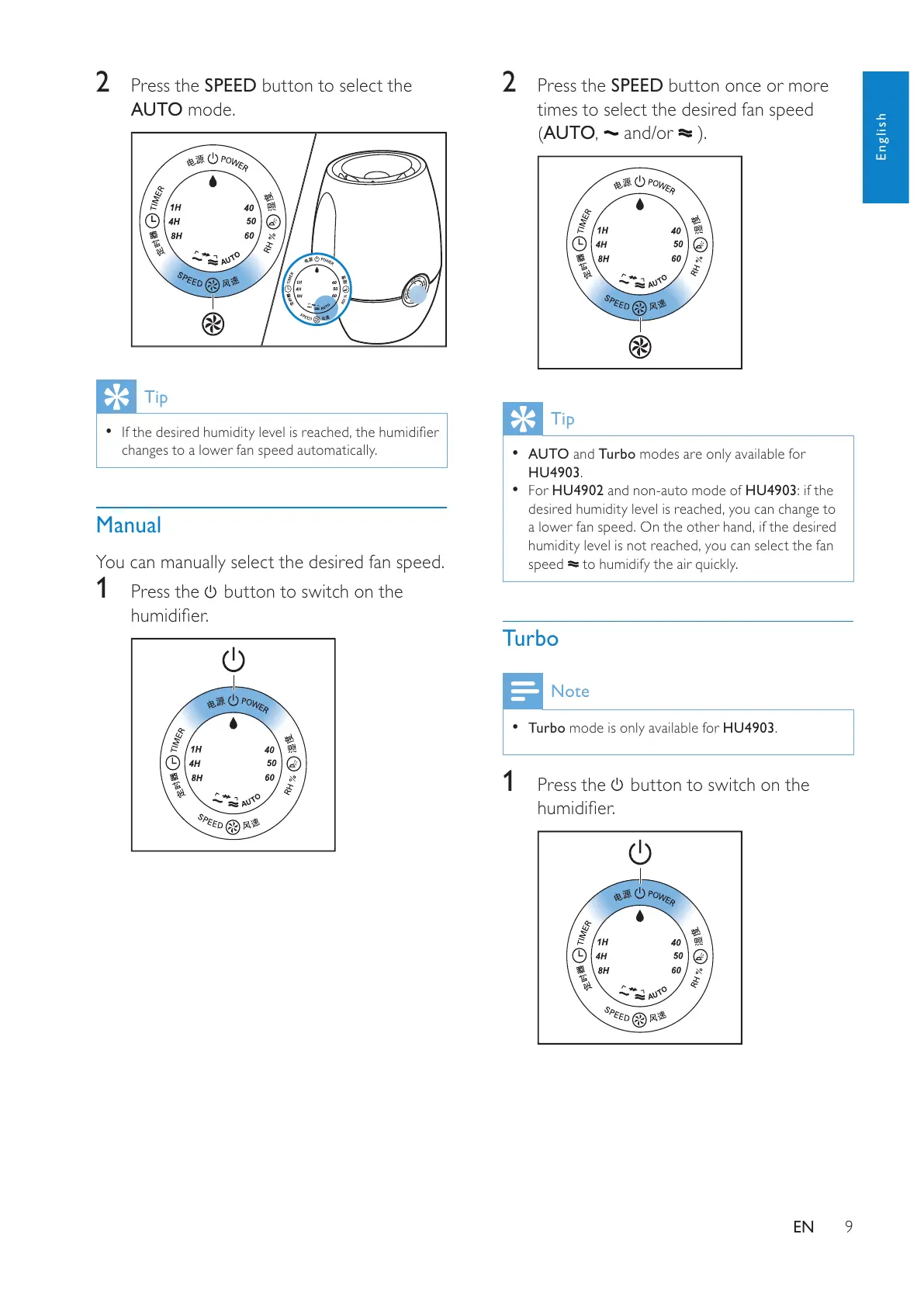
2
P
r
ess
the
S
PEED
butto
n
o
n
ce
o
r m
o
r
e
times to select the desired fan speed
AU
T
O
,
a
n
d/or
Tip
A
U
T
O
a
n
d
T
u
r
bo
modes are onl
y
available fo
r
H
U490
3
.

HU4902
a
n
d
n
o
n-
auto
m
ode
of
HU4903: if
t
h
e
d
es
i
re
d
h
um
idi
t
y
l
eve
l
i
s reac
h
e
d
,
y
ou can c
h
an
g
e to
a lower fan speed.
O
n the other hand, if the desired
h
umidit
y
level is not reached,
y
ou can select the fan
s
pee
d
to humidif
y
the air
q
uickl
y
.
Turbo
Note
T
urbo mode is onl
y
available fo
r
HU4903
.
1
Pr
ess
t
h
e
butto
n
to
s
wi
tc
h
o
n
t
h
e


2
P
r
ess
the
S
PEE
D
butto
n
to
select
the
AU
T
O
m
ode.
Tip


chan
g
es to a lower fan s
p
eed automaticall
y
.
Manual
Y
ou can manuall
y
select the desired fan s
p
eed.
1
P
ress t
h
e
b
utton to sw
i
tc
h
on t
h
e


English
All manuals and user guides at all-guides.com

Other manuals for Philips HU4902

Related product manuals