Mechanical Instructions
EN 8 LC4.41E AA4.
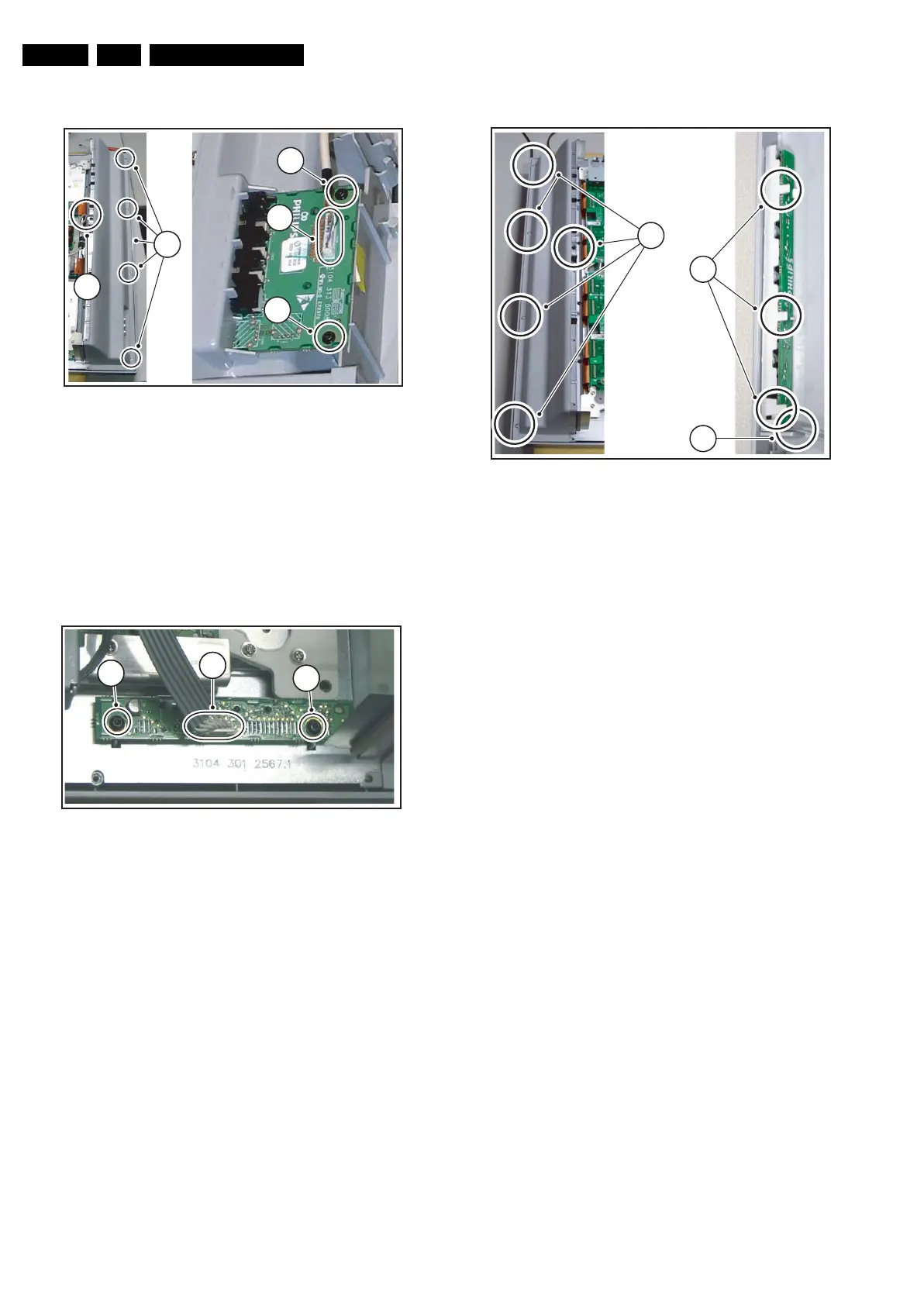
4.3.2 Side I/O Panel
Figure 4-3 Side I/O panel
1. Remove the rear panel.
2. Remove the screw from the cable clip [1].
3. Remove the screws [2] from the loudspeaker cabinet.
4. Lift the loudspeaker cabinet from the frame.
5. Disconnect the cable [3] from the panel.
6. Remove the fixation screws [4], and slide the panel out of
its bracket.
4.3.3 LED Panel
Figure 4-4 LED panel
1. Remove the rear panel.
2. Disconnect the cable [1] from the panel.
3. Remove the fixation screws [2].
4. Remove the panel.
4.3.4 Keyboard Control Panel
Figure 4-5 Keyboard control panel
1. Remove the rear panel.
2. Remove the screws [1] from the loudspeaker cabinet.
3. Lift the loudspeaker cabinet from the frame.
4. Release the three fixation clamps [2] and pull the panel out
of the bracket.
5. Disconnect the cable [3] from the panel.
G_16240_012.eps
150206
2
1
4
3
4
G_16240_013.eps
170206
2
1
1
2
12
G_16240_014.eps
170206
2
3
1



 To Next Page