14
English
Functional Overview
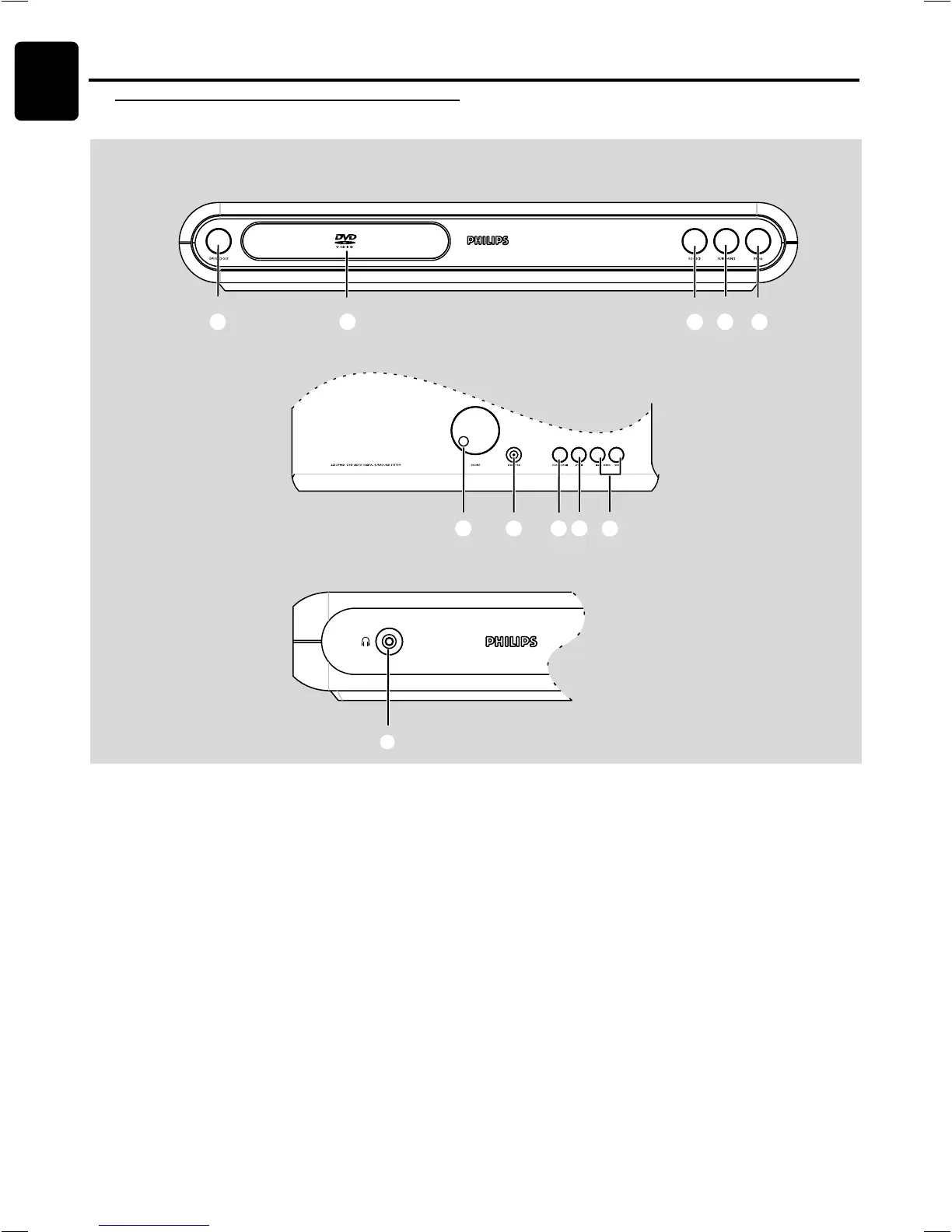
Front panels
FUNCTIONAL OVERVIEW
1 OPEN / CLOSE
– to open or close the disc tray.
2 Disc Tray
3 SOURCE
– to select the relevant active mode: TV/AV, DISC, TUNER
or AUX/DI.
4 SURROUND
– to select multichannel surround (Dolby Digital, DTS, VSS
Dolby ProLogic or Dolby ProLogic II) or stereo sound
effect.
5 PROGRAM
– in Disc mode, to program disc tracks.
– in Tuner mode, to program preset radio station.
6 VOLUME
– to adjust the master volume.
Front view
Top view
Side view
7 STANDBY-ON
– to switch between power on and standby modes.
8 PLAY / PAUSEÉÅ (in Disc mode only)
– to start or interrupt disc playback.
9 STOP Ç (in disc mode only)
– to stop playing the disc.
0 SEARCH S / T
– in Disc mode, press to skip to the previous/next chapter/
track.
– in Disc mode, hold down to fast reverse/forward the
disc.
– in Tuner mode, to tune to a lower or higher radio frequency.
!
nn
nn
n
– to connect headphones.
12 534
67 980
!
English


 To Next Page