15
English
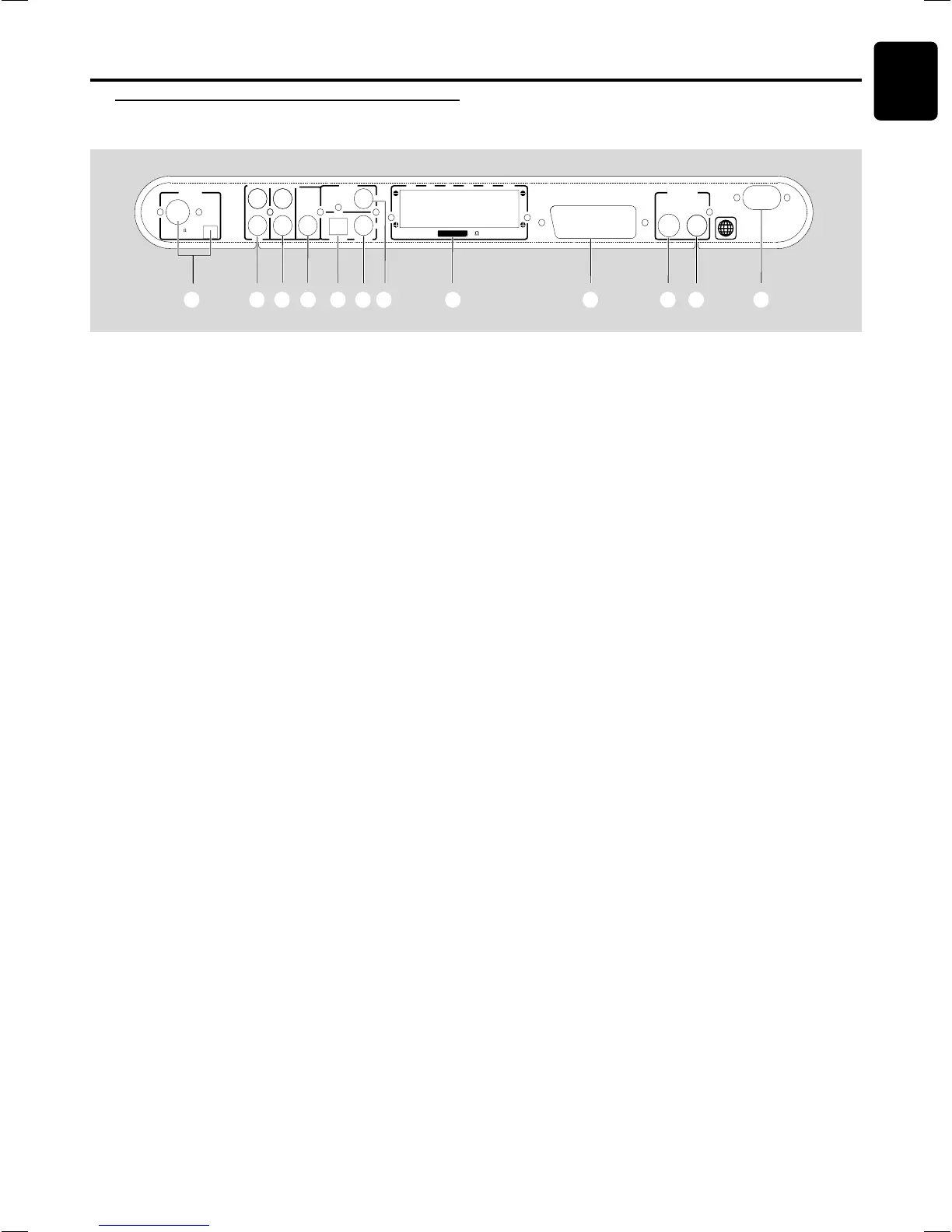
1 MW / FM ANTENNA
– connect to the MW loop antenna or FM antenna.
2 AUDIO IN -AUX
– connect to the analog audio outputs of a TV or VCR.
3 AUDIO OUT
– connect to the analog audio inputs of an external recording
device or amplifier.
4 WOOFER LINE OUT
– connect to an active subwoofer (Optional).
5 DIGITAL OUT - OPTICAL
– connect to an audio equipment with digital (optical) audio
input.
6 DIGITAL OUT - COAXIAL
– connect to an audio equipment with digital (coaxial)
audio input.
Caution: Do not touch the inner pins of the jacks on the rear panel. Electrostatic discharge may cause
permanent damage to the unit.
7 DIGITAL IN
– connect from an audio equipment with digital audio output.
8 SPEAKERS
– connect to the front,center, rear (surround) and subwoofer
speakers.
9 A/V SCART OUT
– connect to TV with SCART input.
0 S-VIDEO OUT
– connect to a TV with S-video input.
! VIDEO OUT
– connect to a TV with video input.
@ AC Power Cord
– connect to a standard AC outlet.
Rear panel
FUNCTIONAL OVERVIEW
Functional Overview
2
A/V SCART OUT
AC MAINS~
AUDIO IN
AUX
AUDIO OUT
WOOFER
LINE OUT
S-VIDEO
VIDEO OUT
VIDEO
MW
ANTENNA
(8 )
SPEAKERS
FR SLSR SWCFL
OUT
OPTICAL COAXIAL
DIGITAL
IN
FM (75 )
1234567 8
90!@


 To Next Page