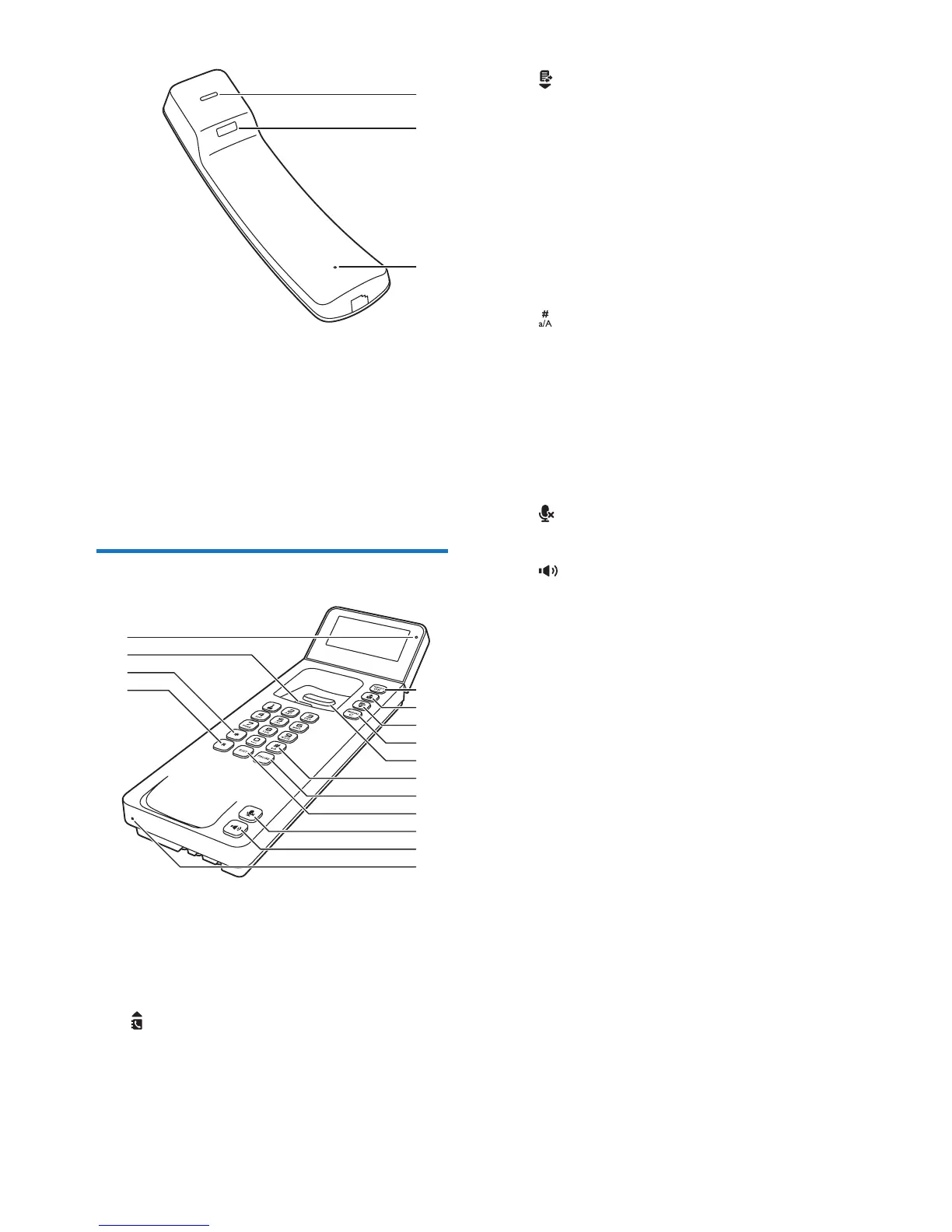
a Speaker
b Receiver
c Slot to hang the handset when wall
mounting
d Microphone
Overview of the base station
a MENU/OK
• Access the main menu.
• Conrm selection.
• Enter the options menu.
b
• Scroll up on the menu.
• Increase the earpiece/speaker volume.
• Access the phonebook
b
c
d
a
d
c
b
h
e
i
j
k
f
g
m
n
l
o
c
• Scroll down on the menu.
• Decrease the earpiece/speaker volume.
• Access the call log.
d REDIAL/C
• Delete text or digits.
• Cancel operation.
• Access the redial list.
e Hang up button
f
Switch to upper/lower case during editing.
g PAUSE
Press to enter a pause when making a call.
h EXIT
• Delete text or digits.
• Cancel operation.
i
Mute or unmute the microphone.
j
• Turn the speaker phone on/off.
• Make and receive calls through the
speaker.
k Microphone
l R
Recall key (This function is network
dependent).
m *
Set the dial mode (pulse mode or
temporary tone mode).
n Hook to hang the handset when wall
mounting
o LED indicator
• It ashes when there are new missed
calls or voice messages.
• It remains steadily on when you pick
up the handset or turn on the speaker.



 To Next Page