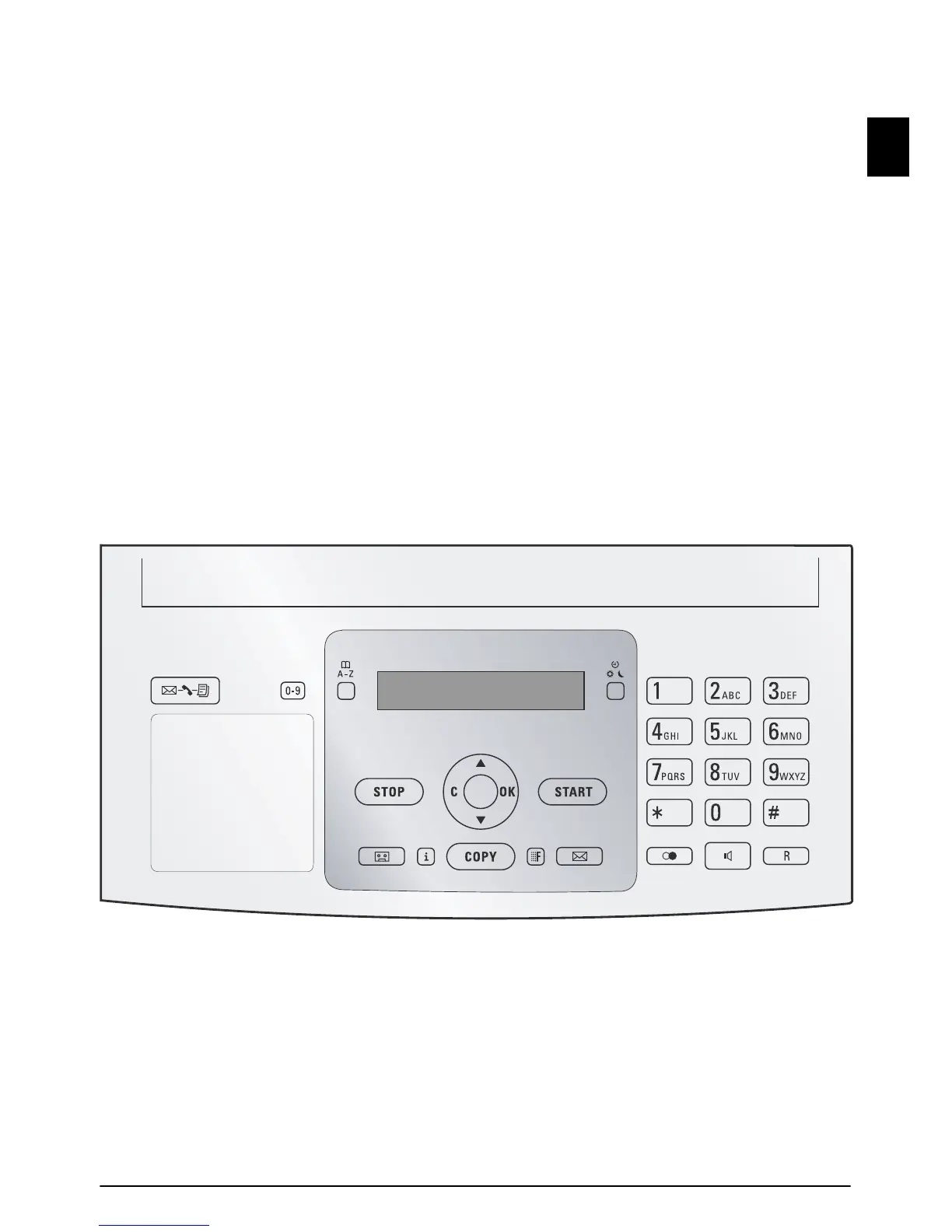
Overview · Panel 7
EN
Panel
Message
ä—Lights up, if new messages are received / list of
the new messages with submenus / blinks in the case of
device error (for example no ink film)
Short Dial
Ý—Press briefly: Load short dial entries. Selecting the
entries with the [ or numeric keys / press and hold:
Assign a new short dial entry
Telephone Book
ma—Press briefly: Calling up the telephone book
entries. Selecting the entries with the [ / press and hold:
saving new entries
Fax Switch
¼/º/»—Setting the timer and the fax reception modes
(= fax switch). Modes set on the display
™ (day), ˜ (night).
Activated timer is indicated with
›
Stop (AM)
STOP—Function abort / return to the starting mode /
documents eject / ending message playback
C (AM)
C—Return to the previous menu level / press briefly:
deleting individual characters / press and hold: deleting
complete input / during a playback: deleting individual
message / in the starting mode: deleting all messages
Arrow Keys
[—Calling the menu functions / navigation within the
menu / selecting options / moving the cursor / adjusting
the volume level
OK
OK—Calling the menu functions / confirming input
Start
START—Press briefly: Starting transmission of messages
/ press and hold: Starting fax polling
Answering Machine
b—Calling answering machine menu
Help
i—Press briefly: Printing help pages and setting lists /
press and hold: Starting initial installation process
Copy (SMS)
COPY—Press briefly: creating a copy / press and hold:
creating multiple copies / printing SMS
Resolution
ã—Setting higher resolution for faxes and copying
(
RESOL.: STANDARD, RESOL.: FINE, RESOL.:
PHOTO
)
SMS (not supported everywhere)
_—Calling the SMS menu (function is not supported
in all countries and networks)
Numeric Keys (short dial)
Numeric keypad—Inputting digits, characters and special
characters / press and hold: Recalling short dial numbers
Redialling
@—Press briefly: Toggling between the list of the last 10
dialled numbers (= redial list) / press and hold: List of last
ten callers (caller list)
Speaker (PPF 675 · 676 · 685/695 · SPFX 48/49)
ß—Dialling with the handset replaced / hands-free
R
R—Press briefly: insert short line interruption (Hook
Flash) as office index on PABX or for calling special func-
tions in the public telephone network (PSTN)/long press:
Inserting dialling pause
PPF 67x



 To Next Page